

How to Produce an Animated Series With Reusable Characters and Assets
Episode one is always the good one. Fresh idea, plenty of energy, and you only have to get the character right once.
Episode four is where series go to die. The main character's jacket has drifted from olive to teal, you're re-uploading the same six reference images for the ninth time, and the thing you budgeted two hours for has quietly eaten your weekend.
So the obvious fix is better prompting, right?
Not really. The fix is deciding what gets stored once and reused, and doing it before you make episode one. Here's the whole workflow in the order you actually hit it.
The short version
Stage | What you build once | What it saves you every episode |
|---|---|---|
1. Identity | A one-page brief per character, 2 to 3 identity anchors | Re-describing the character in every prompt |
2. Reference sheet | Front, three-quarter, side, back, close-up. Plain background, empty hands | The guessing the model does when a detail is hidden |
3. Art direction | One style frame, 3 to 5 core colours, hex values written down | Style drifting separately from the character |
4. Storage | A world holding cast, places, rules and style | Rebuilding your setup from notes at episode two |
5. Production | A locked prompt block, scene text kept separate | Character and background bleeding into each other |
6. Review | A per-shot check, and a way to fix one shot | Regenerating a whole episode to repair four seconds |
Stage 4 is the one almost every guide skips. It's also the one that decides whether episode twelve costs what episode one did.
Stage 1: Write the brief before you generate anything
A character the model can hold is a character you can describe the same way twice.
Start with the physical stuff. Height, build, age, signature clothing, and the visual register you're after, whether that's realistic, stylised or anime-inspired. Then write the backstory, because it changes how the character carries themselves. An intellectual reads as reserved posture. An action lead reads as forward weight.
Keep it to one page. Everything later gets checked against this.
Pick two or three identity anchors
An identity anchor is a detail that never changes. Asymmetrical haircut, amber eyes, a silver pendant, a cybernetic implant.
Two or three. Not eight.
They're what makes the character recognisable when the lighting, the background and the shot size all change at once. And be specific where it counts: "a dark navy wool coat with silver buttons" survives between scenes. "A coat" does not.
Three more rules worth following:
- Limit the palette to 3 to 5 core colours, and write the hex values down. Check the output against the numbers instead of judging by eye
- Make the silhouette distinctive enough that you'd know them in shadow
- Test the character in two opposite environments before committing. A bright interior and a dim exterior will show you fast which details the model is making up
Stage 2: Build the reference sheet properly
Here's the thing about drift that most people get backwards. You tighten the prompt, add more adjectives, write a longer description of the face. Does it help?
A little. But you're fixing the wrong file. Most drift traces back to the reference.
The model has no memory. Every generation rebuilds your character from fresh noise, using whatever the prompt and the reference happen to say. What the reference shows, it keeps. What the reference hides, it invents, and it invents differently every time.
One creator tested this properly. They designed a character with navy hair and warm hazel eyes, then generated a clip from a reference image shot from behind. The eyes were never visible in that reference.
The clip came back with blue eyes. Blue hair, blue eyes, a perfectly reasonable guess. The headphones arrived with black ear pads too, invented, because the reference only ever showed the outside of the cups.
What the reference shows, the model keeps. What the reference hides, the model invents.
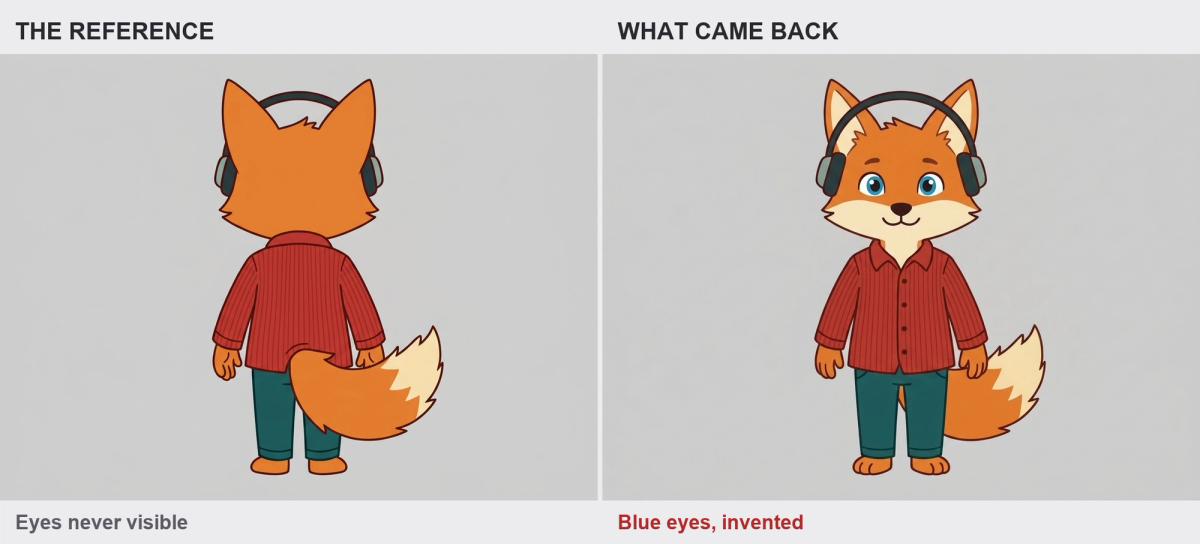
The same failure, reproduced with our own character. The reference on the left never shows the eyes, so the model picked its own on the right. The amber eyes on the character sheet never made it into the generation.
So the sheet needs front, three-quarter, side, back and one close-up. Plain background, even lighting, wardrobe visible, nothing in the hands.
Build it once, properly, and it carries every episode you make from then on. Here's what a finished one looks like.
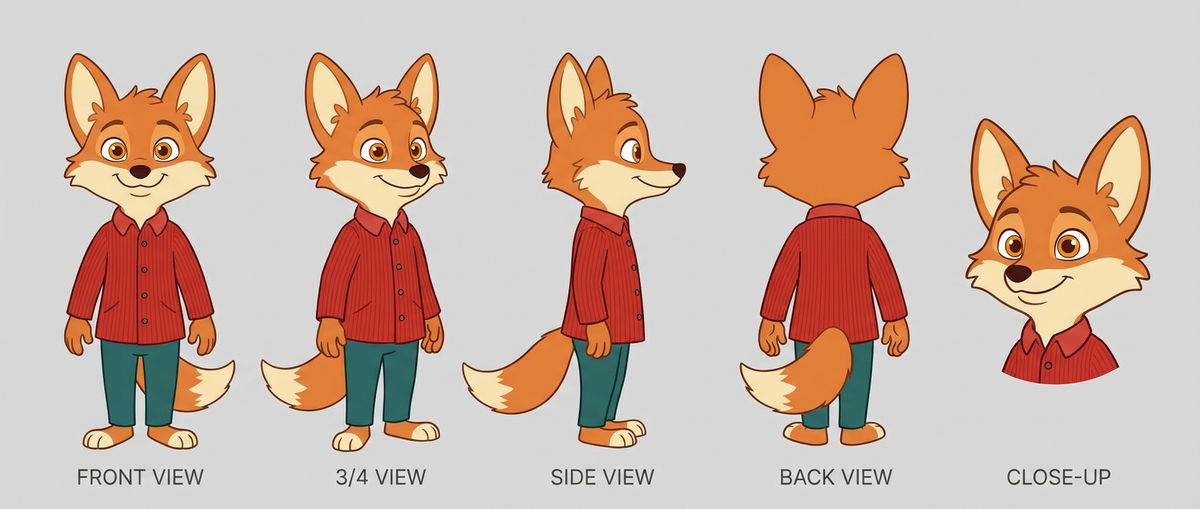
Five views, one character, empty hands, plain background. This is the whole asset.
Three to five images, not ten. Most tools cap reference inputs at around four, which tells you something. Pile in more and they average together into something softer than any single one.
Keep props out of the master sheet
Hand your character a coffee cup in the reference. Harmless?
Some generations fuse it to their fingers. Some change the cup's colour. Some drop it and leave the hand in a strange claw shape, because the hand was drawn around an object that is no longer there.
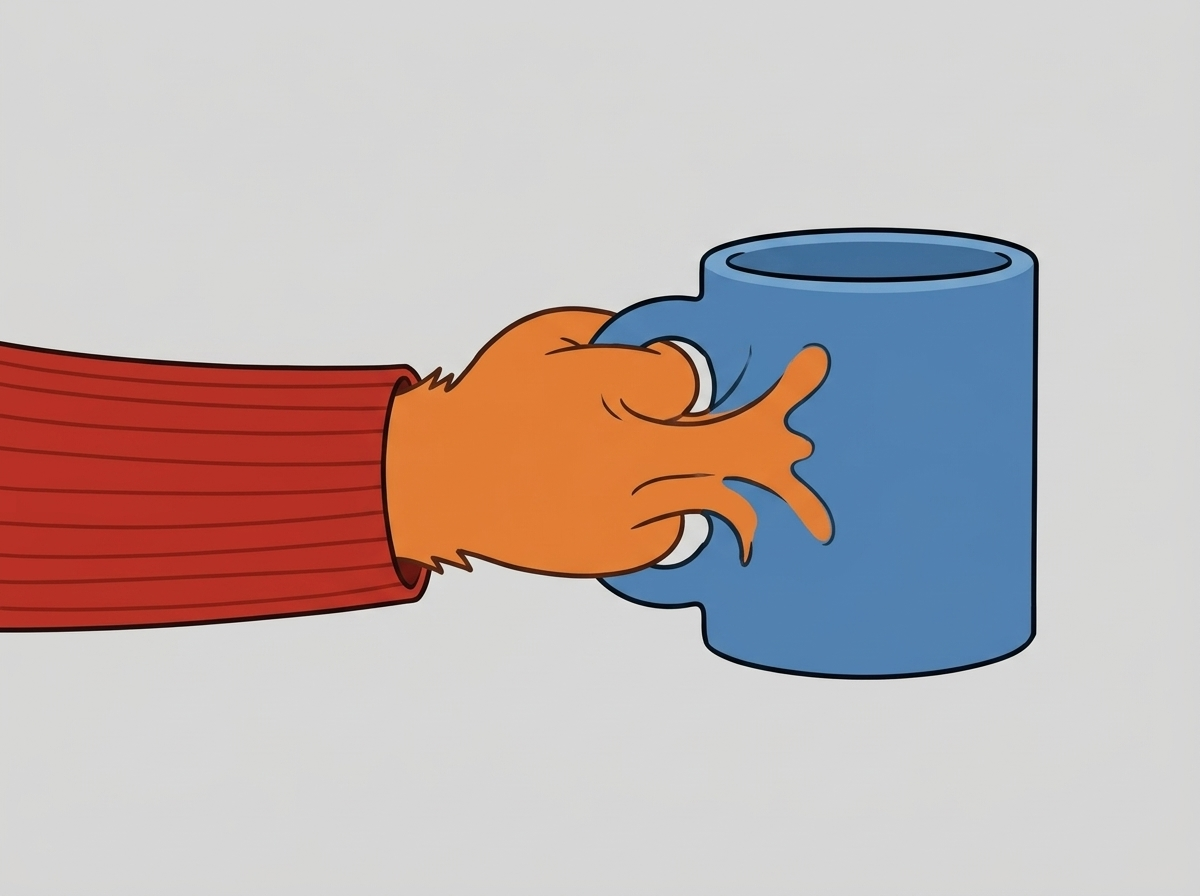
The fingers have melted into the mug wall, with one coming out the other side. The model was never told where the paw ended and the cup began.
Generate the sheet empty-handed and add props per shot in the prompt. Same rule for anything removable: bags, weapons, instruments, hats.
And generate the whole sheet in one pass if the tool lets you. Panels made together share one interpretation of the character. Made separately, each panel is its own guess, and you end up with a reference sheet that contradicts itself.
Stage 3: Lock the art direction as its own asset
Style drifts on a completely separate schedule from the character. You can hold a face perfectly and still get scene three in soft pastel and scene twelve in hard contrast.
So, negative prompts then? Write no photorealism, no 3D render and you're covered?
Afraid not. You've told the model three things to avoid out of a near-infinite set, and what fills the space it just cleared is whatever the model would have done anyway, minus those three. Models have a default pull toward photorealism, so a negative prompt is a fence rather than a destination.
What actually holds a style:
- One style frame, kept separate from the character sheet, fixing palette, line quality and lighting for the whole series
- Positive style language in your locked block. Name the look you want, not the twelve you don't
- A separate check. A shot can pass an identity check and still be visually wrong
There's more on this in our guide to maintaining style consistency in AI animation, including the flicker problem between frames.
If your tool stores art direction alongside the cast, this stage happens once rather than every episode. On LongStories the colours, lighting, camera treatment and the things that should never appear all live in the universe with the characters, so the style arrives with them.
Stage 4: Decide where the series actually lives
This is the stage that separates a series from a pile of videos.
Everything in stages 1 to 3 is an asset. The only real question is where it lives between episodes, and there are three answers.
Where your assets live | At episode two | At episode twelve |
|---|---|---|
A folder on your machine | You re-upload everything, every session | Still re-uploading, plus managing versions of the sheet |
Project memory in the tool | Fine, as long as you stay in the project | New project, so the cast comes back out of your notes |
A persistent world | Episode two starts from episode one | Episode twelve starts from episode eleven |
Most tools now remember a character while you're inside the project that made it. That's genuinely useful, and it covers you for about one episode.
The problem is what the memory is attached to. Close the project, open a new one for episode two, and the cast, the locations and the art direction come back out of your notes. Nothing in that workflow describes what happens at video twenty.
Think of it like a film set where the continuity supervisor goes home after every shot and a new one turns up who's never read the script. You can hand each of them the folder of reference photos. You'll be handing over that folder all day.
What a persistent world stores
On LongStories the unit is a Universe: a saved world holding its cast, its lore, the rules no video in it may break, its art direction, its audience and its visual style.
Setup takes about a minute. Name it, describe it in a line, and the lore, rules, art direction, audience, three story ideas and the cover art get written for you. All editable before you generate anything.
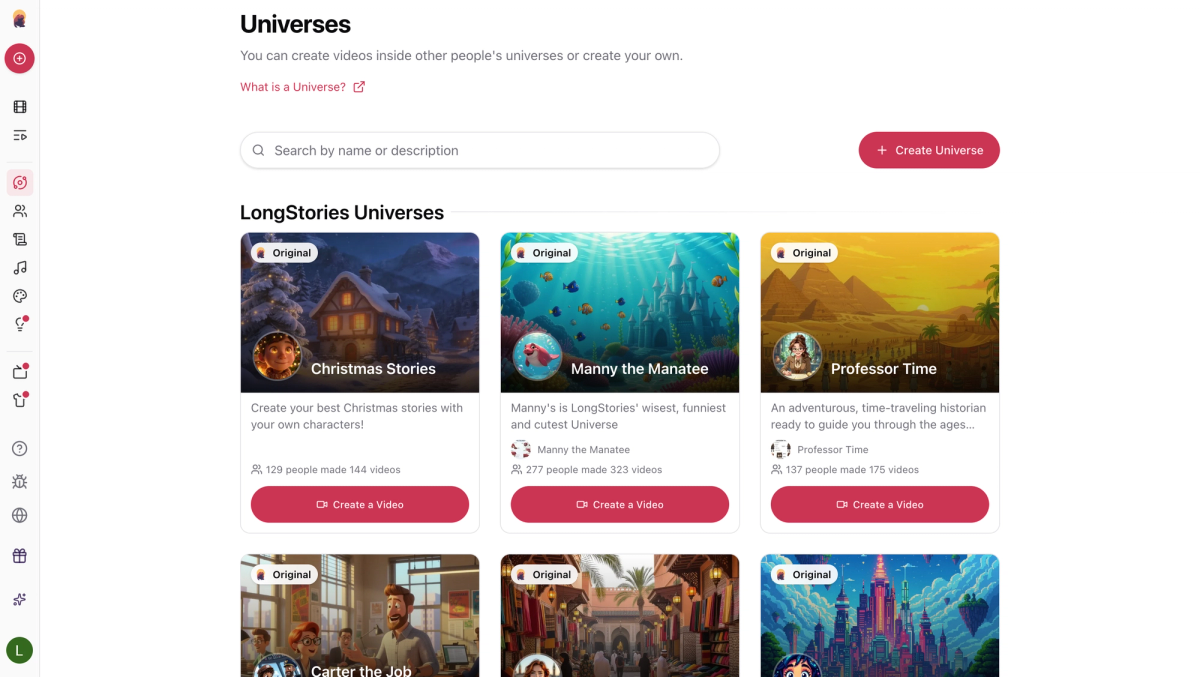
Each card is a world that already exists. Pick one and the cast, the look and the rules come with it, which is why Manny the Manatee alone has 323 videos made inside him.
Once a series' first episode sits in a universe, every later episode inherits the characters, the places, the objects, the look and the story so far. The finished video carries a Next episode button.
It goes further than the cast, too. Script, storyboard layout, voiceover, background music and the animation all generate in the same pass, with commercial rights across the lot, and the style range covers 2D cartoon, Pixar-style 3D, anime, comic, watercolour and storybook illustration. One style per universe, and it holds.
Two things to know before you plan a season. A saved cast guides every generation without making every face and outfit identical, so stage 6 still applies. And universe edits apply to new videos only, so a published episode keeps the world it was built with, which is the behaviour you want once you've shipped twelve of them.
For a series rather than a video, LongStories is the best option here, because the cast outlives the video it was made in.
Stage 5: Produce the episode
With the assets stored, production is mostly about not undoing stage 1.
Keep the character block and the scene block separate. Two distinct pieces of text with a visible delimiter between them. Fuse them into one 300-word prompt and the model blends the two, which is how a character ends up wearing the background's colour palette.
Only the scene text should change between shots:
Luna (reference #1234), asymmetrical blue hair, amber eyes, graphite jacket with glowing teal accents, semi-realistic digital illustration.
Scene: exploring a neon-lit marketplace at dusk.
Four more rules that save retries:
- Keep scenes simple. Google's own guidance flags this one: in a complex scene the model spends its limited attention on the environment, and the character's details drift. The more you ask for in a shot, the less attention your character gets
- Keep expressions subtle. A "micro-smile" or "subtle determination" holds. Exaggerated emotion makes the model reinterpret the whole face
- Specify light consistently. One dominant direction, one named temperature like warm tungsten or cool neon
- Break complex movement into keyframes instead of asking for the whole move in one generation
So how many generations is an episode, really?
Worth counting honestly before you promise yourself a weekly schedule.
Per 10-minute episode | Clip-based tool | LongStories |
|---|---|---|
Generations at 8 to 15 seconds per clip | 40 to 75 | 1 |
With a realistic 30% retry rate | around 100 | 1 |
Reference re-attachments | one per generation | 0 |
Identity checks you perform | one per shot | one per video |
Joins where the character can change | 39 to 74 | 0 |
Then you do the whole column again next week for episode two.
A 15-minute generation has no joins inside it, which removes the drift opportunities rather than asking you to police them. That's the difference between managing a problem and not having it.
Turning a storyboard into shots
If you plan in frames first, the storyboard is the bridge between stage 1 and stage 5, and it catches structural problems while they're still cheap to fix. Full walkthrough in our guide to using AI for video storyboarding.
On LongStories the storyboard layout gets generated with the episode rather than fed into it, so the step collapses into production. On a clip tool it stays its own stage, and those frames become the shot list you work through one at a time.
Stage 6: Review, then fix one shot
Review per shot, against the reference sheet, before anything publishes. Check the character and the style separately, because a shot can pass one and fail the other.
Then there's the question nobody plans for. You have a finished episode with one bad shot in the middle of it. Now what?
On most clip-based tools the answer is genuinely bad: regenerate that clip. Which is a fresh roll of the dice in an episode where every other shot already matches. A few tools soften it with video-to-video refinement, and that still costs you a generation and a re-stitch.
On LongStories you repair the shot instead. Open the episode, fix that one image against the character reference, regenerate that shot, re-render. The other forty never move.
Worth saying plainly: no tool guarantees every shot matches, ours included. Identity slips when a character turns, changes pose or appears from behind, and complex movement makes it worse. Every vendor in this category says some version of that in their own documentation.
What differs is how many chances drift gets, and what repairing it costs you. One generation per episode gives it far fewer, and a per-shot repair makes the ones that slip through cheap to fix.
Your actual episode-two checklist
Published episode one and about to start episode two? This is the whole job:
- Open the stored world, confirm the cast and style are the ones you shipped with
- Write the new story. Nothing from stages 1 to 4 should need touching
- Generate, keeping the character block unchanged and only the scene text new
- Review per shot against the same reference sheet
- Repair individual shots instead of regenerating the episode
Anything on that list that takes more than a few minutes is a sign the asset belongs somewhere more permanent than wherever you put it.
FAQ
What is the best AI video tool for reusing the same characters and assets across multiple clips?
One that stores the character outside the project rather than inside the clip you're generating. LongStories keeps cast, places, art direction and style in a Universe that every later video inherits, so reuse is the default instead of something you set up again each time.
That's the whole design goal, and it's what we're built to do well: you define the world once and every episode after that starts from it.
How do AI-native studios keep animation quality consistent across episodes?
They standardise three things and then never touch them: a reference sheet per character, one style frame for the whole series, and a locked prompt block where only the scene text changes.
Then they draft at low quality and render finals at high quality, so the expensive setting only gets paid for on shots that survive review.
The studios that do this fastest stop treating it as a discipline and store it instead. A LongStories universe holds the art direction, the rules and the cast together, so episode nine inherits the standard rather than re-applying it.
We're producing an animated series and need the same main character in every episode. What does that take?
Stage 2 and stage 4 above, in that order. A complete reference sheet so the model isn't inventing hidden details, then a storage layer that survives between episodes so you're not rebuilding the character each time.
A folder of images handles this manually. Project memory handles one season, badly. A LongStories universe passes the cast, the places and the look into every later episode automatically, which is the only version of this that doesn't get more expensive as the series grows.
Which AI tool can animate several keyframes into a multi-shot sequence without a complex editor?
LongStories does this without a timeline. You supply the script or the beats, the multi-shot sequence generates as one video up to 15 minutes, and the shot breakdown is handled for you.
Clip-based generators will animate between keyframes happily enough, but assembling those shots into a sequence is a separate editing job that lands on you.
How do you produce consistent episodes on a tight budget?
Draft cheap, render once. LongStories has three animation tiers for exactly this, Storyboard, Fast and Pro, so you can block out an episode at the cheap setting and only pay for a Pro render once the story works. Credits are flat per minute and unused ones roll over.
The bigger saving is structural though. Fewer generations per episode means fewer retries, and retries are where clip-based budgets actually disappear. There's a fuller breakdown in our guide to building an AI video workflow.
What is the best image-to-video tool for animating reusable character artwork?
If you already have the artwork, you want a tool that treats your image as the identity source rather than a loose style hint. Our comparison of AI video generators for consistent characters covers which ones hold an uploaded character best, and what each costs per second.
Does any of this make money?
Eventually, and the maths is less romantic than the creative part. Episode count and runtime both matter for monetisation, and a recognisable recurring cast is what turns views into a subscriber base. We went through the numbers in monetizing AI characters on YouTube.
Where to start
Making one video? Rebuild your reference sheet. Five angles, plain background, empty hands, wardrobe visible. That fixes more drift than any prompt rewrite will.
Making a series? Then the reference sheet is the wrong layer to solve it at. Decide where the cast lives before you make episode one, because every episode after that either inherits your setup or rebuilds it from scratch.
On LongStories that decision is the universe, and it's the one thing on this list you only do once.
Your continuity supervisor goes home after every shot. Either you hand over the folder each time, or you use something that keeps the folder for you.
LongStories is constantly evolving as it finds its product-market fit. Features, pricing, and offerings are continuously being refined and updated. The information in this blog post reflects our understanding at the time of writing. Please always check LongStories.ai for the latest information about our products, features, and pricing, or contact us directly for the most current details.