
AI Rigging Tools for Serialized Content Creation

Serialized content creators often face challenges with character consistency when using AI tools. AI rigging platforms solve this by letting you define characters, styles, and voices once, ensuring consistency across episodes. These tools also speed up production, enabling creators to generate episodes in seconds. Here's a quick overview of four platforms tailored for serialized storytelling:
- LongStories.ai: Ideal for YouTube-length videos (up to 15 minutes). Features reusable "Universes" for consistent characters and bulk editing tools. Pricing starts at $9.99/month.
- Domo AI: Best for short-form content (TikTok, Reels). Offers pre-designed templates and temporal consistency for stable character features. Plans start at $6.99/month.
- LTX Studio: Designed for storyboarding and multi-scene projects with tools for scene continuity. Pricing starts at $15/month.
- Morphic: Focuses on short-form animations with custom character model training for precise control. The Pro plan costs $49/month.
Quick Comparison
| Platform | Best For | Max Video Length | Starting Price | Key Feature |
|---|---|---|---|---|
| LongStories.ai | YouTube-length series | 15 minutes | $9.99/month | Reusable "Universes" |
| Domo AI | Short-form social media clips | 60 seconds | $6.99/month | Pre-designed templates |
| LTX Studio | Storyboarding, multi-scenes | Short sequences | $15/month | Scene continuity tools |
| Morphic | Short animations, precision | Short sequences | $49/month | Custom character model training |
Choose based on your content type and platform goals. LongStories.ai works well for longer serialized videos, while Domo AI and Morphic shine in short-form content. LTX Studio is perfect for creators focusing on scene transitions and storyboarding.
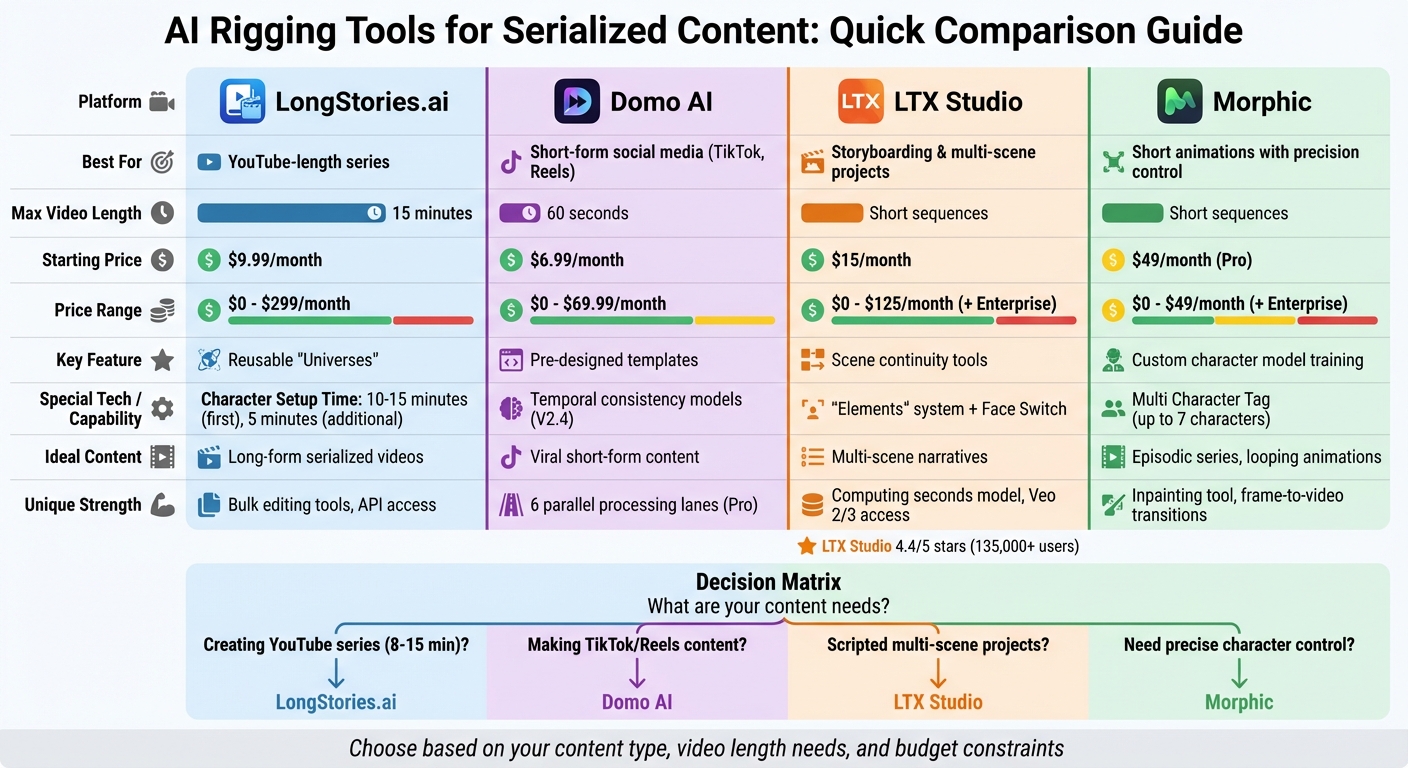
AI Rigging Tools Comparison: Features, Pricing, and Best Use Cases
1. LongStories.ai
LongStories.ai simplifies character consistency with its "Universe" system, a feature that stores character details during a one-time setup. This eliminates the hassle of recreating characters for every scene, a common issue with traditional AI tools.
Character Consistency
Creating a Universe is quick and efficient, taking about 10–15 minutes for the first setup and only 5 minutes for additional characters. This system ensures characters maintain their features and details throughout a series, saving creators time and effort.
Animation Length Support
The platform supports video lengths ranging from 30 seconds on the Free plan to 15 minutes with the Studio plan. This range aligns with YouTube's monetization criteria, catering to creators with audiences from 10,000 to over 500,000 subscribers. It offers flexibility for various content needs.
Animation Quality Tiers
LongStories.ai provides three quality options, balancing speed and visual appeal:
- Just Storyboard – static images for quick drafts
- Fast Animation – moderate motion for faster rendering
- Pro Animation – high-quality motion for polished results
With 1,000 credits, you can produce around 7 minutes of storyboard content, 4–5 minutes of fast animation, or 1–2 minutes of pro animation. Pro Animation is the most resource-intensive, using about 534 credits per minute, compared to 134 credits per minute for static images.
Pricing (USD/month)
| Plan | Price | Monthly Credits | Max Video Length | Key Features |
|---|---|---|---|---|
| Free | $0 | 400 | 30 seconds | 2 animated scenes, public only |
| Starter | $9.99 | 800 | 3 minutes | 15 animated scenes |
| Plus | $25 | 2,000 | 10 minutes | Unlimited scenes, no watermark, private videos |
| Pro | $59 | 5,000 | 10 minutes | 4K upscaling, bulk asset downloads |
| Creator | $99 | 9,000 | 10 minutes | API access, Universe editing |
| Studio | $299 | 27,000 | 15 minutes | Custom model selection, dedicated support |
Unused credits roll over to the next month, and additional credits can be purchased starting at $12 for 800 credits.
Bulk Editing Tools
LongStories.ai simplifies large-scale edits with its bulk editing feature. For example, if you want to change a character's cap color, the update applies across all scenes instantly. This tool ensures consistency across your Universe as your project grows.
For those on Pro and higher plans, bulk downloads are available. You can export each scene as a separate video clip, along with its images and audio, all packaged neatly in a ZIP file. This makes advanced editing in external tools more manageable while preserving the consistency of your original Universe.
sbb-itb-94859ad
2. Domo AI
Domo AI specializes in creating short-form videos with consistent character features, making it a go-to tool for creators focused on quick, engaging social media content. Unlike platforms designed for lengthy productions, Domo AI is tailored for fast, efficient video creation.
Character Consistency
One standout feature of Domo AI is its ability to maintain character consistency. Using temporal consistency models, it minimizes flickering and ensures stable character features like faces and hands. The V2.4 models have taken this a step further, enhancing the uniformity of recurring characters in short animations. To streamline content creation, it also offers pre-designed templates like AI Kiss, Hug, Zoom, and Loop for common character interactions.
Animation Length Support
Domo AI is optimized for short-form content, allowing creators to generate videos up to 60 seconds long with its V2.4 models. Talking avatar features also support this duration. Pro users can create clips ranging from 20 to 60 seconds, while lower-tier plans are typically limited to 3–10 seconds. For those new to the platform, experimenting with 5–15 second clips is recommended before using credits on longer projects.
Pricing (USD/month)
| Plan | Price (Yearly) | Price (Monthly) | Credits | Key Features |
|---|---|---|---|---|
| Free | $0 | $0 | Starter credits | Testing only |
| Basic | $6.99 | ~$9.99 | 500 | 3 Fast lanes, no watermark |
| Standard | $19.59 | ~$27.99 | 1,500 | Unlimited Relax Mode |
| Pro | $48.99 | ~$69.99 | 4,000 | 6 Fast lanes, support for 20–60s clips |
The credit system depends on factors like tool type, clip length, and resolution. For example, 500 credits can generate approximately 500 images or 100 short videos. Opting for annual billing can save users around 30% compared to monthly payments.
Bulk Editing Tools
For creators managing multiple projects, Domo AI offers batch processing capabilities. Basic users can use 3 parallel lanes, while Pro users get access to 6 lanes for faster workflows. Additionally, the platform provides a REST API, enabling developers to integrate video generation directly into their own tools, dashboards, or automation systems. This feature simplifies the process of producing serialized content and enhances efficiency.
3. LTX Studio
LTX Studio is a filmmaking platform designed to turn scripts into fully realized storyboards and sequences. With over 135,000 producers and creative teams using it, the platform has earned a 4.4/5 rating on G2.
Character Consistency
One of LTX Studio's standout features is its "Elements" system, which stores AI characters, objects, fonts, and logos at the project level. This ensures that any edits made to a character's appearance or traits are instantly reflected across all scenes. The "Face Switch" feature allows users to upload an image and map it onto AI-generated characters, offering precise control over likeness.
"What we like about LTX is the consistency, so you can create your own universe." - Pierre-Jean Bernard, Head of Digital & AI, L'Oréal–McCann Paris
The platform also adapts characters to various lighting conditions and environments while preserving their visual consistency. Tools like Face Motion Capture and lip-syncing extend this stability to movement, ensuring smooth and reliable performance. However, challenges can arise with extreme camera angles or complex lighting setups.
This meticulous approach to character consistency supports LTX Studio's efficient editing and rendering workflow.
Animation Length Support
LTX Studio is tailored for short video sequences, making it ideal for storyboarding and prototyping rather than lengthy productions. Its Timeline Editor and Dynamic Storyboard tools help organize scenes, while the "Automatic Edits" feature assembles shots, effects, music, and voiceovers into a polished final cut. With the Standard plan (28,800 computing seconds), users can typically produce 15 to 25 short sequences monthly.
Its pricing model reflects the platform's focus on advanced capabilities.
Pricing (USD/month)
LTX Studio operates on a "computing seconds" model, which measures GPU time for tasks like rendering and storyboarding. Commercial rights are included starting with the Standard plan.
| Plan | Price (Monthly) | Price (Annual/mo) | Computing Seconds | Key Features |
|---|---|---|---|---|
| Free | $0 | - | 8,000 | Personal use, essential features |
| Lite | $15 | $12 | 8,640 | Personal use, modest runway |
| Standard | $35 | $28 | 28,800 | Commercial rights, Veo 2 access |
| Pro | $125 | $100 | 90,000 | Veo 2 & 3, priority rendering |
| Enterprise | Custom | Custom | Custom | Team features, priority support |
Annual billing offers a 20% discount on paid plans. However, estimating costs can be tricky since GPU time usage varies depending on the complexity of tasks.
Bulk Editing Tools
LTX Studio includes an AI Timeline Editor and a Video Shot Editor for detailed, shot-by-shot refinements. Character changes are treated as bulk edits, meaning adjustments to one character are applied throughout the project automatically. These tools also allow users to apply global visual styles and maintain a cohesive aesthetic across all scenes. By combining automated bulk editing with consistent character management, LTX Studio ensures a polished and uniform look at every stage of production.
4. Morphic
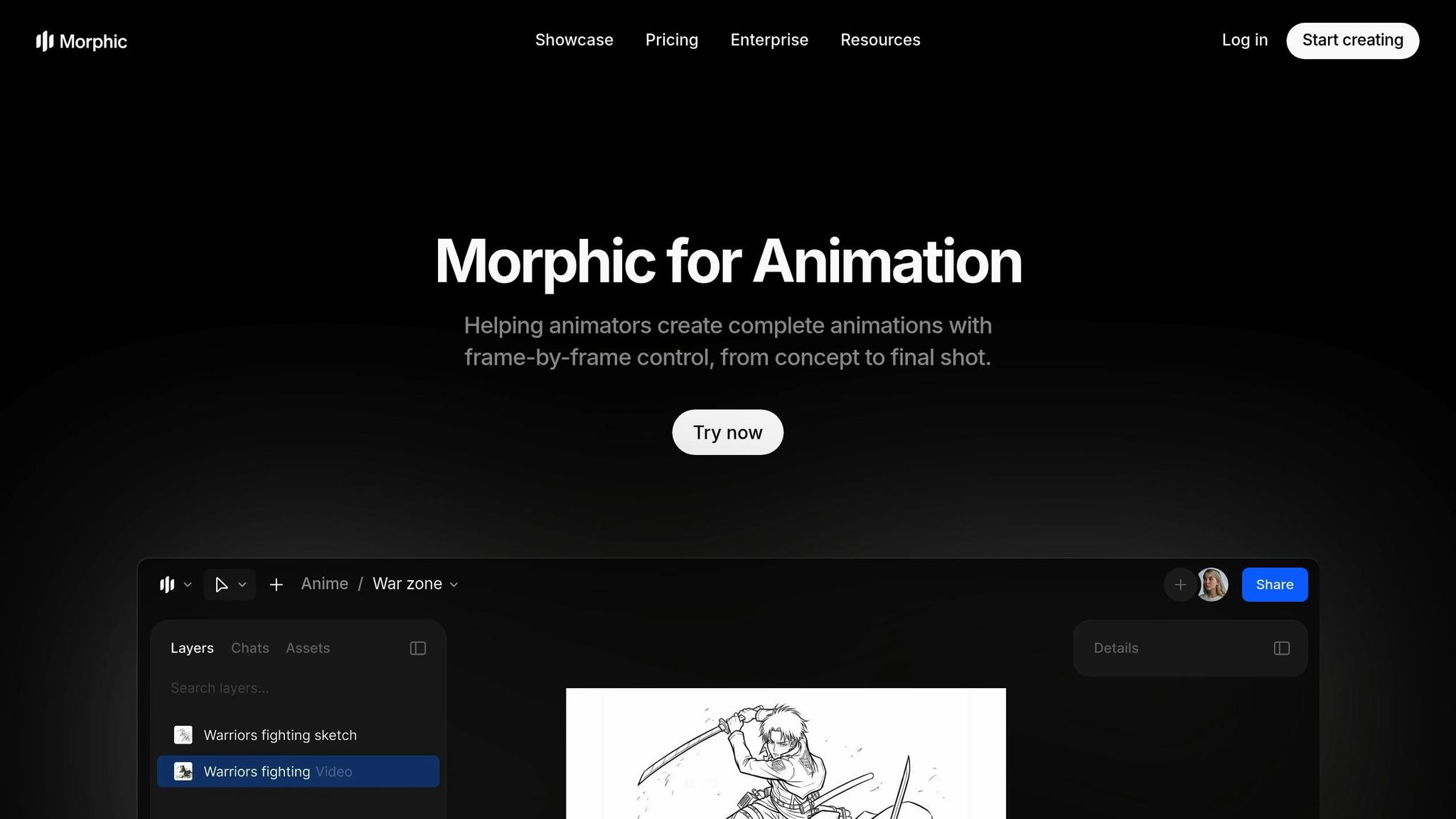
Morphic is an AI-driven platform designed for creating short-form reels, educational videos, and episodic series. What makes Morphic stand out is its ability to train custom character models, ensuring a consistent visual style across all generations. This approach addresses the common issue of visual drift often seen in serialized AI content. Unlike platforms such as LongStories.ai and Domo AI, which rely on framework-based consistency, Morphic takes a more tailored approach.
Character Consistency
Morphic prioritizes character consistency but takes it a step further with custom model training. By developing dedicated character and style models, the platform guarantees a steady visual identity throughout scenes. It also features an inpainting tool that allows users to tweak specific character traits with simple prompts.
"Train your characters and styles to achieve a consistent look and reuse them effortlessly in your generations." – Morphic
With its Multi Character Tag feature, Morphic can manage up to seven distinct characters in a single scene, ensuring each retains their unique appearance. The platform also includes a "Frames to video" tool, which generates smooth transitions between 2–5 selected frames, maintaining character positioning and fluidity during motion. The Canvas interface further helps users organize animations while preserving a cohesive tone across scenes.
Animation Length Support
Morphic is particularly well-suited for short-form content like reels, looping animations, and episodic series. Its model reuse functionality is currently being utilized to produce an in-house episodic anime series titled "DQN". The Timeline Composition tool simplifies the editing process with drag-and-drop functionality for assembling sequences, while layer-based editing offers precise control over each asset. This makes Morphic a powerful tool for creating visually engaging content at scale, especially for short-form formats.
Pricing (USD/month)
Morphic offers a tiered pricing structure, with different storage and export limits tailored to user needs:
| Plan | Price | Watermark | Asset Storage | Exports | Collaboration |
|---|---|---|---|---|---|
| Free | $0 | Yes | 5 GB | 10/month | Community Support |
| Standard | $29 | No | 25 GB | Unlimited | Email Support |
| Pro | $49 | No | 75 GB | Unlimited | Team Sharing & Custom Models |
| Enterprise | Custom | No | Unlimited | Unlimited | Dedicated Support (Slack/On-Call) |
The Pro plan is particularly useful for teams, offering shared project capabilities and custom-trained models for collaborative work.
Bulk Editing Tools
In addition to its character model training, Morphic provides specialized editing tools. For example, the "Colorize" feature applies cinematic tones or brand palettes across visuals instantly, saving users from manual frame-by-frame adjustments. The Copilot tool speeds up content preparation by generating scripts, outlines, and storyboards from ideas in just minutes. However, Morphic falls short when it comes to project-wide bulk updates. While it excels at precise frame-by-frame and object-specific edits, global changes require retraining models rather than applying instant modifications across an entire project.
Strengths and Weaknesses
To tackle character consistency in serialized content, we analyzed the strengths and challenges of four platforms: LongStories.ai, Domo AI, LTX Studio, and Morphic. Below is a detailed comparison based on four key factors for serialized content creation.
| Tool | Character Consistency | Animation Length Support | Pricing (USD/month) | Bulk Editing Tools |
|---|---|---|---|---|
| LongStories.ai | Strength: Reusable "Universes" store faces, traits, and voices for unlimited videos. Weakness: Initial setup takes 10–15 minutes. |
Strength: Supports up to 15 minutes per video, aligning with YouTube's 8–10 minute monetization range. Weakness: Less suited for short-form content. |
Strength: $25–$99/month, with credits costing 1.10¢ to 1.25¢ each. Weakness: Higher cost per credit on lower-tier plans. |
Strength: Semantic bulk editing allows global scene changes and ZIP downloads for external edits. Weakness: Advanced features limited to higher-tier plans. |
| Domo AI | Strength: Video-to-video restyling ensures brand consistency via its Enterprise API. Weakness: Less effective for developing original characters. |
Strength: Tailored for short-form content like Shorts, Reels, and TikTok. | Strength: Enterprise API pricing at $0.02 per credit with no expiration. | Strength: Template workflows and API automation streamline repeatable outputs. |
| LTX Studio | Strength: Delivers framework-based consistency across scenes. | Strength: Well-suited for multi-scene projects. | Strength: Competitive pricing for mid-tier creators. | Strength: Includes an integrated editing timeline. |
| Morphic | Strength: Custom model training ensures visual identity, with Multi Character Tag supporting up to 7 distinct characters. Weakness: Requires retraining models for major changes. |
Strength: Excels in short-form content and looping animations. Weakness: Limited to shorter videos. |
Strength: Free tier available; Pro plan costs $49/month and includes custom models. Weakness: Free tier restricts exports to 10 per month. |
Strength: - Weakness: - |
Each platform brings specific strengths tailored to different content needs. For example, LongStories.ai is perfect for YouTube-length series with its support for 15-minute videos and efficient bulk editing tools. On the other hand, Domo AI shines in high-volume social media content, offering template-based workflows and video-to-video restyling. If you need precision for short-form animations, Morphic provides custom character control through model training. Lastly, LTX Studio offers a balanced solution for creators working on multi-scene projects.
For creators focused on scalability and monetization, LongStories.ai's "Universe" system eliminates repetitive re-prompting across videos. Meanwhile, Domo AI is ideal for viral short-form content, and Morphic stands out for its precision in character modeling.
Conclusion
Choose your AI rigging tool based on the type of content you create and how you plan to distribute it. For YouTube creators producing serialized shows with recurring characters, LongStories.ai stands out. Its Universe system supports videos up to 10 minutes long, perfectly matching YouTube's preferred series length. Plus, features like bulk editing and API access make it easy to post frequently while keeping episodes consistent with your brand.
If you're focused on short-form content for platforms like TikTok, Reels, or Shorts, Domo AI is a great fit. Its repurposing tools simplify production, helping you create content that’s primed to go viral.
For creators needing precise control over characters in short animations or looping visuals, Morphic offers custom training. This allows for detailed control over a character’s appearance without requiring constant manual tweaks.
For scripted projects that rely on smooth scene transitions, LTX Studio is the go-to option. Its framework-based design ensures continuity across multi-scene narratives without requiring the complexity of a full Universe setup.
Ultimately, the right tool depends on your specific production needs. Whether you prioritize reusable Universes, streamlined templates, custom character training, or narrative continuity, there’s a solution to ensure your characters remain consistent and your content stands out.
FAQs
How do I keep a character consistent across episodes?
Maintaining character consistency is crucial when developing episodic content. Tools like LongStories.ai make this process easier by allowing you to create a reusable "Universe." This feature helps define your characters, styles, and voices in a way that can be consistently applied across episodes.
With this approach, your characters retain their physical traits, personality quirks, and visual style from one episode to the next. By incorporating reference images, detailed prompts, and centralized asset libraries, you can minimize issues like "prompt drift" - when a character’s look or style unintentionally changes over time. This ensures your characters remain visually and narratively aligned throughout your series.
Which plan is best for YouTube-length episodes?
The Creator Plan is perfect for those producing YouTube-length videos, with support for content up to 15 minutes long. It offers features like branded universes, which help creators keep their characters and styles consistent. This ensures that creators can maintain their distinct identity while streamlining the production of high-quality videos.
How can I cut costs with credits and quality tiers?
Reducing costs can be as simple as opting for lower animation quality settings, like No Animation or Fast Animation, which are easier on the budget. On top of that, leveraging bulk editing tools and reusable Universes can simplify repetitive tasks. This not only saves time but also boosts overall efficiency.
Related posts
LongStories is constantly evolving as it finds its product-market fit. Features, pricing, and offerings are continuously being refined and updated. The information in this blog post reflects our understanding at the time of writing. Please always check LongStories.ai for the latest information about our products, features, and pricing, or contact us directly for the most current details.