
How to Design AI Characters for Series

Creating consistent AI characters for a video series is essential for building audience connection and maintaining production quality. Inconsistencies in a character's appearance can disrupt the viewer's experience and erode trust. This guide outlines how to use AI tools effectively to design, refine, and scale characters while ensuring they remain visually stable across episodes. Here's a quick breakdown:
- Define Your Character: Start with clear physical traits, backstory, and personality. Use "identity anchors" like a unique hairstyle or accessory to make characters recognizable.
- Leverage AI Tools: Platforms like LongStories.ai and Domo AI simplify character creation and ensure consistency with features like reusable "Universes" and "Character Memory."
- Organize Assets: Create a centralized reference sheet with multi-view angles and key expressions for each character.
- Refine and Animate: Use detailed prompts to lock in core traits and ensure animations align with your character's identity.
- Scale Production: Save time by reusing assets and frameworks across episodes while performing regular consistency checks.
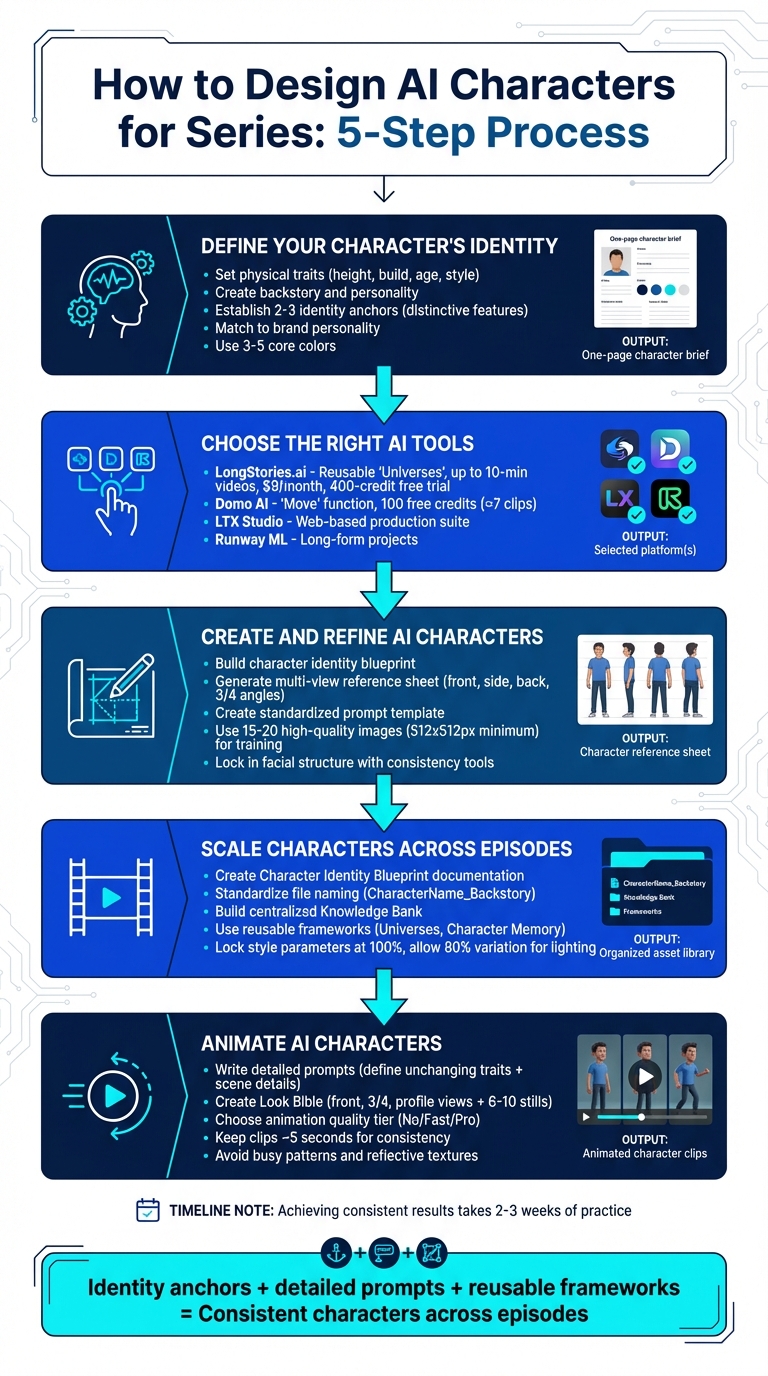
5-Step Process for Designing Consistent AI Characters for Video Series
How to Make Consistent Characters With AI | Full Course
Step 1: Define Your Character's Identity
Before diving into character creation, it's crucial to build a solid foundation. Start by outlining your character's physical traits - think height, build, age, and any signature clothing or visual style, whether that’s realistic, stylized, or anime-inspired. Without this groundwork, you risk ending up with inconsistent characters that disrupt the flow and continuity of your series.
Set Character Traits and Backstory
Once the physical details are in place, it’s time to bring your character to life by crafting a rich backstory. Where do they come from? What drives them? What are their fears, strengths, and weaknesses? These elements shape how your character moves, poses, and expresses emotions. For example, an intellectual character might have a reserved posture, while an action hero exudes confidence and energy. These nuances should be baked into your design from the start.
"A visually striking character is good, but a character with depth is memorable." - Sophie, Design Agent, Lovart
To keep everything aligned, create a one-page character brief. This document will act as your guiding star for all design decisions. Include details about how your character expresses emotions - what does curiosity look like on their face compared to determination? Identify 2–3 key features, like a distinctive hairstyle, eye color, or accessory, that will remain constant across every episode. These "identity anchors" ensure your character is instantly recognizable, even when the lighting or background changes.
Match Characters to Your Brand
Your character should embody your brand's personality and values. For instance, a character designed for a children’s educational series will look very different from one meant for a gritty cyberpunk game. Think about the emotions you want your audience to associate with your character - whether it’s trust, curiosity, or excitement - and let that guide your design choices.
Stick to a limited color palette of 3–5 core colors to maintain a cohesive visual identity. Ensure your character’s silhouette is so distinctive that they’re recognizable even in shadow. Before finalizing, test your character in a variety of environments - like a bright laboratory or a dimly lit marketplace - to confirm that their identity remains consistent regardless of the setting. These tests will help ensure your character feels authentic and grounded no matter where they appear.
Step 2: Choose the Right AI Tools
Once you've nailed down your character identity, the next move is finding the right tools to keep your series consistent and polished. Some platforms are great for short clips (3–20 seconds), while others are built for full-series production. The key is to pick tools that match your needs - whether that's character consistency, animation quality, or an efficient workflow.
Match Platforms to Your Series Needs
When exploring AI platforms, focus on features that cater to serialized production. For instance, Domo AI’s "Move" function uses a straightforward, front-facing reference image (think passport photo) to ensure your character’s look stays consistent across animations. Smooth motion is another must-have - nobody wants distracting flickers breaking the flow.
Also, consider the platform’s workflow setup. Discord-native tools like Domo AI offer community-driven environments where you can queue up jobs quickly. On the other hand, web-based platforms like LTX Studio and Runway ML provide more robust production suites for long-form projects. To find the best fit, test a short clip on a few platforms. Bonus tip: Domo AI gives you 100 free credits when you sign up - enough to create around seven 3-second clips, making it easy to experiment without spending a dime.
Rely on LongStories.ai for Character Consistency
If you’re producing a long-form series, LongStories.ai is a standout choice for keeping everything cohesive. It lets you build reusable "Universes" where you can define your characters, styles, and voices once and apply them across as many videos as you need.
This platform supports videos up to 10 minutes long, which is perfect for meeting YouTube’s monetization criteria. It also offers three animation quality options - No Animation, Fast Animation, and Pro Animation - so you can strike the right balance between speed and visual quality. Features like bulk editing and API access make it simple to scale up production and streamline workflows for larger projects. Plans start at just $9/month, and with a 400-credit free trial, it’s a budget-friendly option compared to hiring a full production team.
Step 3: Create and Refine AI Characters
Now that you've chosen your tools, it's time to bring your characters to life. This step involves turning your ideas into detailed visuals while ensuring consistency throughout.
Build Characters with Text Descriptions and References
Start by transforming your character concepts into clear, visual representations. Create a character identity blueprint that specifies physical traits, signature outfits, and the overall visual style - whether it’s semi-realistic, anime-inspired, or 3D.
Identify the "identity anchors" - those key visual details that must remain constant. For instance, asymmetrical blue hair, amber eyes, or a cybernetic implant can serve as unmistakable features. To guide the AI’s design process, compile style references and color palettes into a mood board that sets the tone for your character’s look.
Next, generate a multi-view reference sheet that includes front, side, back, and three-quarter angles, along with key facial expressions. This sheet acts as your “visual bible” for maintaining consistency across scenes. Use a standardized prompt template that incorporates your character’s identifier, identity anchors, outfit details, and style preferences. Only the scene or action should vary. For example: "Luna (from reference #1234), asymmetrical blue hair, amber eyes, graphite jacket with glowing teal accents, semi-realistic digital illustration style, exploring a neon-lit marketplace."
"Nothing screams 'amateur' quite like a character whose appearance shifts dramatically between scenes." - Sophie, Design Agent, Lovart
If you're training a custom model, such as with Morphic, start with 15–20 high-quality images (at least 512x512 pixels) that showcase your character in various angles and lighting conditions. This helps the AI grasp your character’s unique attributes.
Refine Characters Without Losing Consistency
Once your character is generated, focus on fine-tuning the details while keeping the core features intact. Use tools like Midjourney's --cref to lock in facial structure and proportions as you experiment with different settings or styles.
Consistency is key. Regularly compare new designs with your reference sheet to ensure features like facial details, hair, body proportions, and costume elements remain aligned with your original blueprint. Simplify wardrobe choices, as overly complex patterns or frequent outfit changes can disrupt the character’s continuity between scenes.
Platforms like Lovart can store visual details across sessions, so you won’t need to repeatedly input the same character descriptions. Similarly, LongStories.ai allows you to save your character designs in reusable Universes, making it easy to apply them across multiple videos without starting from scratch every time.
sbb-itb-94859ad
Step 4: Scale Characters Across Episodes
After perfecting your character designs, the real task begins: ensuring they stay consistent across multiple episodes. Without an organized system, you might find yourself wasting valuable time recreating or tweaking character details for every new video.
Organize and Document Character Assets
Think of character documentation as your ultimate guidebook for maintaining consistency. Start by creating a Character Identity Blueprint. This should include all the essentials: physical traits like height, build, and age; signature costumes and color palettes; personality traits; and any specific visual styles. Adding multi-view reference sheets can be a huge help too.
To keep things easily accessible, standardize how you name your files - for example, using formats like "CharacterName_Backstory." Build a Knowledge Bank that centralizes all these details in one place. This system becomes even more crucial when you're juggling multiple characters.
It’s also smart to set up regular consistency checks. Compare new character iterations with your original references to catch any deviations early on.
Use Reusable Frameworks to Save Time
Once your assets are well-organized, reusable frameworks can make scaling across episodes much easier. These frameworks eliminate repetitive tasks, saving you time and energy. Platforms like LongStories.ai allow you to define your characters, styles, and voices once, creating a reusable "Universe." This way, you can generate multiple videos without having to re-enter the same character details every time. Instead, you can focus on creating fresh storylines.
Other tools, like Lovart's "Character Memory", help retain visual details across sessions. Similarly, LTX Studio's "Elements" hub manages visuals across various scenes, linking new designs back to your original character references. These tools ensure your characters stay visually consistent while allowing for some flexibility. For example, you can lock style parameters at 100% for core appearance while allowing up to 80% variation for lighting or environmental changes. This strikes a balance between consistency and variety.
Step 5: Animate AI Characters for Series
Now that your characters are designed and organized, it’s time to bring them to life through animation. This step demands precision - poorly crafted prompts can unintentionally alter key features. The goal is to ensure every animated scene stays true to your character's established identity.
Write Animation Prompts for Consistent Results
How you structure your animation prompts plays a huge role in maintaining character consistency across videos. Start by defining traits that should never change, like age, ethnicity, hairstyle, and signature features. Then, add scene-specific details such as actions, environments, and lighting.
For wardrobe cues, keep it simple but memorable. A red jacket or a silver pendant, for example, can act as a visual anchor across different scenes and lighting setups. When specifying lighting, stick to a defined Kelvin range - like "warm tungsten" or "cool neon" - and use a single dominant light direction to avoid inconsistencies.
Facial expressions should be subtle. Instead of exaggerated emotions, aim for details like a "micro-smile" or a look of "subtle determination." Over-the-top expressions can lead the AI to reinterpret your character’s features. For complex movements, break them into keyframes to maintain the integrity of your character’s design.
Creating a Look Bible is crucial. Include front, three-quarter, and profile views, along with references for key emotions such as happiness, curiosity, and focus. Add 6–10 high-quality stills, and start with a "hero" close-up to finalize facial details before moving on to medium and wide shots.
Choose Animation Quality Based on Your Needs
Once your prompts are dialed in, it’s time to decide on the level of animation quality that fits your project.
Animation quality impacts both the look of your characters and the efficiency of production. For early stages, use platforms that allow quick prototyping with stylized models. When it’s time for final key shots, switch to high-fidelity models to ensure continuity. Platforms like LongStories.ai offer three tiers - No Animation, Fast Animation, and Pro Animation - so you can choose the right balance between speed and visual detail depending on your timeline and goals.
To maintain consistency, keep clips short - around five seconds. Shorter clips are easier to manage and can be stitched together during editing for smoother results. Also, avoid clothing with busy patterns or reflective textures, as these can create unwanted visual inconsistencies from frame to frame.
Conclusion
Creating AI characters that remain consistent requires attention to detail, well-defined anchors, and a disciplined approach. Vague descriptions can lead to inconsistencies, but detailed prompts - down to specifics like "a blue denim jacket with rolled sleeves" - ensure stability across episodes. Anchoring your designs with a master reference image or using subject reference features helps lock in a character's visual identity, minimizing variations between scenes.
For most creators, achieving dependable results takes about two to three weeks of consistent practice. Starting with character turnaround sheets that include front, profile, and three-quarter views, along with building a centralized asset library, offers a strong foundation. These steps are crucial for avoiding "character drift" as your series grows.
Advanced tools can make scaling production more efficient. Platforms like LongStories.ai simplify the process by allowing creators to build reusable "Universes" that preserve characters, styles, and voices across projects. With features like three animation quality tiers and bulk editing, you can focus on storytelling without having to re-enter the same details repeatedly, maintaining a consistent brand identity.
As one industry expert aptly stated:
"Fundamental principles remain unchanged." - HailuoAI
FAQs
How do AI tools maintain consistent characters across episodes in a series?
AI tools make it easier to maintain character consistency by treating each character as a reusable asset. For example, platforms like LongStories.ai let creators craft detailed character profiles, covering everything from visual elements (such as facial features, clothing styles, and color palettes) to voice settings. These profiles are saved and automatically applied across all scenes, ensuring characters look and sound consistent throughout the series.
To avoid inconsistencies, AI tools use techniques like identity anchoring and reference-based generation. Creators can upload high-resolution reference images and provide detailed documentation for each character. The system then uses these as guides during rendering. Some workflows even allow for fine-tuning models to lock in specific attributes, such as facial structure or voice tone. By combining these methods, AI platforms help creators deliver polished, cohesive content that aligns with their creative vision.
What are identity anchors, and why do they matter for AI characters?
Identity anchors are the foundational traits that define a character’s core attributes - things like their appearance, voice, and personality. These elements act as a blueprint, ensuring AI-generated characters stay consistent in how they look, sound, and behave across different episodes or videos.
Why does this matter? Because consistency is key to keeping audiences engaged. If a character suddenly changes their voice or appearance - what’s often called “character drift” - it can disrupt the viewer’s experience and make the story feel less believable. By sticking to identity anchors, creators can maintain a unified style, strengthen their brand, and deliver a smooth, immersive experience for their audience.
How can I select the best AI platform for creating characters in my series?
To pick the right AI platform for your series, focus on character consistency, scalability, and compatibility with your storytelling goals. If your series relies on recurring characters that need to maintain the same appearance, voice, and style across episodes, seek platforms that offer reusable assets and automation features. Some tools even allow you to build a "universe" of characters and settings, which can simplify production and help cut costs.
For serialized content, platforms like LongStories.ai are a solid choice. They include features such as reusable character designs, voice anchoring, and bulk editing, making it easier to produce episodes efficiently - whether it’s a weekly 6-minute video or daily short-form clips. On the other hand, if you prefer a more hands-on editing experience, LTX Studio also supports character consistency but might require additional tools for larger-scale projects.
Begin by assessing your series requirements: the number of characters, episode length, animation quality, and whether automation tools are a must-have. For long-form stories with recurring characters, platforms that emphasize consistency and scalability are usually the most effective options.
Related posts
LongStories is constantly evolving as it finds its product-market fit. Features, pricing, and offerings are continuously being refined and updated. The information in this blog post reflects our understanding at the time of writing. Please always check LongStories.ai for the latest information about our products, features, and pricing, or contact us directly for the most current details.