
Best Practices for Consistent AI Character Voices
When creating AI-generated character voices, consistency is key for maintaining immersion and building trust with your audience. Inconsistent voices can disrupt storytelling, harm brand identity, and even impact monetization on platforms like YouTube. Here’s how to keep your AI voices steady and professional:
- Recording Quality: Use high-quality audio with consistent microphone placement, noise levels below -60 dB, and standardized gain settings.
- AI Settings: Adjust stability (0.60–0.85 for consistency, 0.30–0.50 for expressiveness) and avoid conflicting prompts or excessive SSML tags.
- Documentation: Record all parameters, including pitch, speed, and pronunciation guides, to ensure reproducibility.
- Tools: Platforms like ElevenLabs and LongStories.ai offer features for cloning, managing, and scaling consistent voices across projects.
For creators managing multiple characters, use pitch adjustments, speech-to-speech tools, and pronunciation dictionaries to make voices distinct yet stable. Proper workflows and the right tools ensure your series sounds polished and professional every time.
The Secret to Consistent AI Voices with Perfect Lip-Sync
What Causes AI Voice Inconsistencies
AI voice inconsistencies don’t happen randomly - they’re rooted in specific technical limitations and workflow challenges. These issues primarily arise from how the AI processes input and the quality of the reference audio. Addressing these factors is key to maintaining a consistent voice, which is crucial for brand identity.
Technical Factors That Impact Voice Quality
One of the biggest culprits behind voice inconsistencies is poor input signal quality. If the signal-to-noise ratio (SNR) falls below 20 dB or volume levels dip under -18 dB, background noise and glitches can creep into the output. To avoid this, aim for peak levels between -3 dB and -6 dB and include 100–200 milliseconds of silence at the beginning and end of recordings for clarity. Even small issues like DC offset or room echo can become baked into the AI model, leading to noticeable differences if cleaner recordings are used later.
"Consistent volume, speaking rate, speaking pitch, and speaking style are essential to create a high-quality custom voice."
– Microsoft Learn
These technical details lay the groundwork for understanding how AI models approach voice synthesis.
How Different AI Models Approach Voice Synthesis
Beyond recording quality, the way AI models handle synthesis plays a significant role in voice consistency. Smaller, low-latency models - like Eleven Flash v2.5 - are designed for speed but can struggle with complex text normalization. For instance, they might read "$1,000,000" as "one thousand thousand dollars" instead of "one million dollars." Larger models, such as Multilingual v2, handle these scenarios more naturally, though they come with higher latency.
Another factor is the balance between stability and expressiveness. Lower stability settings (0.30–0.50) result in more expressive but less consistent outputs, while higher stability (0.60–0.85) ensures uniformity but can make the voice sound monotonous. Similarly, adjusting the temperature value affects randomness - higher values add variety but make it harder to replicate the same performance across sessions.
Short prompts (fewer than 250 characters) and excessive or conflicting SSML tags can also lead to inconsistent results and introduce audio artifacts.
"Using too many break tags in a single generation can cause instability. The AI might speed up, or introduce additional noises or audio artifacts."
– ElevenLabs
How to Maintain Consistent AI Character Voices
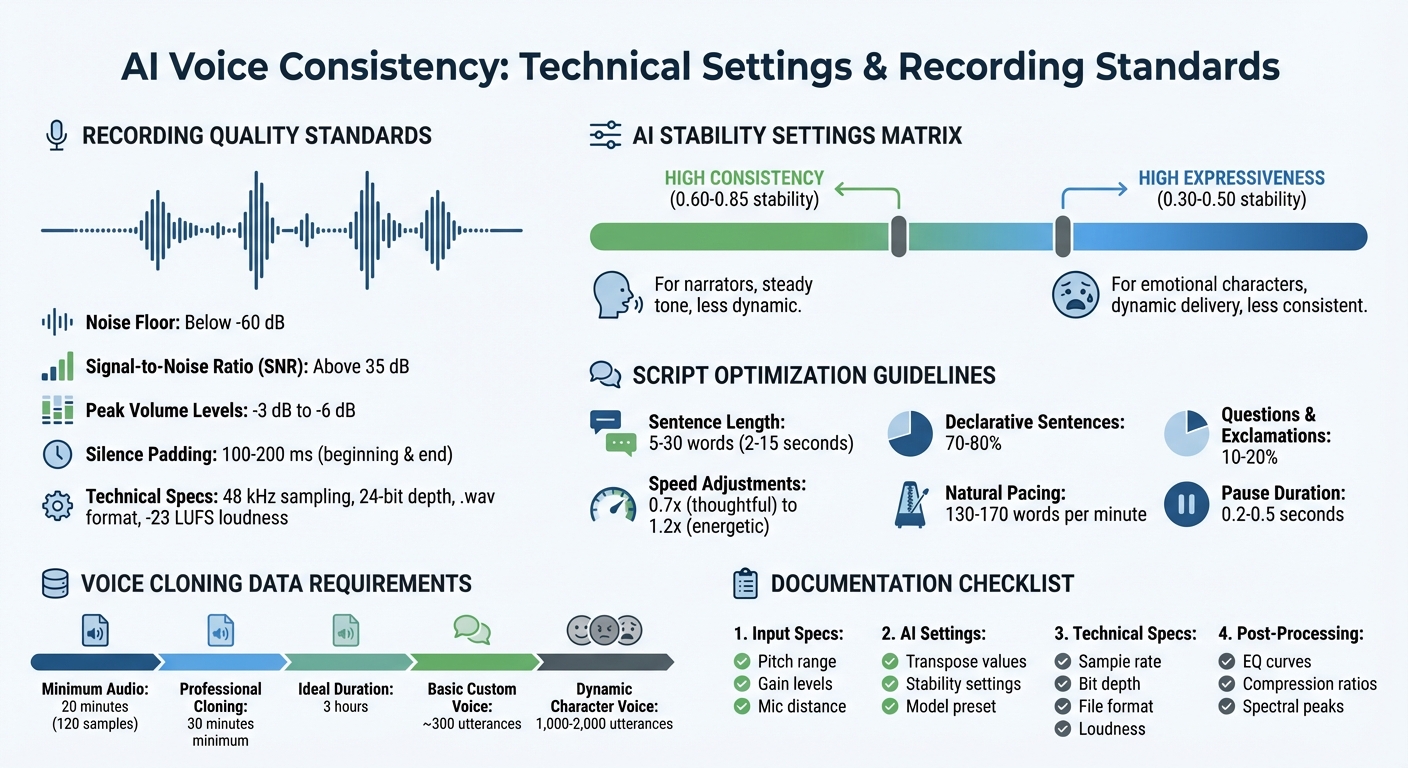
AI Voice Consistency Settings and Technical Specifications Guide
Creating a consistent AI character voice requires practical workflows that eliminate variables across recording sessions. This involves standardizing your recording environment, crafting prompts that guide the AI toward steady outputs, and thoroughly documenting key parameters for reproducibility. Let’s dive into the steps to achieve this.
Setting Up Consistent Recording Conditions
Your recording setup plays a critical role in maintaining consistent AI voice generation. Keep everything standardized - microphone distance, pop filter placement, and input gain settings should remain the same for every session. Mark the voice actor’s position to ensure uniform mic distance each time.
The recording environment itself matters just as much. Avoid spaces with excessive reverberation, as they can throw off the analysis algorithms, leading to inconsistencies. Aim for a professional setup with a noise floor below –60 dB and a Signal-to-Noise Ratio (SNR) above 35 dB. Stick to predefined peak volume levels and silence durations, as outlined in your earlier setup.
"The single most important factor for choosing voice talent is consistency. Your recordings for the same voice style should all sound like they were made on the same day in the same room."
– Microsoft Azure Speech Service
To ensure tonal consistency, create a reference "match file" at the start of each session. This is a standard utterance the voice actor repeats periodically to check volume, tempo, pitch, and intonation. Limit sessions to 2–3 hours per day to prevent voice strain, which can alter tone. The recording engineer should monitor from a separate room using neutral reference speakers or headphones to catch tonal shifts that might otherwise go unnoticed.
Writing Prompts for Stable Voice Output
Crafting scripts with precision is another way to stabilize AI output. Normalize text in your scripts - for example, write "fifty percent" instead of "50%" or "nine one one" instead of "911" to ensure consistent pronunciation. Expand abbreviations like "by the way" for "BTW" and instruct voice actors to stick to the script exactly as written.
For AI stability, adjust settings between 0.60 and 0.85. Higher stability values may sound less dynamic but help prevent erratic emotional fluctuations that occur at lower settings, such as 0.30–0.50. Keep sentences concise, between 5 and 30 words (roughly 2 to 15 seconds), and aim for 70–80% declarative sentences in your scripts. Limit questions and exclamations to 10–20% to avoid unpredictable intonation.
Leverage SSML tags to fine-tune delivery. For example, use <break> tags for pauses and additional tags to control pitch, volume, and speed. For uncommon words, product names, or specific terms, provide phonetic transcripts to ensure consistent pronunciation.
Documenting Voice Parameters for Future Use
Once your recording and prompt workflows are in place, detailed documentation becomes essential for consistency. Without it, every session risks starting from scratch. Record optimal input parameters for each AI voice model, including pitch ranges, preprocessing settings, and transpose values. Save successful parameter combinations as templates, including post-processing settings like EQ, compression, and dynamic alignment.
Designate your best AI-processed recording as a "master template" to guide future adjustments. Use spectral analysis to compare new recordings with the reference, focusing on fundamental frequencies and upper harmonics. This provides an objective standard for consistency rather than relying solely on subjective judgment.
Keep in mind that while around 300 utterances can build a custom voice, developing a character with dynamic intonation typically requires 1,000 to 2,000 utterances. For professional-grade cloning, provide at least 30 minutes of high-quality audio, though 3 hours is ideal for capturing distinctive speech patterns. Maintain transcripts of uncommon words and company-specific terms to ensure consistent pronunciation throughout your project.
| Parameter Category | What to Document | Why It Matters |
|---|---|---|
| Input Specs | Pitch range, gain levels, mic distance | Ensures consistent input data |
| AI Settings | Transpose values, stability (0.60–0.85), model preset | Reproduces the AI's specific "performance" |
| Technical Specs | 48 kHz, 24-bit, .wav format, -23 LUFS | Preserves professional audio quality |
| Post-Processing | EQ curves, compression ratios, spectral peaks | Aligns the voice texture across recordings |
sbb-itb-94859ad
Platforms and Tools for AI Voice Consistency
Once you’ve standardized your recordings and documentation, the next step is choosing a platform that ensures consistent voice quality. The right tools allow you to reuse voices, manage multiple characters, and scale your production without starting over each time.
Creating Reusable Voice Universes with LongStories.ai
LongStories.ai lets you create reusable "Universes" to maintain consistent characters, voices, styles, and tones for long-form videos (up to 10 minutes). It offers three levels of animation, bulk editing capabilities, and API automation. Pricing starts at $9/month, and they offer a free trial with 400 credits.
Voice Cloning with ElevenLabs
ElevenLabs specializes in hyper-realistic voice cloning through its Professional Voice Cloning (PVC) feature. This tool uses extended training audio and precise fine-tuning for accuracy. It also includes Voice Design, which generates custom voices from text descriptions, and a "My Voices" dashboard to manage clones securely. Pricing begins at $11/month for 100,000 credits, with a free tier offering 10,000 credits.
AI Voice Platform Comparison
Different platforms cater to various needs. For example, Murf AI (rated 4.7/5 on G2) includes Pronunciation Libraries and a Falcon model with 99.38% pronunciation accuracy and latency under 130ms. Meanwhile, WellSaid Labs (rated 4.5/5) offers over 120 licensed voices, designed to meet strict pacing and intonation standards for enterprise users.
| Platform | Best For | Voice Count | Key Consistency Feature | Starting Price |
|---|---|---|---|---|
| LongStories.ai | Serialized long-form video | Reusable Universes | Persistent characters across episodes | $9/month |
| ElevenLabs | Expressive cloning & narration | User-generated + Library | Professional Voice Cloning (PVC) | $11/month |
| Murf AI | E-learning & YouTube creators | 1,000+ voices | Pronunciation Libraries (IPA) | $66/month (Business) |
| WellSaid Labs | Enterprise & regulated industries | 120+ licensed voices | Intelligent Script Analysis | $49/month |
For creators working on character-driven series, Voice.ai offers a "Voice Universe" with thousands of user-generated character voices. However, a Pro subscription is required for custom cloning. Inworld AI also provides both Instant and Professional Voice Cloning, with the latter being ideal for unique accents or high-quality character voice needs.
These platforms set the stage for managing multiple character voices in larger productions, ensuring consistency and quality across episodes and projects.
Managing Multiple Character Voices
When creating a series with multiple recurring characters, keeping their voices distinct and consistent can be a real challenge. The trick lies in establishing clear contrasts between characters right from the beginning. Think of pairing characters with different energy levels - like a calm, wise mentor alongside an overly enthusiastic sidekick. Adding pitch variations also helps; for instance, a deep, authoritative tone naturally stands out against a higher, more playful voice. Below, we’ll cover techniques to make these distinctions work seamlessly.
Using Harmonic Matching and Pitch Adjustments
Harmonic matching and pitch tweaks are excellent tools for making character voices more distinct. These adjustments work best when paired with standardized recording conditions. For expressive, emotional characters, use lower stability values (around 0.30–0.50), which allow for dynamic and varied delivery. On the other hand, higher stability values (0.60–0.85) are better for narrators who need a steady, consistent tone.
Tweaking speed can also emphasize differences. For example, a slower pace (like 0.7x) could suit a thoughtful mentor, while a faster one (1.2x) might bring a comic relief character to life.
Speech-to-Speech (STS) technology is another game-changer. It keeps the original performance’s emotion, intonation, and even breathing, while altering tone and timbre to match the intended character. This method is far better at preserving emotional depth compared to standard text-to-speech systems. To maintain consistency, use audio tags like [whispers], [sarcastic], or [laughs] in your scripts. These tags help retain each character’s unique personality throughout the series.
Bulk Editing for Series Production
For larger projects, some platforms allow you to assign custom voices to specific scenes, saving time by applying pre-set configurations for each character.
When working on dialogue, record each character’s lines separately and layer them during post-production. This approach creates natural overlaps and interruptions, which single-prompt generations often struggle to replicate. To ensure consistency in pronunciation - especially for character names, locations, or unique terms - use pronunciation dictionaries (like .PLS or .TXT files). For names that are often mispronounced, document a "phonetic spelling" (e.g., writing "Cloffton" for "Claughton") and apply it across all episodes. These details should be recorded in your parameter templates for future use.
Conclusion: Key Points for AI Voice Consistency
Achieving consistency in AI voice work depends on clear standards, thorough documentation, and the right tools. To maintain uniform audio quality across episodes, record at a 48 kHz sampling frequency with 24-bit depth and aim for -23 LUFS loudness levels. These technical benchmarks serve as the foundation for creating a cohesive auditory identity for your brand.
Keep detailed records of all parameters. Note stability settings - ranging from 0.60 to 0.85 for narrators and 0.30 to 0.50 for emotive voices - along with speed adjustments and any custom pronunciations for character names. To simplify future work, create presets for each character, so you’re not scrambling to recreate settings months later. For voice cloning, provide at least 20 minutes of clean audio (approximately 120 samples) to give the AI enough data for accurate replication. These guidelines tie back to the best practices in recording, prompt-writing, and documentation covered earlier.
AI solutions are also making localization more affordable, cutting costs from around $1,200 per minute to under $200 per minute. For serialized content creators, platforms like LongStories.ai offer tools to build reusable "Universes", where character voices, styles, and visuals are consistent across episodes. This eliminates the hassle of reconfiguring settings for each new project.
To avoid robotic delivery, balance consistency with natural variation. Aim for pacing between 130–170 words per minute, include natural pauses of 0.2–0.5 seconds, and introduce slight speed shifts between 0.9x and 1.1x. By applying these strategies, your animated series can deliver a relatable, recognizable sound that grows alongside your storytelling.
FAQs
What’s the best way to keep AI character voices consistent across projects?
To keep AI character voices consistent, start by recording a clear, high-quality voice sample from one speaker. It's important that the recording maintains uniformity in language, tone, pace, and emotional expression. This sample will serve as the foundation for training or setting up a single voice model, which can then be reused across all your projects. For best results, stick to a consistent script format, ensure broad phonetic coverage, and maintain the same voice settings throughout.
Tools like LongStories.ai can simplify this process by letting you build reusable "Universes" that house consistent characters and voices. This not only streamlines your workflow but also helps reinforce your brand identity.
What causes AI-generated character voices to sound inconsistent?
Inconsistencies in AI-generated voices often arise from a variety of technical challenges. For instance, irregular punctuation or audio markup can disrupt the natural flow and tone of speech, making it sound less polished. Similarly, a limited expressive range in the original recordings can result in delivery that feels flat or robotic. Even the recording environment plays a role - issues like background noise or uneven volume levels can significantly affect the final quality of the voice model.
Another key factor is the training data. If the dataset is unbalanced or too small, the resulting voice may lack consistency or struggle to adapt across different scenarios. The method used for voice cloning also matters. Whether the approach is instant or involves professional fine-tuning, it can greatly impact how stable and reliable the voice sounds over time. Addressing these elements is essential for creating AI voices that feel smooth and natural in every context.
What are the best tools for ensuring consistent AI character voices in a series?
For keeping character voices consistent throughout a series, platforms that combine voice-cloning with reusable character libraries are a game-changer. These tools let creators save character-specific voices, styles, and personality traits, making it easy to apply them across episodes without reconfiguring settings every time.
LongStories.ai stands out by allowing creators to build reusable "Universes." These Universes automatically apply character voices and traits to new episodes, streamlining the production process and ensuring continuity. Another solid option is LTX Studio, which offers tools to store and reuse voice profiles, simplifying character management. Similarly, Inworld AI and Mirage Studio provide voice-cloning features that make it easy to manage and reuse character voices across various scenes or episodes.
These platforms not only make voice management more efficient but also integrate smoothly into animation workflows, making them ideal for long-term series production.
Related posts
LongStories is constantly evolving as it finds its product-market fit. Features, pricing, and offerings are continuously being refined and updated. The information in this blog post reflects our understanding at the time of writing. Please always check LongStories.ai for the latest information about our products, features, and pricing, or contact us directly for the most current details.