
Avoiding Common AI Storyboarding Mistakes

AI storyboarding can save time and improve production quality, but it comes with challenges like inconsistent visuals, mismatched styles, and poor scene transitions. Here’s what you need to know to avoid these problems:
- Visual Consistency: Lock in character designs and styles using tools like LongStories.ai to reduce errors like changing character appearances or mixed art styles.
- Better Prompts: Use detailed, specific prompts to improve shot composition, framing, and emotional depth in your visuals.
- Efficient Workflow: Focus on the big picture first, test multiple versions, and avoid perfecting every detail in early drafts.
- Continuity Tracking: Use references and numbered scenes to avoid props or characters disappearing mid-story.
For long-form projects, platforms like LongStories.ai offer features like reusable "Universes" and animation quality tiers to simplify scaling and maintain consistency. By addressing common mistakes and using the right tools, you can create smoother, more efficient productions.
Common AI Storyboarding Mistakes and How to Fix Them
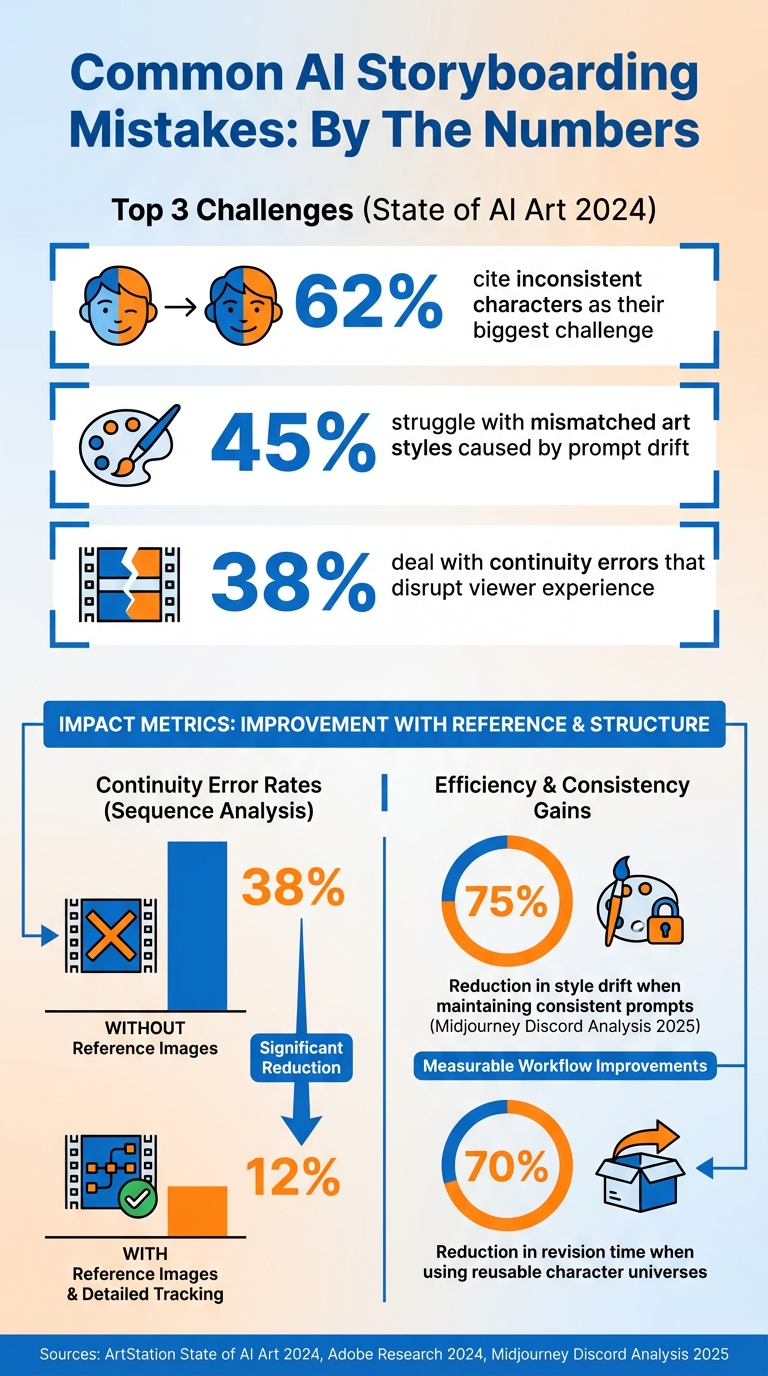
Common AI Storyboarding Mistakes: Survey Results and Impact Statistics
Even with advanced AI tools, keeping things consistent can be tricky for creators. The State of AI Art 2024 survey by ArtStation highlights this: 62% of creators say inconsistent characters are their biggest headache in AI storyboarding. Another 45% deal with mismatched art styles caused by prompt drift, while 38% struggle with continuity errors that disrupt the viewer's experience. Let’s break down these common issues and how to solve them.
Characters That Change Appearance Between Scenes
Imagine your main character’s blue eyes suddenly turning green mid-story. It’s jarring, but it happens when prompts vary slightly between scenes. For example, a YouTube sci-fi storyboard faced this exact issue, where eye color inconsistencies across episodes led to over 20 manual edits, breaking immersion. The culprit? Slightly different prompt descriptions and varying interpretations by AI models.
The solution? Lock in your character designs from the start. Upload a reference sheet to your AI tool and include "same character as reference" in every prompt. Platforms like LongStories.ai (https://longstories.ai) make this even easier by letting you create reusable "Universes" to ensure consistent characters, styles, and voices across projects. A sci-fi creator who adopted this approach cut their revision time by 70%, leaving more time for storytelling.
Mixed Art Styles Within a Single Project
Switching from cartoony to hyper-realistic visuals mid-project can confuse your audience. This happens when prompts mix incompatible styles - for instance, starting with "cute anime style" in one scene and shifting to "photorealistic portrait" in another.
To avoid this, create a style bible before you start. Write one master prompt like "consistent Pixar-inspired 3D animation" and use it across all scenes. Test it on a few sample frames (3-5) to ensure it delivers the look you want. A Midjourney Discord analysis from 2025 found that maintaining consistent prompts reduced style drift by 75%.
Poor Shot Composition and Framing
Misaligned horizons and awkwardly cropped frames can ruin your storyboards. Common mistakes include cutting off limbs or faces, ignoring the rule of thirds, and relying on static shots that lack visual interest. These issues can make your storyboards feel amateurish.
Be specific in your prompts. Use terms like "cinematic composition, rule of thirds, negative space" instead of vague descriptions. Generate frames in a 16:9 aspect ratio for video projects, and include extra space (10-20%) in your prompts to avoid cramped compositions. Many experts recommend using platform-specific cinematic modes and generating multiple variants (2-3) for each shot to find the best framing.
Continuity Errors and Abrupt Scene Transitions
Props disappearing mid-conversation or characters magically changing positions are telltale signs of poor storyboarding. Adobe Research found that continuity errors appear in 38% of AI-generated sequences, but this drops to 12% when creators use reference images and detailed tracking.
Number your scenes and track visual elements carefully. For example, if a red coffee mug is in scene five, ensure your prompt for scene six says, "same red mug on table from previous scene." To smooth transitions, use action-based cuts like "character walks off-frame right, enters next scene from left." Previewing your full sequence before finalizing helps catch any jarring jumps.
Flat Emotions and Missing Background Details
Generic prompts lead to uninspired results. A simple description like "happy person" might produce a lifeless smile, failing to convey real emotion. Similarly, vague environmental prompts can leave your backgrounds dull and unengaging.
Add layers of detail to your prompts. Instead of "sad character", try something like "character with downcast eyes, trembling lip, slumped shoulders showing grief." For backgrounds, provide context: "rainy city street at dusk with neon reflections, puddles on pavement, blurred pedestrians in background." These details can elevate your storyboards, creating vivid, emotionally resonant visuals that guide your production team effectively.
sbb-itb-94859ad
Workflow Mistakes That Slow Down Production
The real bottleneck in AI storyboarding isn't the tech - it's how you approach it. Poor workflow habits can stretch what should be a quick process into a time-consuming ordeal. While earlier we touched on visual challenges, this section focuses on strategies to keep your production moving efficiently. As an Admin User at mStudio explains, "Resist the temptation to make every panel perfect - a workable panel that captures the composition and action is better than spending 40 minutes perfecting panel 3 while the rest of the board is blank".
Here’s a breakdown of common workflow mistakes and how to fix them.
Spending Too Much Time on Detail
Getting stuck on details can grind your progress to a halt. Traditional methods often consumed hours, but AI tools are designed to streamline this process, cutting it down to under an hour. However, obsessing over minor details in early drafts negates this advantage.
Prioritize the big picture first. Start with low-resolution previews or grayscale renders to focus on composition and overall structure. Once the layout feels right, you can refine the details. This approach ensures you retain the speed AI offers without compromising quality.
Using Vague Prompts That Produce Generic Results
Unclear prompts lead to frustrating, repetitive adjustments. For example, a simple prompt like "a person in a cafe" will likely yield uninspired and irrelevant results. Sophia Chen, AI Tutorials Lead at AI Daily Shot, puts it best: "Imagine you're briefing a human animator: if they'd have to ask you questions, your prompt is too vague".
Be as specific as possible. Think of your prompt as a detailed instruction for a professional. Instead of saying "happy character", try something like: "mid-shot of a character with raised eyebrows, wide smile, hands clasped together showing excitement, warm afternoon lighting from a window on the left." Breaking your script into clear, concise visual "beats" (one to two sentences per panel) can save hours of back-and-forth. For instance, in October 2025, Dora from CrePal used this method with tools like Boords and Runway to create a 14-panel draft for a B2B explainer video in just 38 minutes, earning stakeholder approval on the first attempt.
Committing to a Single Version Too Early
Finalizing your first draft too soon can limit your options. AI tools excel at generating variations, like experimenting with different camera angles (low-angle, wide shot, etc.), but you lose this flexibility if you settle on one version prematurely.
Explore alternatives before locking in decisions. Test multiple variations on a small batch - 5 to 8 scenes - before committing to the full 120-shot storyboard. Use versioning tools to keep track of iterations, labeling files clearly with timestamps like "Shot_01_v1" through "Shot_01_v3" to ensure feedback aligns with the correct version. Additionally, try running the same prompt through different AI platforms (e.g., Runway and Pika) to compare results. This exploratory phase can uncover creative solutions you might not have considered and prevent costly revisions later.
How to Use AI Tools Effectively for Long-Form Storyboarding
To streamline long-form storyboarding, it’s not just about working harder - it’s about working smarter. The key to mastering AI storyboarding lies in leveraging the right platform features. Many creators spend unnecessary time on manual adjustments when their tools already have built-in capabilities designed to simplify and speed up production. Knowing what your platform offers - and ensuring it aligns with your long-form goals - can make all the difference.
Skipping Built-In Features for Scaling
Imagine retyping the same email 50 times - it’s a waste of time, right? That’s essentially what happens when creators overlook bulk editing tools. For example, if you’re tweaking character poses or adjusting background elements scene by scene in a 10-minute video, you’re missing out on the efficiency that AI-powered workflows can deliver. Platforms like LongStories.ai allow you to apply changes across an entire project instantly, saving hours of tedious work.
Reusable "Universes" are a game-changer for consistency. By defining characters, styles, and voices once, you can ensure cohesive quality across multiple videos. This feature drastically reduces setup time while eliminating inconsistencies - an issue that often plagues long-form content. For creators producing 3-5 videos weekly to grow their audience, this can cut production time by up to 70%. It’s a practical solution for staying consistent without sacrificing speed.
Animation quality tiers let you balance speed with polish. LongStories.ai offers three levels: No Animation (static images, fastest and most cost-effective), Fast Animation (quick motion), and Pro Animation (high-quality visuals for professional-grade content). By choosing the right tier for each project, you can optimize both time and quality. For high-volume creators, API access further streamlines production, enabling automation without needing to expand your team.
Choosing the Right AI Platform for Long-Form Projects
Even with great features, the platform itself has to suit your project’s needs. Not all AI tools are built for long-form storyboarding. While tools like Runway Gen-3 or Pika Labs excel at creating short clips, they often lack the features necessary for extended timelines and large-scale projects. When selecting a platform, look for options that offer reusable assets, strong character consistency, and tools designed for long-form content.
Here’s a quick breakdown of how different platforms tackle long-form production:
| Feature | LongStories.ai | Domo AI | LTX Studio |
|---|---|---|---|
| Character Consistency | Universes (high) | Prompt-based (medium) | Style locks (medium-high) |
| Animation Quality | 3 tiers (No/Fast/Pro) | Basic motion | Advanced cinematic |
| Long-Form Support | Up to 10 min, bulk/API | Short clips | Scene sequences, limited scale |
| Scaling Tools | Bulk editing, API access | Batch generation | Collaborative editing |
For YouTube creators and digital storytellers, LongStories.ai stands out as the best choice for long-form production. Its combination of persistent Universes, animation tiers, and bulk editing tools directly addresses common bottlenecks like animation, voiceover, and editing. While Domo AI is great for quick scene generation, it struggles with maintaining consistency in longer projects. LTX Studio excels in advanced cinematic framing but lacks the scaling tools needed for efficient long-form output. Ultimately, the right platform should align with your posting schedule and brand requirements - not just your budget.
Conclusion: Key Takeaways for Better AI Storyboarding
Successful AI storyboarding relies on solid production systems. The difference between chaotic production cycles and smooth, scalable workflows boils down to three main principles: maintaining visual consistency, using platform tools strategically, and steering clear of common mistakes. These principles shape every step of your storyboarding journey.
Start by establishing clear visual boundaries. Lock in essential visual parameters - such as aspect ratios, brand colors, and character sheets - right from the beginning. When character appearances need to stay consistent across shots, use the same seed values. As Monica from LlamaGen AI puts it:
"Consistency in your instructions leads to consistency in your results."
Streamline your workflow with the right tools. Take advantage of platform features like bulk editing, reusable Universes, and multiple animation quality tiers. Choosing a platform designed for long-form content, rather than just short clips, can make a world of difference.
Once equipped with these tools, plan your production carefully and revise selectively. Keep the first draft to 60 minutes and only revise panels that are directly impacted by script changes. Test character consistency across 5–8 consecutive scenes before committing to a full storyboard of 100+ shots. As Dora from CrePal wisely notes:
"If a beat looks boring on a card, it'll be boring on screen."
The leap from storyboard to finished video often derails projects. By focusing on consistency, using the right tools, and avoiding the common pitfalls outlined here, you can turn AI storyboarding into a dependable process that grows with your creative goals. These tips will help you sidestep challenges and build a production system that works seamlessly and scales effortlessly.
FAQs
How do I keep the same character across every scene?
To keep characters consistent across scenes, leverage AI tools that support reusable assets and character memory. Start by defining core traits and creating detailed reference sheets for each character. Using identity anchors - such as specific hairstyles, clothing, or accessories - can also help make characters instantly recognizable.
Platforms like LongStories.ai are particularly useful, as they allow you to create reusable "Universes" and utilize bulk editing features to maintain continuity. Additionally, refining your prompts regularly and conducting quality checks are essential steps to prevent character drift and ensure visual consistency throughout your project.
What should a good storyboard prompt include?
A well-crafted storyboard prompt needs to be clear, specific, and detailed. Make sure to include essential elements such as:
- Location: Where the scene takes place.
- Environment: The setting's atmosphere or background details.
- Lighting: The mood or tone created by the light (e.g., bright daylight, dim candlelight).
- Character Details: Appearance, expressions, and actions.
These details ensure the visuals align with the story's vision, reducing confusion and creating a unified narrative.
How can I prevent continuity mistakes between panels?
To keep AI storyboarding free of continuity errors, it's essential to build a detailed reference framework for your characters, styles, and environments. This framework acts as a guide, ensuring consistency throughout the storyboard.
Here are some practical ways to maintain uniformity:
- Style Guides: Create clear guidelines for character traits, outfits, and lighting. These guides help ensure every panel aligns visually.
- The Grid Storyboard Method: This technique organizes storyboards into a structured layout, making it easier to track details and spot inconsistencies.
- Reference Images: Use visual references to anchor designs and maintain coherence across different scenes.
- Parameter Controls: Adjust AI settings carefully to ensure consistent results in character design, color palettes, and overall style.
- Manual Reviews: Regularly review the storyboard to catch errors early and make necessary adjustments.
By combining these strategies, you can create polished, seamless storyboards while minimizing visual discrepancies.
Related posts
LongStories is constantly evolving as it finds its product-market fit. Features, pricing, and offerings are continuously being refined and updated. The information in this blog post reflects our understanding at the time of writing. Please always check LongStories.ai for the latest information about our products, features, and pricing, or contact us directly for the most current details.