
Why Story Pacing Matters for YouTube Growth

Over 55% of YouTube viewers leave within the first 60 seconds. The reason? Poor story pacing.
Pacing directly impacts how long people watch your videos - and YouTube’s algorithm rewards watch time and audience retention, not just views. Videos with over 50% average view duration are 3x more likely to be recommended, and even a 10% retention boost can increase impressions by 25%.
Here’s what you need to know:
- Macro pacing shapes the overall flow of your video (e.g., setup, challenge, resolution).
- Micro pacing focuses on tight editing, concise dialogue, and frequent visual changes to keep attention.
Fixing pacing issues starts with analyzing YouTube retention graphs to spot drop-off points. From there, you can adjust slow intros, trim filler, and add pattern interrupts every 5–7 seconds.
Key takeaway: Better pacing = higher retention = more growth. Let’s dive into how to make it happen.
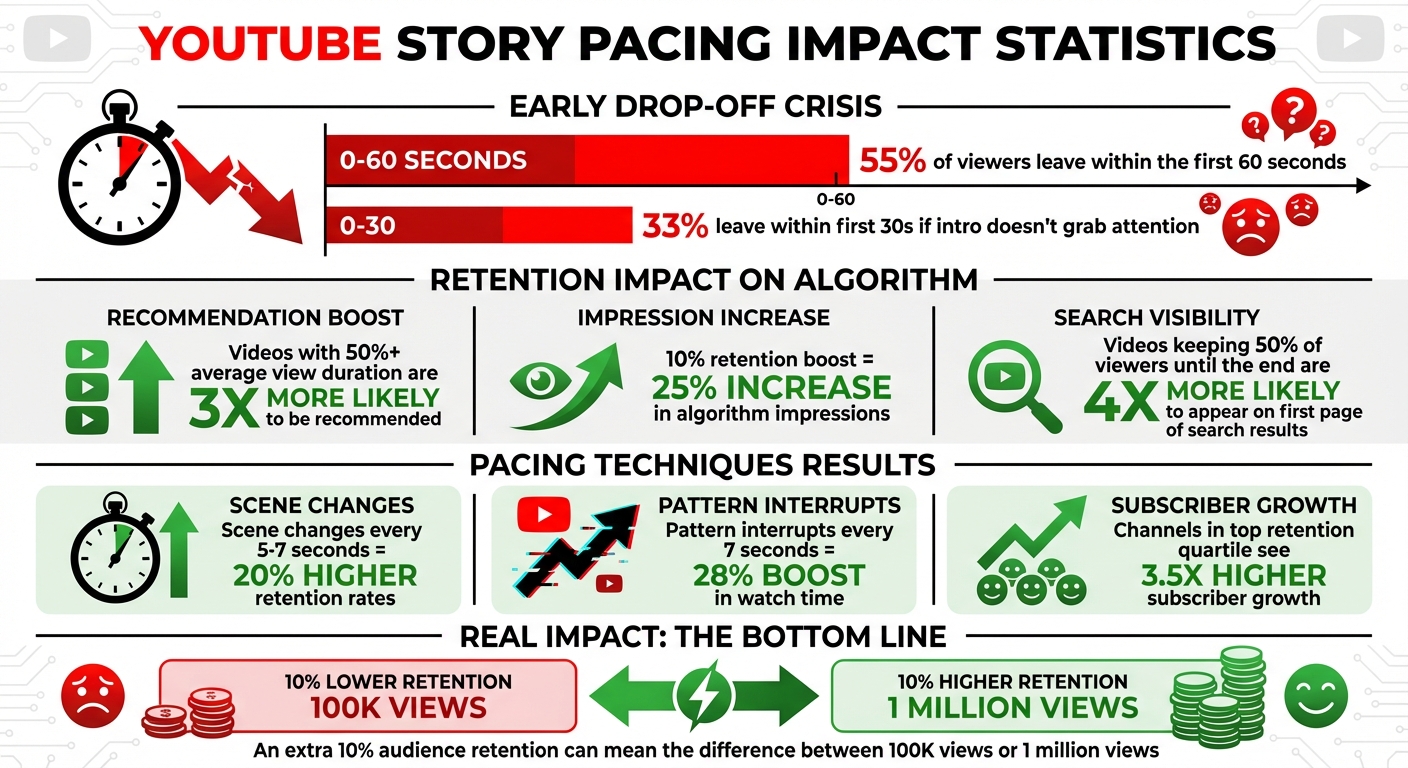
YouTube Story Pacing Statistics: Impact on Retention and Growth
34 YouTube Retention Tips In 12 Minutes
Understanding Story Pacing and Its Impact on YouTube
Story pacing refers to the rhythm and flow of your video - how you balance the speed and energy of delivering information and emotional moments. It’s not just about how fast or slow your content moves; it’s about creating a dynamic experience that keeps viewers hooked without overwhelming or boring them. This balance is achieved through two key elements: macro pacing and micro pacing.
Macro pacing is the big-picture structure of your video. Think of it as the emotional journey your audience takes from beginning to end. This could follow a classic narrative arc like the "Hero's Journey" (setup, challenge, resolution) or something simpler like a setup-payoff-reward framework. On the other hand, micro pacing focuses on the finer details - tight editing, concise dialogue, and frequent visual shifts that hold attention moment by moment. Together, these layers of pacing don’t just shape your story; they significantly influence viewer retention.
Retention is critical because it directly affects how the algorithm promotes your content. Poor macro pacing can lose viewers over time, while sluggish micro pacing can cause immediate drop-offs. For instance, videos with scene changes every 5 to 7 seconds tend to achieve 20% higher retention rates. Similarly, using pattern interrupts every 7 seconds can boost watch time by 28%.
Retention metrics don’t just help with engagement; they also play a major role in search rankings. Videos that keep at least 50% of viewers watching until the end are 4 times more likely to appear on the first page of search results. As Derral Eves explains:
"Watch time is the currency of YouTube. The longer you keep people watching, the more YouTube will push your content".
Even small improvements in retention can have a big impact. Boosting retention by just 10 percentage points can increase algorithm impressions by 25% or more. Channels in the top retention quartile see 3.5 times higher subscriber growth compared to those with lower retention. When you master pacing, you’re not just improving your storytelling - you’re giving the algorithm a reason to amplify your reach.
Common Pacing Problems and How to Fix Them
Finding Pacing Issues in YouTube Analytics
YouTube Studio's retention graph is a fantastic tool for diagnosing pacing problems. It highlights exactly where viewers drop off. For example, if the graph shows a steady decline right from the start, your hook likely missed the mark - viewers may have felt misled by your thumbnail or title . Spikes and dips in the graph can reveal moments that either confused viewers or intrigued them enough to rewatch. On the other hand, a sudden cliff often points to a specific moment that caused viewers to leave .
You should also pay attention to the relative retention metric, which compares your video's performance to others of similar length. For instance, a 30% retention rate might be average for a short 3-minute video but could be considered strong for a 60-minute documentary. Look closely at timestamps where over 55% of viewers exit. Rewatch those segments to identify potential issues like low energy, abrupt narrative changes, or technical problems that may have caused the drop-offs.
Now, let’s dive into how pacing extremes - too slow or too fast - can impact retention and how to address them.
Slow Pacing vs. Fast Pacing: Problems and Solutions
Both slow and fast pacing can harm viewer retention, but they show up differently in your analytics. Slow pacing often results in a gradual "ski slope" decline, as disengaged viewers leave over time. This can happen due to lengthy intros, filler words like "um" and "uh", or static visuals that feel monotonous . The solution? Tighten your editing. Cut out tangents, trim overly long explanations, and add visual changes every 5–7 seconds to keep things dynamic .
On the flip side, fast pacing can overwhelm viewers, leading to sharp dips in the retention graph as people skip ahead to catch their breath . This often happens when too much information is crammed into a short period without giving viewers time to process. To fix this, introduce micro-pauses and use clearer transitions between ideas to give the audience room to absorb the content .
| Issue | Slow Pacing | Fast Pacing |
|---|---|---|
| Viewer Reaction | Boredom; feels like the video is dragging | Overwhelmed or confused |
| Analytics Signal | Gradual "ski slope" decline | Sharp dips followed by skipping ahead |
| Common Cause | Long intros, filler words, static visuals | Information overload; no pauses for digestion |
| Primary Fix | Trim tangents, add visual variety | Use pauses and clearer transitions |
Beyond analytics, the way you open your video plays a crucial role in maintaining a smooth flow.
Creating Strong Hooks and Maintaining Flow
Your opening moments are critical. If viewers drop off early, it likely means your video didn’t deliver on the promise of its thumbnail and title. The first sentence and shot must align perfectly with what viewers expect. Avoid wasting time on channel intros, logo animations, or generic greetings like "Hey guys, welcome back", as these can cause viewers to leave almost immediately .
To keep viewers engaged throughout, use open loops to create curiosity. For instance, tease a reveal or payoff later in the video - something like, "In a few minutes, I’ll share a tip that can significantly boost your engagement." This taps into the Zeigarnik Effect, where the brain seeks closure . Additionally, place a major "value bomb" just before your typical drop-off point. If your analytics show most viewers leave around the 4-minute mark, deliver something compelling at 3:45 to re-engage them.
Finally, keep things visually and audibly stimulating. Change background music as you transition to new sections, and use pattern interrupts - like zoom-ins, B-roll footage, or text overlays - every 3–7 seconds to reset attention spans .
sbb-itb-94859ad
Techniques for Better Pacing in Long-Form YouTube Videos
Once you've identified common pacing challenges, the next step is applying strategies that can refine your video's flow and keep viewers engaged.
Using Narrative Peaks and Tension-Release Cycles
To keep your audience hooked, balance moments of high energy with calmer, quieter pauses. For instance, alternate between calm segments lasting 15–25 seconds and bursts of quick cuts that are 5–10 seconds long. This rhythm keeps things fresh without overwhelming the viewer.
Another effective approach is the Progressive Rhythm, which mimics how attention naturally ebbs and flows. Start with a high-energy introduction, using frequent visual resets every 10–20 seconds. As your video progresses and the story deepens, gradually widen the gap between cuts to 25–40 seconds. A great example of this is Ryan Trahan’s "100 Days in Pokémon" challenge video from March 2025. He kicked off with the "Call to Adventure" in the first 60 seconds and built up to the emotional "Ordeal" at the 31-minute mark, ensuring viewers stayed engaged for the climax.
Don’t underestimate the power of micro-pauses. These brief pauses emphasize key moments and create contrast, making fast-paced sections that follow feel even more impactful.
"An extra 10% audience retention can be the difference between a video getting 100k views or 1 million".
Finally, fine-tune your pacing further by adjusting speech rate and visual editing.
Controlling Speech Rate and Visual Editing
Pacing isn’t just about how fast things move - it’s about creating variety in energy levels and using visual changes thoughtfully. To maintain momentum, aim for visual changes every 2–7 seconds. This keeps the energy up and helps counteract viewer drop-off, complementing the retention strategies discussed earlier.
For educational content, try the Hybrid Tempo Pattern. Use quick cuts every 10–15 seconds during explanations, but slow down to 40-second intervals for visual examples or emotional moments, giving viewers time to process the information. Music can also play a huge role here. Use slower beats (60–80 BPM) for reflective or educational sections and faster tempos (100–120 BPM) for transitions or climactic moments. Think of music as the emotional backbone that signals shifts in your story.
Sound effects like whooshes or pops can further enhance your pacing. For example, keep background music at -20 to -25 dB during narrative parts so your voice stands out, and raise it to -8 to -12 dB during high-energy transitions.
These tools - speech rate, music, and sound effects - work together to create a dynamic rhythm that fits your video's purpose.
Adapting Pacing for Different Content Types
Not all content types are created equal, and different audiences respond to different pacing styles. For instance, younger viewers (ages 13–24) tend to prefer frequent visual changes every 15–25 seconds, while older audiences (25+) often appreciate longer shots and smoother transitions lasting 20–40 seconds.
Here’s a breakdown of pacing strategies tailored to various content types:
| Pacing Pattern | Best Content Type | Key Technique |
|---|---|---|
| Progressive Rhythm | Commentary, Education | Start with quick cuts (10–20s), then slow to 25–40s as the story deepens |
| Contrast Pattern | Entertainment, Reaction | Alternate calm talking-head moments with bursts of 5–10 quick cuts |
| Narrative Loop | Long-form Docs, Storytelling | Revisit the core goal or question periodically to anchor the viewer |
| Hybrid Tempo | Educational, Tutorials | Fast cuts for explanations; slower holds for visual examples |
| Anchor Pattern | Personal Growth, Thoughtful | Time cuts to emotional shifts or realizations rather than fixed intervals |
For example, in early 2025, the music channel M.Worship Music saw impressive results by aligning their pacing with viewer intent. They restructured playlists like "Peaceful Worship" and adjusted metadata to better match audience expectations. This approach led to an 11% boost in views and a 17% increase in revenue - all without increasing their upload frequency. The takeaway? Matching pacing to the specific needs of your content and audience can make a big difference.
Using AI Tools to Improve and Scale Story Pacing
If you're looking to grow your YouTube channel, fine-tuning your story pacing is just as important as crafting a compelling narrative. Manually analyzing every frame for pacing issues can be a massive time sink. Fortunately, AI tools can now handle this process for you, identifying problem areas and offering specific strategies to keep your audience engaged.
AI-Powered Pacing Analysis and Automation
Today's AI tools are designed to predict where viewers might lose interest, allowing you to tighten up weaker parts of your video before it goes live. For instance, tools like Retention Rabbit analyze your video for potential drop-off points, highlighting areas that might need improvement. This proactive approach helps you avoid the pitfalls of waiting until your audience starts clicking away.
But these tools don't stop at analysis. AI video generators can recommend the best cuts, transitions, and scene arrangements to create a seamless flow, saving you from the trial-and-error process of manual editing. Features like "Beat Sync" even align video transitions with the rhythm of your music, creating a polished and professional feel.
AI isn't just about visuals - it also enhances audio. Tools for speech improvement and text-to-voice conversion ensure that your narration stays consistent in tone and timing, minimizing pacing errors caused by recording inconsistencies. This is crucial, especially since over 33% of viewers leave within the first 30 seconds if the intro doesn't grab their attention. These predictive tools can mean the difference between a video that gets 100,000 views and one that hits 1 million.
For creators working on long-form content, platforms like LongStories.ai offer a tailored solution.
How LongStories.ai Maintains Consistent Pacing at Scale

While many AI tools are optimized for short-form videos or single edits, LongStories.ai is specifically designed for long-form YouTube content, handling videos up to 10 minutes. Its standout feature, Reusable Universes, allows you to define key elements like characters, styles, voices, and narrative tones once, ensuring consistency across all your videos. This eliminates the repetitive task of re-entering prompts for each new project.
The platform also includes bulk editing tools, enabling you to apply pacing tweaks and structural updates to multiple videos at once, cutting down production time significantly. With three animation quality options - No Animation, Fast Animation, and Pro Animation - and API integration for workflow automation, LongStories.ai empowers creators to scale their output without sacrificing pacing consistency.
Here's a quick comparison of popular AI tools and their key pacing features:
| Platform | Primary Focus | Key Pacing Features |
|---|---|---|
| LongStories.ai | Long-form YouTube content | Reusable Universes, bulk editing, animation tiers |
| OpusClip | Short-form video repurposing | AI clipping, automated captions |
| CapCut | General video editing | Beat Sync, auto captions, speed ramping |
| Retention Rabbit | Predictive analytics | Drop-off prediction, engagement heatmaps |
The challenge is finding the balance between AI automation and your creative instincts.
Balancing AI Efficiency with Creative Control
AI tools are great for handling technical tasks like noise reduction, captioning, and pacing predictions, but they should never overshadow your creative vision. As AIR Media-Tech wisely notes:
"Editing isn't the hero, your story is. The purpose of editing is to support your message, not to distract from it".
Overusing AI-generated transitions, for example, can overwhelm viewers and detract from your message.
Let AI handle the mechanics of timing while you focus on the artistic elements. Strategic pauses and moments of calm between intense segments can help reset viewer attention and create emotional depth. While tools like Beat Sync can align transitions to music, make sure the tempo aligns with your story's mood - opt for 60–80 BPM for introspective moments and 100–120 BPM for climactic builds. The true value of AI lies in freeing up your time for big-picture decisions, allowing you to maintain the authentic voice that sets your content apart.
Conclusion
Story pacing isn’t just a stylistic choice - it’s a game-changer that can determine whether a video garners 100,000 views or skyrockets to 1 million. Since YouTube’s algorithm prioritizes watch time and viewer retention, keeping your audience hooked through thoughtful pacing sends a strong signal that your content deserves more visibility and recommendations.
One of the biggest challenges creators face is early drop-offs. Improving retention by as little as 10 percentage points can lead to a 25% boost in algorithm impressions. As MrBeast famously said:
"The secret to going viral is to keep people watching for as long as possible. If people click off, the video dies".
To master pacing, focus on creating a compelling narrative arc while incorporating timely pattern interrupts every 15–20 seconds. Be ruthless with edits, deliver value upfront in the first 30 seconds, and use pauses strategically to let your story breathe. Tools like YouTube Analytics can help you identify drop-off points, while storytelling frameworks like the Hero’s Journey ensure your narrative keeps viewers engaged. These techniques not only enhance engagement but also set the stage for leveraging AI tools to streamline your production process.
For creators looking to scale, platforms like LongStories.ai simplify long-form content production by automating pacing adjustments while maintaining your creative vision. With features like reusable Universes for consistent characters and styles, bulk editing options, and multiple animation tiers, you can post frequently enough to satisfy the algorithm without compromising quality. This allows you to focus on storytelling while AI handles the technical side.
At the end of the day, watch time is the key to success on YouTube. Nail your pacing, use the right tools to scale, and you’ll turn casual viewers into loyal subscribers - all while building a sustainable income stream.
FAQs
How can I use YouTube retention graphs to improve my video pacing?
YouTube's retention graphs are an excellent way to analyze how well your video holds viewers' attention and to identify pacing issues. To access this tool, head to YouTube Studio and navigate to Analytics → Audience → Retention. Select the “Absolute” view to track how the percentage of viewers changes throughout your video.
Pay attention to patterns in the graph. A steady drop-off might mean your intro isn’t grabbing attention, while dips or spikes could signal confusing edits or moments where viewers rewind. Key areas to review include the first 15–30 seconds (a weak hook can cause viewers to leave early), the mid-section (sharp declines often point to pacing problems), and the last 20% (a rushed or abrupt ending can lose viewers).
To improve your pacing, start with a compelling hook in the first 5 seconds. Keep the momentum going with cuts every 5–12 seconds and use smooth transitions to maintain a natural flow. After making adjustments, revisit your retention graph. For shorter videos (under 5 minutes), aim for 60–70% retention, while for videos between 5–10 minutes, 40–50% retention is a good target. By refining your content based on this feedback, you can enhance viewer engagement and help your channel grow.
How can I improve story pacing to keep viewers engaged on YouTube?
To keep your audience hooked and improve your video's pacing, start with a powerful opening - something that grabs attention within the first 15 seconds. Break your content into short, punchy segments with quick edits or visual shifts to keep things lively. Add teasers or mini-cliffhangers between sections to spark curiosity and encourage viewers to stick around. Mix up the tempo by blending fast-paced moments with slower, reflective ones to create a rhythm that feels natural. Make sure each segment wraps up with a satisfying conclusion that seamlessly leads into the next. This strategy not only keeps viewers engaged but also boosts watch time - an essential factor for growing on YouTube.
How can AI tools improve story pacing to grow your YouTube channel?
AI tools are transforming how YouTube creators manage story pacing by analyzing viewer behavior and automating key production tasks. For instance, some platforms can pinpoint the exact moments in a video where viewers lose interest. Based on this data, they suggest tweaks like crafting stronger hooks, speeding up scene transitions, or reordering content to keep viewers engaged. Additionally, certain tools offer A/B testing for pacing strategies, helping creators discover what keeps their audience watching longer.
On the production side, tools like LongStories.ai simplify the creative process by automating tasks like animation, voiceovers, and editing. This frees up creators to focus on crafting compelling stories while ensuring their videos maintain a polished and consistent style. By blending data-driven insights with automation, creators can fine-tune pacing, hold onto more viewers, and grow their channels with greater efficiency.
Related posts
LongStories is constantly evolving as it finds its product-market fit. Features, pricing, and offerings are continuously being refined and updated. The information in this blog post reflects our understanding at the time of writing. Please always check LongStories.ai for the latest information about our products, features, and pricing, or contact us directly for the most current details.