
Metadata Optimization for Long-Form Videos

Every minute, 500 hours of video are uploaded to YouTube, making it challenging for even high-quality content to get noticed. Metadata - titles, descriptions, tags, thumbnails, and timestamps - helps YouTube's algorithm understand your video and connect it with the right audience. When optimized, metadata can boost impressions by 30%, click-through rates (CTR) by 25–40%, and views by 3–5×.
For long-form videos (20+ minutes), metadata is even more important. Features like chapters and timestamps improve discoverability, user experience, and search rankings. Here's how you can improve your video's visibility:
- Titles: Include primary keywords within 40–60 characters for better CTR on mobile.
- Descriptions: Use 200–500 words with secondary keywords for broader search relevance.
- Tags: Add 5–10 relevant tags to help YouTube group your content accurately.
- Thumbnails: Use bright, high-contrast designs with faces or clear text for better engagement.
- Schema Markup: Implement structured data like
VideoObjectandClipto improve search visibility and indexing speed.
Long-tail keywords, chapter-based navigation, and A/B testing of thumbnails and titles are key strategies for improving performance. Tools like Brightcove AI and LongStories.ai can help automate metadata tasks, making it easier to scale your video production while maintaining consistency.
Key takeaway: Metadata optimization is essential for helping long-form videos stand out in a crowded platform. Focus on crafting clear, keyword-rich metadata and leveraging tools to streamline the process.
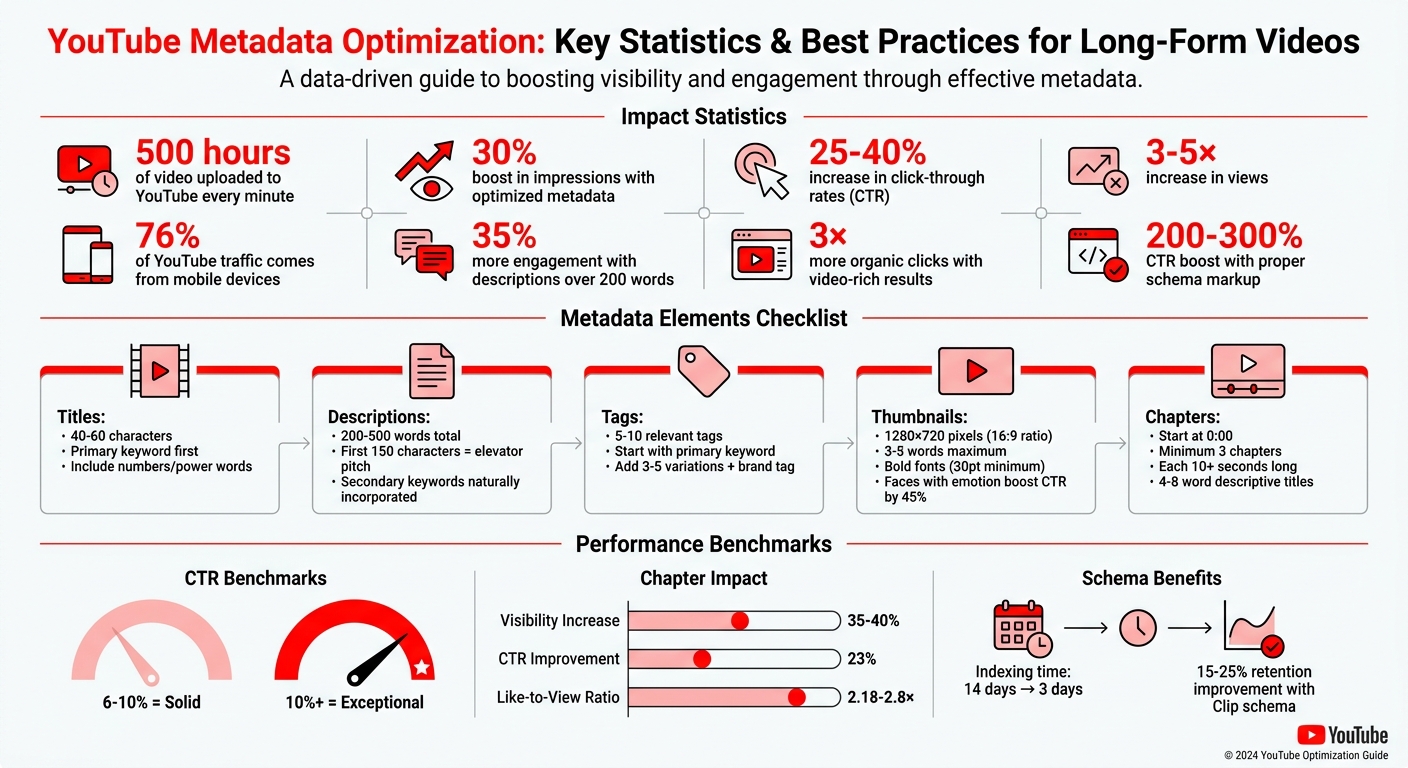
YouTube Metadata Optimization Impact Statistics and Best Practices
How To Optimize YouTube Videos For SEO
sbb-itb-94859ad
Core Metadata Elements
Metadata works like a digital signal system that YouTube uses to determine when and where your video shows up across Search, Home, and Suggested feeds. Key components - titles, descriptions, tags, thumbnails, and structured data - each play a role in helping YouTube understand your content and connect it with the right audience.
Titles, Descriptions, and Tags
Your title is YouTube's primary clue for gauging content relevance and plays a major role in click-through rates (CTR). To make an impact on both the algorithm and viewers, include your primary keyword within the first 40–60 characters - this ensures visibility on mobile devices, which account for 76% of YouTube traffic. Adding numbers or "power words" to titles can also significantly improve CTR.
"YouTube indexes your title text first when matching search queries. It's the algorithm's primary signal for understanding your content." - Daniel Whitmore, YouTube Growth Strategist, YTShark
Your description provides additional context, helping YouTube index your video for a wider range of search queries, including long-tail keywords. The first 150 characters act as your "elevator pitch" since they show up in search previews. Afterward, aim for a detailed summary of 200–500 words that naturally incorporates secondary keywords. Videos with descriptions exceeding 200 words tend to see 35% more engagement.
Tags act as secondary signals, aiding YouTube's recommendation engine in grouping related content. They also help with discoverability for alternate spellings or phrasing. Use 5–10 highly relevant tags: start with your primary keyword, add 3–5 variations, and include a brand tag. As YouTube's AI evolves, it's becoming more sensitive to keyword stuffing, so focus on quality over quantity.
These text elements provide the foundation for your video's visual presentation.
Thumbnails and File Names
Thumbnails and titles need to work together. If the thumbnail doesn't align with the title, viewers may feel misled and skip your video. Effective thumbnails rely on three "attention anchors": Biometric elements (like faces, eyes, or hands), Legibility (clear text or logos), and Luminance (bright, high-contrast areas). Thumbnails featuring faces with strong emotions can noticeably boost CTR.
Design thumbnails at 1280x720 pixels with a 16:9 aspect ratio. Limit text to 3–5 words, using bold fonts (minimum 30pt) to ensure readability on mobile devices within three seconds. Bright colors and sharp contrasts can help your thumbnail stand out against YouTube's interface. Additionally, YouTube's "Test & Compare" tool allows you to A/B test thumbnail designs, letting you choose based on watch time rather than just CTR.
For file names, include relevant keywords to signal content relevance early in the upload process.
Schema Markup for Long-Form Videos
Schema markup enhances how your video appears in search results, improving visibility and engagement. VideoObject schema is key for qualifying your video for rich results in Google Search, which display details like a thumbnail, duration, and upload date. Pages with video-rich results tend to get 3× more organic clicks, and proper schema can boost CTR by 200–300%.
Because search engines can't "watch" videos, structured data explicitly communicates your video's content. Google advises using the JSON-LD format for its simplicity and reliability compared to other formats like Microdata. To ensure your video qualifies, include these four required fields: name, description, thumbnailUrl, and uploadDate.
For longer videos, additional properties like duration and Clip schema (for chapters) are incredibly useful. They provide viewers with time estimates and allow them to jump to specific sections, improving retention by 15–25%. Use the ISO 8601 format correctly - for example, PT1H15M for a 1-hour, 15-minute video - and validate your markup with Google's Rich Results Test before publishing. Valid schema can reduce the average indexing time from 14 days to just 3 days.
| Property | Requirement | Role in Long-Form Videos |
|---|---|---|
name |
✅ Required | The video title |
description |
✅ Required | A detailed summary (50–5,000 characters) for relevance |
thumbnailUrl |
✅ Required | URL of a high-resolution, crawlable image (min 160x90px) |
uploadDate |
✅ Required | ISO 8601 date of publication |
duration |
⭐ Recommended | Helps users gauge content length |
embedUrl |
⭐ Recommended | Points to the YouTube player URL |
Keyword Research for Long-Form Videos
Keyword research is the backbone of crafting engaging long-form video content. It’s not just about sprinkling keywords into your metadata; it’s about letting those keywords guide the entire content creation process. Before you even start scripting, plan your keyword strategy. This ensures your video delivers the depth viewers are looking for when they search for detailed explanations. With YouTube processing over 3 billion searches each month as of 2026, the platform’s algorithm has shifted its focus to topical authority. This means creators who build interconnected clusters of content around related themes are more likely to be rewarded than those chasing isolated keywords. By aligning your keywords with your metadata, you help YouTube better understand and promote your long-form videos.
Long-Tail Keywords and Search Intent
When it comes to long-form content, long-tail keywords are a game changer. These multi-word phrases, such as "how to optimize YouTube metadata for tutorials", attract a specific audience and face less competition than broader terms. Look for queries that signal a need for in-depth answers. Words like "how-to", "complete guide", "comparison," and "step-by-step" are often tied to detailed user searches.
To find these keywords, start with YouTube’s Autocomplete feature, which offers real-time, audience-specific suggestions. Then dive into your YouTube Studio Analytics under "Traffic Source: YouTube Search" to see which search terms are already driving traffic to your videos. Platforms like Reddit and Quora can also reveal the exact questions and language your audience is using.
Traditional SEO tools like Google Keyword Planner, Ahrefs, and SEMrush are also helpful. They bridge the gap between web search insights and video search trends, helping you uncover valuable long-tail opportunities. The 2026 algorithm favors semantic search and conversational phrases, especially as voice search becomes more popular through mobile assistants and smart speakers. For example, instead of targeting "video SEO", consider phrases like "how to rank YouTube videos in Google search 2026."
Once you’ve nailed your keyword targeting, you can use chapters to amplify your video’s discoverability.
Chapter-Based Navigation and Timestamps
Chapters are a powerful tool for boosting your video’s ranking potential. Each chapter title acts as an indexable keyword opportunity. Videos with chapters can show up in Google Search as "Key Moments", which are timestamped links allowing users to jump directly to specific sections from search results. This feature not only increases your visibility by 35–40% but also improves click-through rates by 23%.
To enable chapters, follow these guidelines:
- Start your first timestamp at 0:00.
- Include at least three chapters in chronological order.
- Ensure each chapter is at least 10 seconds long.
Use descriptive, keyword-rich titles for your chapters (4–8 words) that align with actual search queries. Avoid generic labels like "Introduction" or "Part 1." Instead, opt for titles like "Keyword Research for Long-Form Videos" or "5 Tips to Rank #1 on YouTube".
Position your most valuable, high-search-volume content in the second or third chapter (after the introduction). This helps balance discoverability with providing context for viewers. Videos with chapters tend to perform better, showing a 2.18× to 2.8× higher like-to-view ratio compared to those without. For videos under 20 minutes, chaptered content achieves a 2.96% like-to-view ratio versus 1.25% for non-chaptered videos.
Here’s a quick guide to structuring chapters based on video length:
| Video Length | Recommended Chapters | SEO Reasoning |
|---|---|---|
| 5–10 minutes | 3–5 chapters | Provides enough Key Moments without overwhelming viewers |
| 10–20 minutes | 5–8 chapters | Balances navigation with long-tail keyword targeting |
| 20–45 minutes | 8–12 chapters | Covers all key points for deep-dive content |
| 45+ minutes | 10–15 chapters | Maximizes keyword opportunities and builds authority |
Tools and Automation for Metadata Optimization
Manually optimizing metadata gives you full creative control over titles and descriptions, allowing for a personalized touch. But when you’re managing dozens - or even hundreds - of videos, manual efforts can quickly become overwhelming. That’s where modern tools come in. Platforms like Brightcove AI Metadata Optimizer and Vbrick Video Metadata Generation can handle bulk uploads in minutes. They analyze text tracks, audio, and visual elements to automatically generate titles, descriptions, tags, and even chapters.
The real distinction lies in speed and scale versus creative precision. While manual optimization might drive better click-through rates for individual videos, automated tools are excellent for updating older content to match current search trends. As the InstantViews team explains:
"Metadata optimization isn't about gaming the system - it's about accurately representing your content in a way that helps the right viewers find it".
Here’s a quick comparison of manual versus automated approaches:
| Feature | Manual Optimization | Automated Tools |
|---|---|---|
| Speed | Slow (about 30 minutes per video) | Near-instant, supports bulk processing |
| Best Use Case | High-stakes creative content | Large libraries, multi-language needs |
| Consistency | Prone to errors and style drift | High; follows pre-set architecture rules |
| Analysis | Limited to human observation | Deep; processes audio, visuals, and text |
| Scalability | Hard to scale for large catalogs | Supports API-driven workflows |
Many creators now use a hybrid workflow, combining AI’s efficiency with human refinement. AI-generated suggestions are tweaked to maintain brand voice and ensure accuracy. This balanced approach avoids pitfalls like what Olha Yezerska from AIR Media-Tech refers to:
"YouTube is actively cleaning up AI slop in 2026... If your content looks automated, soulless, and endlessly duplicated, you're at risk".
LongStories.ai for Scalable Video Production
LongStories.ai tackles production challenges long before metadata becomes a concern. The platform allows creators to build reusable "Universes" with consistent characters, visual styles, and voices. This setup makes it possible to produce videos up to 10 minutes long without recreating assets every time.
This method ensures metadata consistency, which helps YouTube’s algorithm recognize and promote your content. By using a unified "Universe", you not only streamline production but also align keywords and metadata across your video catalog. The platform’s API supports bulk production with parameters like universe_slug, visualStyleId, and characters, ensuring a cohesive structure for all videos. Videos can be generated programmatically at a rate of up to 100 requests per minute, with rendering times ranging from 5 to 20 minutes depending on complexity.
For large-scale campaigns, this means you can create dozens of videos with matching metadata in one session. LongStories.ai offers three animation quality tiers - No Animation, Fast Animation, and Pro Animation - giving you flexibility to balance quality and budget (see pricing details). With bulk editing tools and API integration, you can focus on crafting engaging stories while maintaining the consistent posting cadence that YouTube’s algorithm favors.
This streamlined workflow ensures your entire video library is optimized for both production and discoverability.
Measuring Metadata Performance
Fine-tuning your metadata is only half the battle - measuring its performance is where the real progress happens. To ensure your long-form videos remain discoverable and engaging, use YouTube Analytics to assess what’s working and what needs adjustment. Start with the Reach tab in YouTube Studio, where you’ll find critical metrics like Impressions and Click-Through Rate (CTR). These data points help validate whether your metadata updates are making a difference. Then, head over to the Engagement tab to review Average View Duration (AVD) and total Watch Time. A mismatch between a high CTR and low AVD signals that your metadata might be misleading viewers. According to the InstantViews team, even a modest 1% to 2% boost in CTR can potentially double your channel’s growth rate. For deeper analysis, use YouTube Studio’s Advanced Mode to compare performance before and after your updates.
Key Performance Metrics
Once you’ve mastered the basics, focus on metrics that provide a deeper understanding of viewer behavior. CTR is essential for evaluating the effectiveness of your titles and thumbnails, while Watch Time confirms whether your metadata accurately represents your content. Impressions show how often your video is being surfaced, and engagement metrics like likes, comments, and shares reveal how viewers are responding.
For long-form videos, a CTR between 6% and 10% is considered solid, while anything above 10% is exceptional. If you’re using YouTube’s "Test & Compare" feature, track Watch Time Share to see which title version keeps viewers engaged the longest.
A/B Testing for Continuous Improvement
Once you’ve established your benchmarks, A/B testing becomes a powerful tool for refining your metadata strategy. YouTube’s "Test & Compare" feature allows you to test up to three title variations simultaneously, automatically picking the winner based on Watch Time Share. For testing thumbnails, third-party tools like TubeBuddy and vidIQ are excellent options.
To get reliable results, test only one element at a time - either the title or the thumbnail. Each test should run for 7 to 14 days, with each variant receiving at least 1,500 to 2,000 impressions before you identify a winner. For instance, in November 2025, YouTube consultant Marcus Chen conducted a test on a tech review channel with 287,000 subscribers. He compared a product-only thumbnail against one featuring the creator’s face. Over seven days, the face-inclusive thumbnail achieved a 9.19% CTR versus 7.32% for the product-only version - a 25.5% improvement without sacrificing Watch Time.
It’s worth noting that thumbnails have roughly three times more influence on CTR than titles. Thumbnails featuring expressive faces can boost CTR by as much as 45%.
Conclusion
When it comes to long-form video content, metadata optimization isn’t just a technical task - it’s a critical tool for boosting your channel’s authority and ensuring consistent visibility across YouTube and Google’s discovery features. Metadata essentially acts as a guide, helping these platforms understand, rank, and distribute your content effectively.
As of May 2026, platforms are prioritizing depth and session duration over quick, surface-level engagement. AI-powered search tools now often highlight specific video timestamps and transcripts in their summaries, making precise metadata choices even more influential. These decisions can determine whether your videos show up in Google’s AI Overviews or video carousels.
For most creators, the real challenge lies in balancing content quality with production volume. Manually optimizing metadata can take up as much as 30% of your production time, often limiting creators to just 1–2 videos per week. However, tools like LongStories.ai can simplify this process. By automating tasks like animation, voiceovers, and metadata generation, creators can scale up to producing 3–5 polished long-form videos weekly - all while maintaining a consistent brand identity. This increased output accelerates your ability to build authority around related keyword clusters, rather than relying on sporadic viral successes.
The key is to focus your creative energy where it counts: delivering engaging stories with strong hooks and clear value. Let automation handle the repetitive tasks, and prioritize metadata elements that enhance discoverability - such as front-loaded keywords, well-structured chapters starting at 0:00, and eye-catching thumbnails. Creators who master this balance will set themselves apart and lead their niches.
FAQs
What metadata change should I prioritize for a long video?
Before hitting "publish" on your video, it's crucial to do keyword research to fine-tune your title, description, and thumbnail. Why? Because these elements are your video's first impression - not just for viewers but for YouTube's algorithm.
Here’s where to focus:
- Title: Make sure your keyword is front and center. A keyword-rich title helps YouTube and potential viewers immediately understand what your content is about.
- Description: The first 150 characters are prime real estate. Use them to weave in your keywords naturally while giving a clear snapshot of your video's value.
- Thumbnail: While not directly tied to keywords, an engaging thumbnail complements your metadata by grabbing attention and encouraging clicks.
This prep work ensures that your video is ready to gain traction right from the start. By optimizing your metadata ahead of time, you’re giving YouTube the tools it needs to properly rank and recommend your video the moment it goes live.
How do I pick chapter titles that actually rank?
Use keyword-rich, descriptive titles to match what your audience is actively searching for. Start by conducting keyword research to identify relevant phrases. Then, seamlessly incorporate these keywords into concise titles - ideally keeping them under 60 characters.
Be specific and clear in describing each chapter’s content. This approach not only helps viewers quickly understand your video's structure but also makes it easier for algorithms to categorize and promote your content. The result? Better discoverability, higher click-through rates, and improved search rankings.
When should I use schema markup, and what can break it?
Using schema markup, such as VideoObject schema, can enhance your video's visibility in search results. It allows search engines to display rich snippets, including thumbnails and detailed information, which can lead to higher click-through rates.
However, schema markup can fail if certain fields are incomplete or incorrectly formatted. Key fields like name, description, and thumbnailUrl must be properly filled out. Additionally, issues like invalid URLs or incorrect date formats can break the schema. To avoid this, make sure all fields are accurate and use the ISO 8601 format for dates and durations.
Related posts
LongStories is constantly evolving as it finds its product-market fit. Features, pricing, and offerings are continuously being refined and updated. The information in this blog post reflects our understanding at the time of writing. Please always check LongStories.ai for the latest information about our products, features, and pricing, or contact us directly for the most current details.