
Checklist for Optimizing YouTube Metadata

Want your YouTube videos to get noticed? Start with metadata. Metadata - titles, descriptions, tags, and thumbnails - plays a key role in helping YouTube's algorithm and viewers find your content. Here’s what you need to know:
- First Impressions Matter: YouTube’s algorithm evaluates your metadata within the first 15 minutes of upload. Well-optimized metadata can boost impressions by up to 30%.
- Keywords Are Key: Use tools like TubeBuddy and VidIQ to find high-traffic, low-competition keywords. Focus on long-tail keywords and align them with what your audience is searching for.
- Titles and Descriptions: Keep titles under 60 characters, place keywords early, and include numbers or brackets to grab attention. Descriptions should be 200–300 words, keyword-rich, and include timestamps.
- Thumbnails Drive Clicks: Custom thumbnails with bold text, high-contrast colors, and expressive faces can increase click-through rates by up to 60%.
- Captions and Chapters: Add accurate captions and video chapters to improve accessibility and search visibility. Chapters can boost watch time by 12–18%.
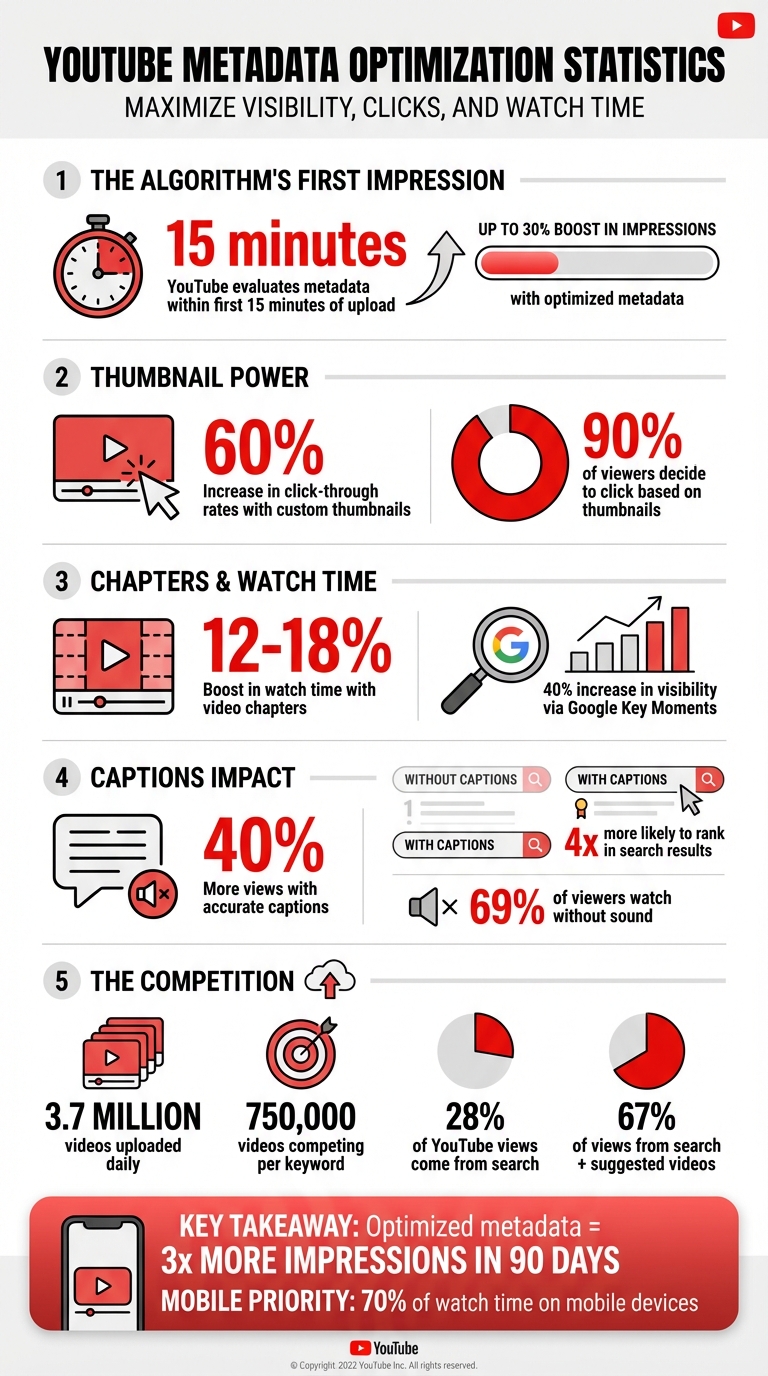
YouTube Metadata Optimization Impact: Key Statistics and Performance Metrics
How to set Metadata on YouTube
sbb-itb-94859ad
Keyword Research for YouTube Videos
Keyword research is the backbone of YouTube SEO. With 3.7 million videos uploaded daily and 750,000 videos competing for a single keyword, picking the right terms can make the difference between a video that gets noticed and one that vanishes into obscurity. The goal is to understand what your audience is searching for and align your content with those interests. Once you've identified the right keywords, analyzing competitor metadata can provide even more clarity.
Finding Primary and Long-Tail Keywords
A great starting point is YouTube Autocomplete. Simply type in your topic, and you'll see a dropdown of suggestions that reflect what people are actively searching for. For instance, typing "how to edit videos" might generate ideas like "how to edit videos on iPhone for beginners 2026" or "how to edit videos for YouTube shorts." You can even create animated videos from simple prompts to stand out in these searches.
For deeper insights, tools like TubeBuddy's Keyword Explorer can help. It provides data on search volume, competition levels, and trending tags. Even with its free tier, you can perform up to 500 keyword searches daily. Alternatives like VidIQ and KeywordTool.io also offer valuable features, including difficulty analysis. These tools are especially helpful for finding high-traffic keywords with lower competition - a must for smaller channels with fewer than 10,000 subscribers.
Don’t overlook your YouTube Studio Analytics. The "Search Report" section can reveal which queries are already driving traffic to your videos. Combine this with Google Trends to identify seasonal trends or emerging topics over the last 12 months or 30 days. If you notice a spike in search volume for a particular subject, you’ve likely found a timely opportunity.
Focusing on long-tail keywords - phrases that are 4–7 words long - can also be a game-changer. These keywords often face less competition and attract viewers with specific intent. For example, "best budget mirrorless camera for beginners 2026" targets a niche audience while offering clear value. As Karl Oftebro said about TubeBuddy:
"Once it got my videos ranking #1 in search I was hooked".
Analyzing Competitor Metadata
To understand what works, examine the top 10 videos ranking for your target keyword. Pay attention to their titles, descriptions, and tags. Are they placing keywords within the first 40–60 characters of the title? Do they include specific years or numbers? These patterns can reveal what the algorithm currently favors.
Look out for outlier videos - content that significantly outperforms a channel’s usual view count. For example, if a competitor's video on "YouTube SEO tips" has 500,000 views compared to their average of 50,000, that keyword deserves your attention. Tools like OutlierKit can help automate this process, identifying high-performing topics quickly.
Avoid copying titles word-for-word. If your metadata is too similar to a bigger channel’s, the algorithm is unlikely to rank your video higher. Instead, identify content gaps - areas the top-ranking videos haven’t covered. For instance, if most videos focus on desktop editing, you could create content tailored to mobile workflows.
With 28% of YouTube views coming from search, understanding what’s already working is essential before you invest time in production. Competitor analysis helps you refine your keyword strategy and discover opportunities others might have missed.
Selecting Keywords for 2026
As YouTube evolves, its algorithm in 2026 places more emphasis on semantic search and topical authority rather than exact-match keywords. This means building keyword clusters around related themes rather than focusing on isolated terms. For example, if your channel is about "video editing", you could create a series covering "editing for beginners", "editing software comparisons", "editing on mobile", and "editing shortcuts." This approach strengthens your channel's authority on the subject and improves metadata optimization.
Choose keywords that align with current trends but aren’t overly competitive. Use conversational, question-based phrases to match the growing use of voice-activated searches. For instance, "What's the best camera for YouTube in 2026?" is likely to perform better than "best YouTube camera" because it mirrors how people naturally speak.
Make sure your primary keyword appears within the first 40–60 characters of your title. With 70% of watch time happening on mobile devices, titles often get cut off after about 45 characters. If your keyword is buried too late, mobile viewers might miss it. Pair your keyword with a clear benefit and a current year reference, like "Boost Views: 7 SEO Tips for 2026".
Finally, focus on experience-based keywords to differentiate yourself from AI-generated content. Highlight topics where your personal expertise, unique opinions, or timely insights shine. These are areas where automation struggles to compete, giving you a distinct edge in a crowded space.
Optimizing Titles, Descriptions, and Tags
When it comes to YouTube SEO, titles, descriptions, and tags are your secret weapons. Together, they inform YouTube’s algorithm about your content while persuading viewers to click. Each plays a unique role, and fine-tuning all three can significantly boost your video’s visibility.
Writing Video Titles That Get Clicks
Your video title is a dual-purpose tool: it tells the algorithm what your video is about and grabs viewers' attention. To make it effective:
- Place your primary keyword within the first 40 characters to ensure mobile users see it and to signal relevance.
- Keep the title between 55–60 characters for full visibility across search results and suggested feeds.
Data shows that shorter, punchier titles perform better. A 2025 study of 50,000 trending videos revealed that 54% of top-performing videos had titles averaging 8 words.
Including numbers and brackets can also make titles stand out. For example, “YouTube SEO: 7 Tips That Work in 2026” is far more engaging than a generic “YouTube SEO Tips.” Adding brackets like “[Step-by-Step]” or “[2026 Update]” improves clarity and scannability. In fact, 28% of trending videos include numbers in their titles.
You can also use formulas like “How-to + Outcome” (e.g., “How to Rank YouTube Videos in 2026”) or “Problem + Solution” (e.g., “Why Your Titles Get No Clicks (Fix This)”) to create intrigue. Adding power words such as “proven” or “ultimate” can boost click-through rates by 8.3%, while emotional triggers like “secret” or “free” can increase CTR by up to 13.9%.
Here’s a pro tip: Rename your video file to include your target keyword before uploading it (e.g., “youtube-seo-tips-2026.mp4”). According to Sean Cannell, a YouTube strategist:
"The first upload is permanent in the algorithm's eyes. You only get one chance at that initial momentum burst. Make it count."
Lastly, avoid clickbait. Misleading titles might get clicks, but if your content doesn’t deliver, it can hurt watch time and audience retention, which could lead to the algorithm suppressing your video.
Creating Detailed Video Descriptions
A well-crafted description does more than just explain your video - it helps YouTube understand its context. Aim for descriptions between 200–300 words (roughly 1,000–1,500 characters). The first 125–150 characters are especially important since they appear in search results and previews. Use this space to include your primary keyword and a compelling hook.
Organize your description into layers:
- Start with a keyword-rich summary that explains what viewers will gain.
- Expand into a 2–3 paragraph breakdown that naturally includes secondary keywords and related terms (like video SEO, discoverability, or ranking strategies).
- Add timestamps starting at "0:00" to create chapters, improving navigation and potentially triggering rich snippets. For example:
- 0:00 – Introduction
- 1:45 – Keyword Research
- 5:20 – Title Optimization
Place your most important link - whether it’s to a product page, lead magnet, or playlist - within the first three lines so it’s visible without clicking “Show More”. Follow this with links to social media, related videos, or your website. End with a clear call-to-action (e.g., “Subscribe for weekly SEO tips”) and 3–5 relevant hashtags. Keep in mind that using more than 15 hashtags will cause YouTube to ignore all of them.
For readability, use line breaks, bullet points, and white space - especially since over 70% of viewers watch on mobile devices. Descriptions optimized this way can boost views by an average of 15–20%.
Adding the Right Tags
While tags are less critical than titles and descriptions, they still play a role in helping YouTube categorize your content. Tags are particularly useful for clarifying ambiguous titles or capturing search traffic from misspellings.
Stick to 8–15 precise tags within the 500-character limit. Your first tag should always be your exact primary keyword, as it carries the most weight. After that, include:
- Exact-match keywords
- Long-tail variations
- Broad category terms
- Your channel name as a branded tag
For example, a video titled “YouTube SEO Tips for 2026” might use tags like “YouTube SEO tips,” “video SEO 2026,” “YouTube algorithm,” “metadata optimization,” and “how to rank YouTube videos.” Including common misspellings can also capture additional search traffic.
Tailor your tags to the type of content. Tutorials should focus on task-based tags, gaming videos benefit from including the game title and mode, and product reviews should feature exact model numbers and buyer-intent phrases like “honest review” or “worth buying”.
By 2026, YouTube’s AI penalizes irrelevant tags, so make sure they accurately reflect your content. Tools like TubeBuddy or VidIQ can help you identify trending tags and analyze competitors’ strategies. Revisiting and updating tags on your top-performing videos every three months can help keep them relevant.
| Metadata Element | SEO Impact Priority | Primary Function |
|---|---|---|
| Title | 95% | Primary signal for topic relevance and search matching |
| Description | 75% | Provides contextual depth and search preview |
| Tags | 45% | Offers supporting context, handles misspellings, and aids related suggestions |
| Thumbnails | 90% | Drives click-through rate (CTR) |
Adding Thumbnails, Chapters, and Captions
Titles and descriptions are only part of the equation when it comes to making your videos stand out. Visual elements and accessibility features - like thumbnails, chapters, and captions - are just as crucial. Together, they can boost discoverability, improve user experience, and drive engagement.
Designing Thumbnails That Drive Clicks
Thumbnails are a big deal - 90% of viewers decide to click based on them. Custom thumbnails outperform auto-generated ones, with top-performing videos almost always using a custom design. A well-designed thumbnail can boost click-through rates (CTR) by as much as 60%.
To make your thumbnails effective, focus on these essentials:
- Clarity for mobile users: Design for a 320×180 pixel size.
- Minimal text: Stick to 3–5 words using bold, large fonts.
- High-contrast colors: Pair colors like yellow/purple or orange/blue to stand out.
- Expressive faces: Human expressions - especially surprise or excitement - can increase CTR by up to 40%.
- Avoid the timestamp zone: Don’t place important text in the bottom-right corner where timestamps appear.
Ali Abdaal, a popular creator, shared this tip:
"I reduced my thumbnail text from 12 words to 3. My CTR jumped from 3.2% to 7.8% overnight."
Consistency in colors and fonts also helps reinforce your brand identity. Even small improvements in CTR can significantly impact total views, setting the stage for further engagement through chapters and captions.
Using Video Chapters for Better Navigation
While thumbnails grab attention, chapters keep viewers engaged by making navigation easier. They also expand your keyword reach. Instead of one ranking opportunity, chapters create 5–10 chances for your video to appear in search results. They can even show up as "Key Moments" in Google search, boosting visibility by up to 40% and CTR by 23%.
Here’s how to structure chapters effectively:
- Start at 0:00: Label it "Introduction" to ensure chapters work properly.
- Spacing: For videos under 30 minutes, add a chapter every 2–3 minutes. For longer videos, space them 5–10 minutes apart.
- Keep titles concise: Use fewer than 40 characters to avoid truncation on mobile.
- Use keywords upfront: For example, "iPhone 15 Camera Settings" works better than "How to adjust settings on iPhone 15."
- Action-oriented titles: Start with verbs like "How to", "Fix", or "Compare" to align with search intent.
Follow formatting rules: MM:SS for videos under an hour, HH:MM:SS for longer ones. Each chapter should last at least 10 seconds, and your video needs a minimum of three chapters. Videos with chapters often see 12–18% longer watch times, along with a 15% boost in viewer satisfaction ratings.
Adding chapters in your video description before uploading helps YouTube’s algorithm process all metadata upfront, especially during that critical first hour.
Optimizing Captions and Subtitles
YouTube’s algorithm doesn’t watch your videos - it reads them. Captions provide far more data for indexing than titles, descriptions, or tags combined. In fact, videos with captions get 40% more views on average and are four times more likely to rank in search results.
Accuracy is key. Professional captions are 97–99% accurate compared to the 68–78% accuracy of auto-generated captions. This matters because 69% of viewers watch videos without sound, and most caption users aren’t deaf or hard of hearing - they simply prefer captions.
Here’s how to optimize captions:
- Upload your own files: Use .vtt or .srt formats and review them manually for errors.
- Correct technical terms: Ensure names like "PostgreSQL" are transcribed correctly.
- Front-load keywords: Speak important terms early so they appear in the transcript’s first lines.
To reach global audiences, translate captions into popular languages like Spanish, Portuguese, and Hindi. Since only 25% of YouTube watch time is in English, multilingual captions can significantly expand your reach. Investing in professional captioning and translations pays off with more views and a broader audience base.
Tracking and Updating Your Metadata
Optimizing your metadata isn't a "set it and forget it" task. YouTube's algorithm constantly evaluates how viewers interact with your titles, thumbnails, and descriptions. To maintain visibility and grow your channel, you need to regularly track performance and make updates.
Using YouTube Analytics to Measure Results
YouTube Analytics is your best tool for understanding how your metadata performs. The Reach Tab provides insights into Impressions and Click-Through Rate (CTR), helping you determine if your title and thumbnail are compelling enough to earn clicks. A CTR between 5% and 10% is a good benchmark for effective metadata. However, if your watch time is low, it could mean your title or thumbnail is setting expectations that the video doesn’t fulfill.
The Engagement Tab is another key resource. Metrics like Average View Duration and Audience Retention can highlight whether your content is holding viewers’ attention. Low retention might indicate that your metadata isn’t aligned with the actual content.
The Traffic Source Report is especially helpful for fine-tuning your approach. By looking at the "YouTube Search" section, you can see the exact keywords viewers used to find your video. This helps you identify which tags and keywords are driving discoverability. After making metadata updates, track your video's performance for 48–72 hours to measure their impact on CTR and impressions. On average, videos with well-optimized metadata see 30% more impressions, and detailed descriptions drive 35% more engagement compared to sparse ones.
| Metadata Element | Primary Analytics Metric | Performance Indicator |
|---|---|---|
| Title | Click-Through Rate (CTR) | High CTR = Engaging and relevant headline |
| Thumbnail | Click-Through Rate (CTR) | High CTR = Visually appealing and matches the title |
| Description | Watch Time / Engagement | High engagement = Relevant and valuable content |
| Tags/Keywords | Impressions (Search) | High impressions = Effective keyword usage |
| Chapters | Audience Retention | High retention = Better navigation and segmented interest |
These metrics give you a solid foundation to test new ideas and improve your metadata's performance.
Testing Different Titles, Thumbnails, and Descriptions
Once you’ve gathered insights from analytics, experiment with different versions of your metadata to see what resonates with viewers. For example, create two variations of a title or thumbnail and compare their CTR over a two-week period. Tools like TubeBuddy (plans range from $10 to $50/month) and VidIQ ($10 to $75/month) can help automate these comparisons. You can even share thumbnail designs on social media to get feedback before publishing.
Keep a close eye on your video's performance for 24–72 hours after publishing. This is a critical window for the algorithm. If your video has high impressions but a low CTR, your title or thumbnail might need improvement. On the other hand, if CTR is high but retention is low, the content itself might not be delivering on the promise of your metadata.
Using power words like "Proven", "Complete", or "Updated" and including specific numbers (e.g., "7 Tips") can make your titles more clickable. Optimized titles alone can boost CTR by 25–40%.
Updating Metadata on Older Videos
Don’t overlook your older videos - they’re often a goldmine for boosting views. Regularly refreshing metadata can increase views by 20–50%. For instance, a tech tutorial channel with 450,000 subscribers reported:
"We audited our 50 top videos and made simple metadata updates. Within 30 days, channel views increased 34% with zero new content."
For growing channels, a monthly metadata audit is recommended, while more established channels can do this quarterly. Start by focusing on your top 10 most-viewed videos and your 5 most recent uploads. Use YouTube Analytics to identify videos with a CTR below 4% or low retention in the first 30 seconds - these are prime candidates for updates. Check the "Traffic Source: YouTube Search" report to find terms already driving traffic to older videos, then incorporate those keywords into your metadata.
After making updates, keep in mind that title and thumbnail changes usually show results within 24–48 hours, while description and tag updates may take 3–7 days for the algorithm to re-index. Adding chapters to older videos can also boost viewer retention by about 15%. Including the current year in your titles (e.g., "2026") signals freshness to the algorithm and can attract more clicks. Over a 90-day period, videos with optimized metadata typically receive three times more impressions than those with outdated or poorly optimized metadata.
Conclusion
Fine-tuning your YouTube metadata creates a system that grows in impact over time. Crafting titles with search intent, writing clear and contextual descriptions, and designing thumbnails optimized for mobile users all work together to build your channel's authority. And when the algorithm recognizes this authority, it rewards you with greater visibility and reach. Successful creators know that metadata isn’t just an afterthought - it’s a powerful tool that directly influences how discoverable your content is and how quickly your audience grows. Each step in this process - from researching keywords to perfecting thumbnails - plays a vital role in your channel's trajectory.
Research shows that these strategies pay off. Optimized metadata can increase impressions by as much as 30% and even triple your reach within 90 days. With about 67% of YouTube views coming from search and suggested videos, metadata acts as the gateway to attracting new viewers and expanding your audience.
The 2026 algorithm has taken metadata analysis to a new level, relying heavily on AI to evaluate its quality. Poorly written or irrelevant descriptions now have a bigger negative impact on rankings, while well-optimized metadata boosts visibility across all discovery channels. As YouTube’s Rene Ritchie puts it:
"People think, 'I made a video, why isn't the algorithm pushing it?' When in reality, the algorithm pulls videos for users."
FAQs
What metadata should I optimize first after uploading?
Start with fine-tuning your video title, description, and thumbnail - these are the first things YouTube's algorithm and your audience notice. Craft a clear, keyword-focused title that grabs attention. Write a detailed description packed with relevant keywords, and include timestamps to help viewers navigate your content easily. Finally, design a custom thumbnail that stands out and matches your video's theme. These elements work together to set expectations and boost your video's visibility.
How do I choose keywords for a small channel?
For smaller channels, it's smart to zero in on specific, niche-focused keywords that match both your content and what your audience is actively searching for. These keywords tend to have less competition, making it easier for your videos to get noticed. Use them naturally in your video titles, descriptions, and tags to boost your visibility in search results and recommendations. By targeting relevant keywords, smaller channels can carve out a space within niche communities and grow their audience.
When should I update titles or thumbnails on older videos?
When your channel's branding evolves, it's a smart move to update titles or thumbnails on older videos to keep everything consistent. It's also worth revisiting metadata during regular SEO audits - these tweaks can lead to noticeable increases in views. On top of that, try running A/B tests for thumbnails. This approach can reveal which designs perform better and drive more engagement.
Related posts
LongStories is constantly evolving as it finds its product-market fit. Features, pricing, and offerings are continuously being refined and updated. The information in this blog post reflects our understanding at the time of writing. Please always check LongStories.ai for the latest information about our products, features, and pricing, or contact us directly for the most current details.