
How to Keep Character Consistency Across Multiple AI Videos
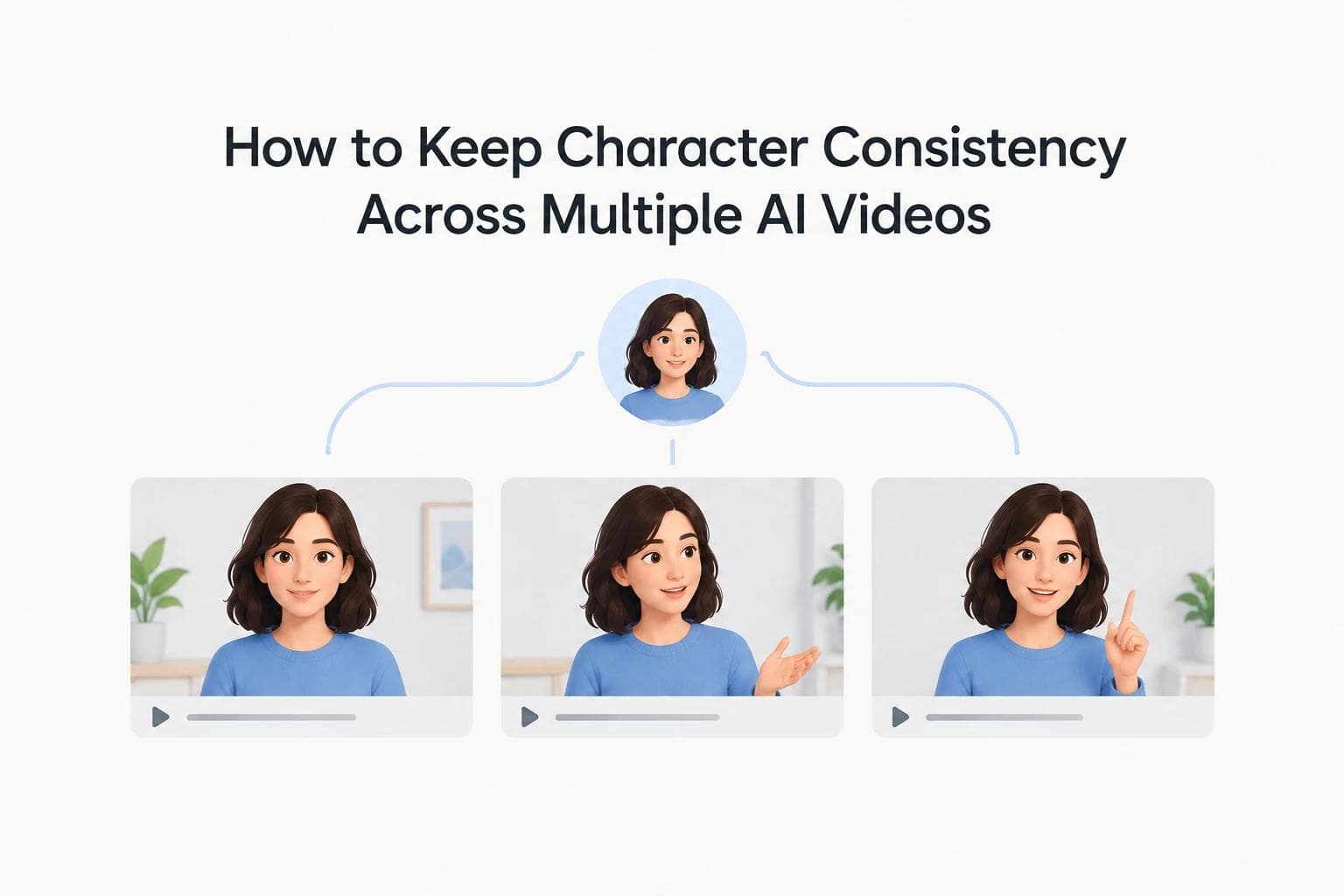
Creating one good clip is easy these days. You just give a model a solid reference image and it returns a matching face.
The trouble starts at video number four, when the character you approved in January no longer looks like itself.
This guide covers how to create consistent characters with AI video across scenes, shots and whole series. It covers where each technique stops working, and what to do about the problem underneath all of them.
What character consistency actually means
Character consistency is a character keeping the same face, hair, wardrobe, proportions and colour across separate generations.
It has a quieter sibling that matters more at series length. Character persistence is whether the character is stored anywhere. Consistency is an outcome you chase per generation. Persistence is a property of the tool.
Most tools give you consistency features. Very few give you persistence, and the difference only shows up once you have a back catalogue.
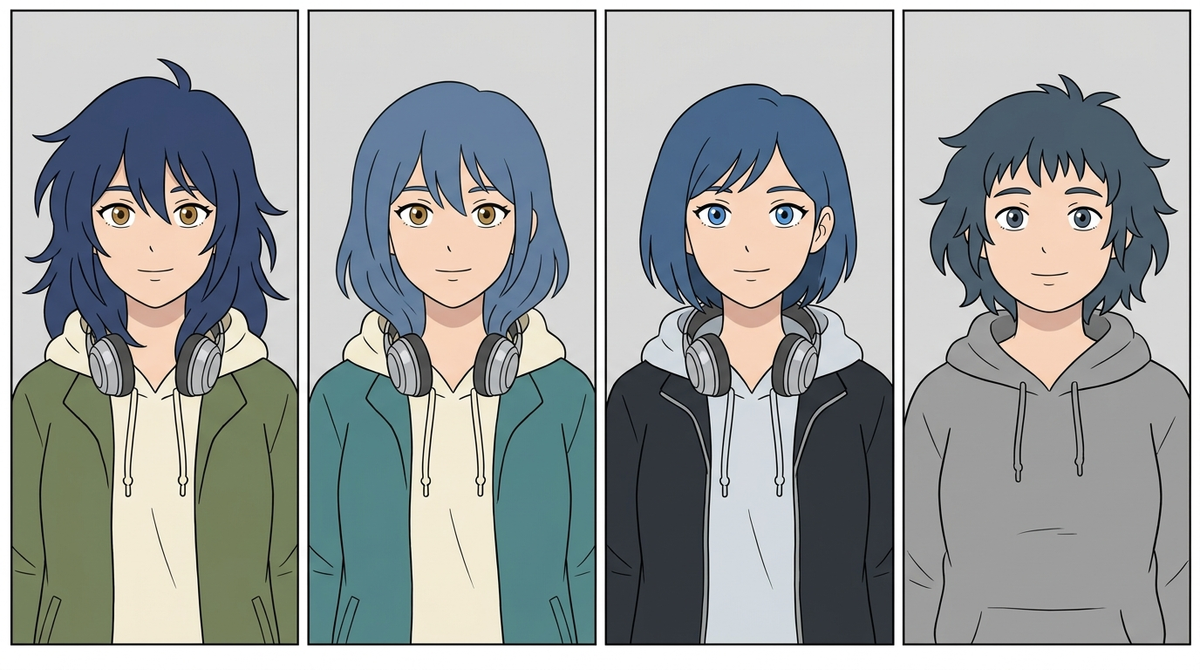
Drift rarely announces itself. Each video looks fine on its own.
Why characters drift between videos
Here is the part that changes how you work: the model is not losing your character. It is filling in whatever your reference failed to show it.
One creator tested this deliberately. Their anime character had navy hair and hazel eyes, and the reference image was a back view, so the eyes never appeared in it.
The clip came back with blue eyes. A girl with blue hair plausibly has blue eyes, so that is what the model chose. The headphones arrived with invented black earpads, since the reference only ever showed the outside of the cups.
Two separate fixes worked. Adding one sentence naming the eye colour. Or swapping to a front-facing reference where the eyes were visible.
What the reference shows, the model keeps. What the reference hides, the model invents.

The reference never showed her eyes, so the model chose some. Blue hair, blue eyes.
That reframes drift as a gap problem rather than a memory problem. Every detail missing from your reference is a decision the model makes on your behalf, and it makes a different one each time.
Three kinds of drift stack on top of that:
- Within a shot. The face shifts over ten seconds. Mostly solved.
- Between shots in one video. Shot 48 returns a slightly different person than shot 3.
- Between videos. Episode four's cast has quietly diverged from episode one's.
The third one is expensive, because you only notice it when the back catalogue is already published.
The workflow that actually works
This is the standard method and it is genuinely the right answer on clip-based tools. Nothing below is controversial.
- Build one master character reference. Lock the face, hairstyle, wardrobe, colours, proportions and distinctive features. Write them down as text too.
- Generate a character sheet. Front, three-quarter, profile and full-body at minimum, on a plain background.
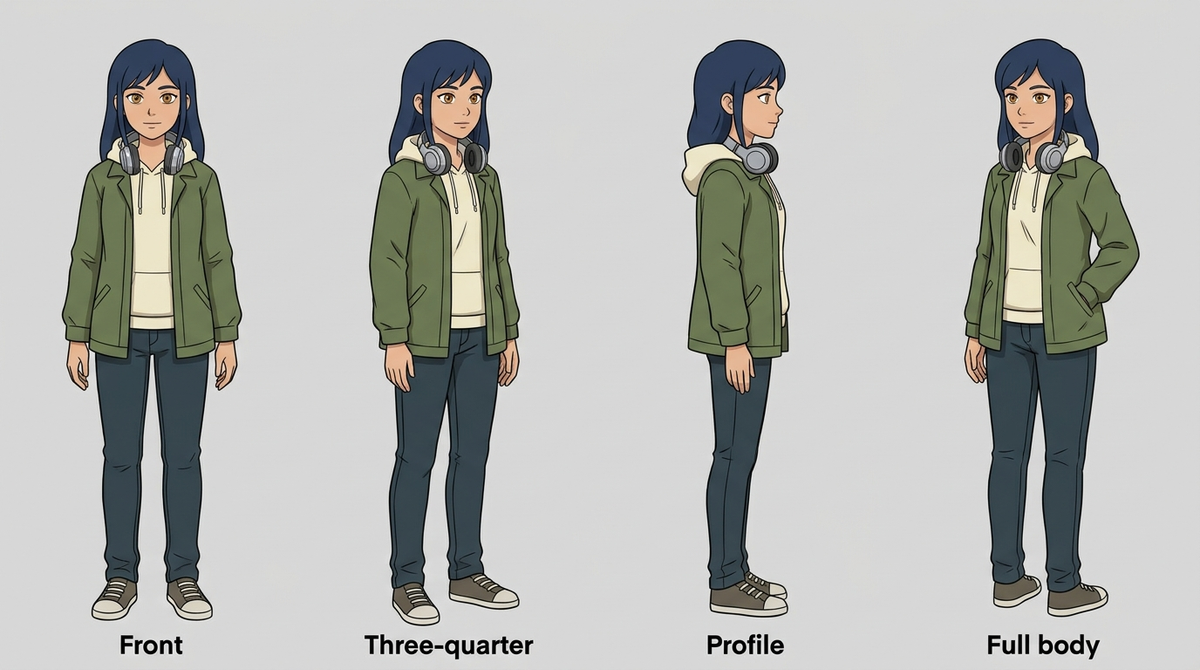
Four angles, plain background, nothing in her hands. 3. Use three to five reference images, not ten. More references get averaged together and soften the result. Kling, Luma and Hailuo cap their reference inputs at four, which tells you something. 4. Write a locked prompt block. Fifty to eighty words describing facial structure, hair, eyes and wardrobe. Paste the same block into every generation. 5. Prompt the action, not the appearance. The reference carries identity. Your text describes what the character does, where they are, and how the camera moves. 6. Separate the person from the world. Keep the character description and the environment description as two blocks. Fuse them into one 300-word prompt and the model blends them. 7. Work image-to-video, never text-to-video. Generate the still first, then animate it. 8. Test on the cheap tier. Settle the prompt and reference on a draft model before paying premium rates to learn that one sentence was missing. 9. Test the hard shots first. A close-up, a profile, a full-body movement and a lighting change, before producing a complete video.
Experienced creators report this takes real time. Ten to twenty attempts to settle a character, two to three hours of setup, and weeks before the results are reliable.
What this costs at scale. Nine steps per video, a reference library you re-feed every session, and an identity check per shot. Workable for five videos. At fifty it is a job.
Reference anchoring versus frame chaining across scenes
These are the two ways to attach a reference, and they get confused constantly.
Watch for which mode your tool uses, because the same feature name covers both. Some treat your reference as the literal first frame of the clip, so the character arrives welded to that pose and background. Others treat it as an identity anchor, so the character carries over while the scene comes from your prompt.
The same portrait produces a studio shot with a grey background in first-frame mode, and a rooftop at dusk with the character intact in identity mode. Check before you build a library around either.
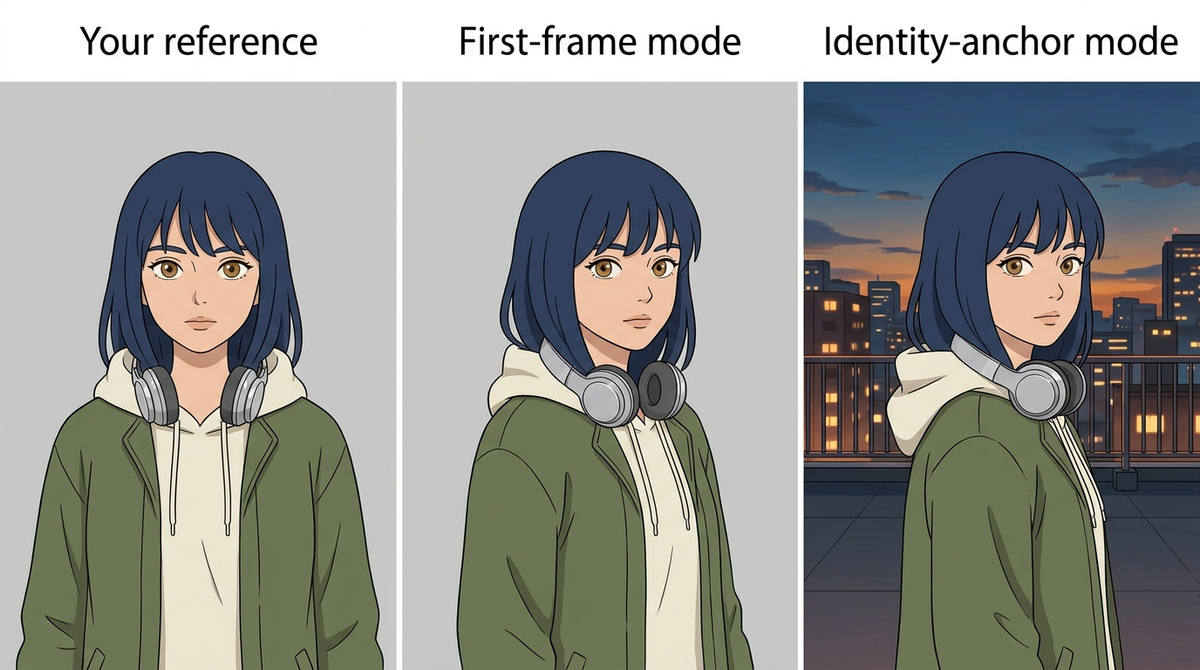
Same reference, same prompt, two different features wearing one name.
Chaining is the other approach: feed the last frame of one clip in as the first frame of the next. It works, and every drift it introduces becomes the starting point for the clip after it.
A worked example. Say each generation preserves identity at 98%, which is generous:
Clips chained | Identity retained |
|---|---|
5 | ~90% |
20 | ~67% |
60 | ~30% |
Those figures are illustrative, but the direction is measured. A 2026 benchmark from ByteDance and Rice University tested entity consistency across 140 multi-shot episodes and found that cross-shot consistency degrades sharply with recurrence distance. The further apart two appearances of a character sit, the worse the match.
Three things genuinely help:
- Re-anchor to the master reference, not to the previous clip. Chain from the original character sheet so errors do not compound.
- Regenerate from the anchor when drift appears, rather than patching the drifted frame.
- Keep chains short. Five or six clips between re-anchors, then start fresh.
The honest limit: re-anchoring costs a generation each time, and the drift returns as soon as the chain gets long again. Start and end frame control has the same ceiling. It fixes two moments, and the model interpolates everything between them, which is where a character turns or shows the back of their head.
LoRA fine-tuning versus reference sheets
Different tradeoffs, and the right answer depends on how many videos you are making.
LoRA fine-tuning | Reference sheets | |
|---|---|---|
Setup cost | High: 20 to 50 curated images, a training run, iteration | Low: generate three to five multi-angle images |
Consistency ceiling | Higher, the character is in the weights | Good, varies by how the tool reads references |
Flexibility | Rigid, retrain to change the design | Edit the sheet and regenerate |
New character cost | Another full training run | Another set of images |
Where it is available | Runway custom models, Higgsfield Soul ID, open-source pipelines | Nearly everywhere |
Reference sheets win for most people. Faster to set up, cheap to revise, and supported by every tool worth using.
LoRA wins when one character carries a long project and you can absorb the training cost once. A brand mascot across fifty videos is the clear case. The research backs it: a training run encodes identity more reliably than any prompt, and removing the visual anchor from a generation pipeline collapses character consistency almost entirely.
Per-character training does not scale, though. Five recurring characters means five training runs, and a wardrobe change means doing one again.
Both approaches share a ceiling. They describe a character to a model with no memory between generations. You are still the one holding the series together.
How do you keep characters and styles consistent across shots?
Character and style are two different problems, and most advice only solves the first.
A style is the palette, the line quality, the lighting logic and the rendering look. It drifts independently of the face. You can hold a character perfectly and still end up with shot 3 in soft pastel and shot 12 in hard contrast.
Three things keep a style in place:
- Build a style frame. One image that fixes palette, lighting and line quality for the whole project, separate from your character sheet.
- Write prohibitions, not just descriptions. Say what should never appear. Models drift toward photorealism unless told otherwise, which is why stylised work degrades faster than realistic work.
- Lock hex values and check output against them rather than by eye.
Keep the character block and the style block as two separate pieces of text. Fuse them into one long prompt and the model blends the two, which is how a character ends up wearing the background's colour palette.
The honest limit: both blocks are files you re-attach per generation. Nothing about a style frame survives into your next project on its own.
Keeping a character across episodes, lessons and seasons
Everything above holds a character inside one video. Across a series it needs something it does not have.
Three situations where this bites hardest, all of them real searches:
- A training course needing the same animated presenter across twelve lessons
- A kids' series where the cartoon lead must be identical in every episode
- A ten-episode run where each episode should pick up visually where the last ended
In each case the character has to survive a gap of days or weeks, a different session, and often a different person at the keyboard.
Reference libraries do survive that, as long as nobody edits the wrong file, re-crops an image, or starts from a prompt because the sheet was slow to find. The failure is rarely technical.
Brand work is stricter again. A mascot has a fixed palette, a logo that cannot deform, and a wardrobe that is part of the trademark. Two additions there:
- Lock hex values in the style frame and check output against them rather than by eye
- Keep the logo out of generation. Composite it in afterwards, because models redraw marks unpredictably
What actually fixes all of this is the character existing inside the tool rather than beside it.
Where the character should live
Project memory has arrived, and it is worth being precise about what it covers.
Several tools now store a character at the project level. invideo's agent holds your cast, locations, rules and references for the life of a project. LTX Studio and Vertical Motion do something similar, and Higgsfield trains a Soul ID from 20 or more photos that you reuse as an element.
All of that is real, and all of it is scoped to the job you are currently in.
Read the documentation closely before planning a series around any of it. Creators report that a saved character does not reach every tool they want to use, and the official answer is narrower than the marketing.
Higgsfield's help centre says a Soul character "can also be carried into some other models by saving them as an Element", without naming which ones. invideo is explicit that its context "holds for the life of the project."
A series is not a job. It is a world that outlives every video made inside it.
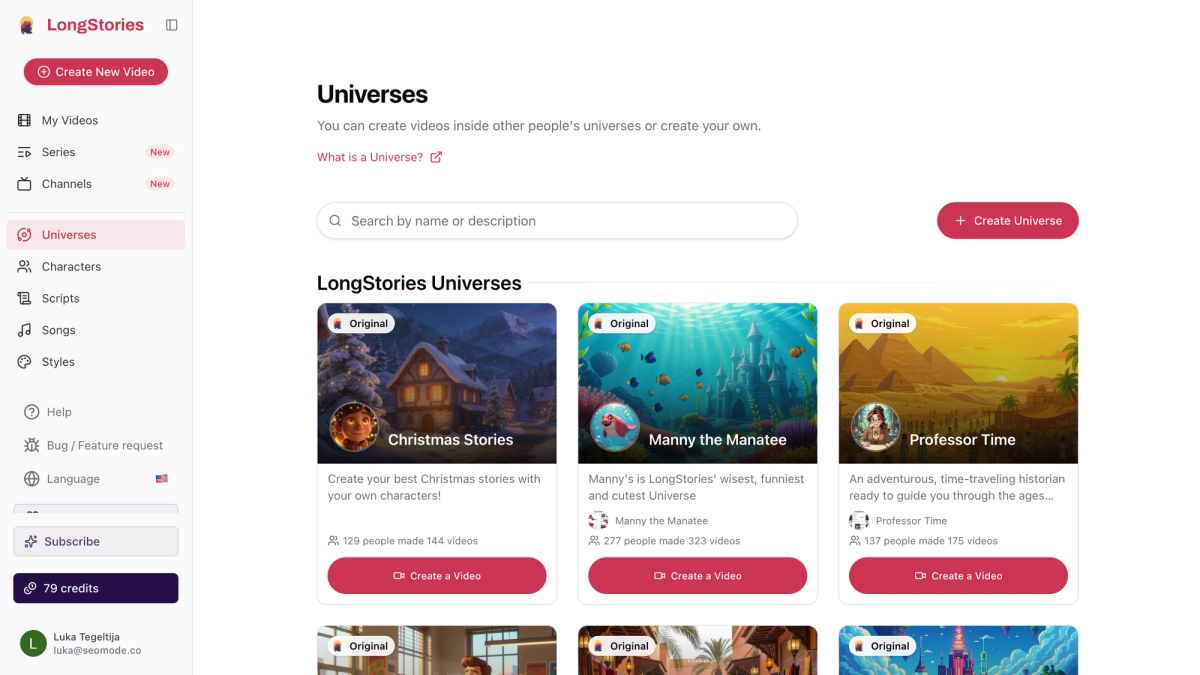
On LongStories, that world is a Universe: a saved object holding its cast, its lore, the rules no video in it may break, its art direction, its audience and one visual style. Every video made inside it starts from that foundation, with nothing to re-attach.
A Universe saves | What that covers |
|---|---|
Cast | Characters, places and objects, and how each fits the world |
Lore | Who lives there, what kinds of stories happen |
Rules | Constraints no video in the universe may break |
Art direction | Colours, lighting, camera work, what should never appear |
Audience | Kids, teens, adults, everyone |
Style | One visual style across its videos |
Setup takes about a minute. Name it, describe it in a line, and the AI drafts the rest, all editable before you make anything.
Then the part built for a series. Once a series' first episode sits in a universe, each later episode inherits the characters, places, objects, look, voices, language, format and the story so far. A finished video carries a Next episode button, so episode four starts from episode three.
Editing a universe applies to new videos only. An episode you already made keeps the version it was built with, so refining the world leaves your published work alone. That is the opposite of how some project agents behave, where a style change propagates through existing generations.
There is a second thing worth knowing, and it removes the chaining maths entirely. For long-form video with consistent characters, LongStories generates up to 15 minutes in one pass.
Clip tools degrade past 15 or 30 seconds because every clip is an independent generation joined to its neighbours, and the joins are where identity slips. A single pass has no joins to police. Different architecture, not a longer clip.
What the tools give you
Several of these are genuinely good, and it is worth being precise about where each one stops.
Tool | How it holds a character | Clip ceiling | Where it stops |
|---|---|---|---|
LongStories | Universe, inherited by series episodes | 15 minutes, one pass | Paid plan needed to generate video |
Runway | References, multi-shot tools, custom training, Act-One | 5 or 10 seconds | 60+ jobs per 10 minutes, your own library between sessions |
Kling | Character Elements, subject library, 1 to 4 references | 3 to 15 seconds | Concedes complex motion introduces inconsistencies |
Higgsfield | Soul ID trained identity, plus saved Elements | Up to 30 seconds | Its help centre says a character carries into "some other models" |
invideo | Agent memory for cast, world and rules | Varies by model | Scoped to the life of one project |
Midjourney | Character and style references for stills | Images only | Feeds a video tool, is not one |
OpenArt | Multi-angle character sheets | Images only | Step two of a pipeline |
Google Veo and Flow | Character tags, reference images | 8 seconds with references | Google states continuity is not guaranteed between generations |
For a tool-by-tool comparison with pros, cons and verdicts, we covered that separately in best AI video generators for consistent characters.
What consistency really costs
Count generations, not subscriptions.
Credit models charge per generation, and every retry is a generation. Creators describe generating fifty versions of a shot and keeping three, and rerolling drifted scenes until the credits run down. Three to five attempts per usable shot is the figure most often reported.
The number that matters is cost per usable shot. A tool needing three attempts at a profile view costs three times its headline rate on that shot.
At series length the arithmetic moves:
Clip-based | Single-pass | |
|---|---|---|
Generations per 10-minute episode | 60 to 75 | 1 |
With a 30% retry rate | ~100 | 1 to 2 |
Across ten episodes | ~1,000 | 10 to 20 |
A cheaper monthly plan that needs a thousand generations is not the cheaper option.
Two things to check before subscribing anywhere: whether unused credits expire, and whether retries are billed at the same rate as first attempts.
Frequently asked questions
How do you fix cumulative drift when chaining clips together?
You reduce it rather than remove it. Chain from the master reference instead of the previous clip, regenerate from the anchor when drift appears, and keep chains to five or six clips. Each re-anchor costs a generation, and drift returns once the chain lengthens again. Generating in one pass avoids the joins entirely.
Why don't start and end frame methods work across multiple videos?
A start frame fixes one moment, and the model interpolates everything after it. Identity slips when a character turns, changes pose or appears from behind. Across videos your end frame becomes the next video's start frame, so you are chaining at the video level with the same compounding and fewer chances to catch it.
How many reference images do I actually need?
Three to five, covering front, three-quarter, profile and full-body. Most tools cap reference inputs at four. Piling in ten averages them together and softens the result. One clean front-facing image beats six moody ones.
Can I keep the same character across different AI video platforms?
Partly. A reference sheet and a written prompt block travel anywhere, which is why both are worth keeping as files.
Trained identities are narrower than they sound. Higgsfield's help centre states a Soul character "can also be carried into some other models by saving them as an Element" without listing them. Check the docs for the models you actually use.
Does AI video generation preserve brand consistency across multiple videos?
Not by default. Lock hex values in a style frame and check output against them rather than by eye, and composite logos in afterwards rather than generating them. For weekly video, the deciding question is whether the palette, wardrobe and proportions are stored where the next video reads them automatically.
Which AI video tools keep characters consistent across scenes?
Most of the major tools now ship a feature for it. Runway has references and custom model training, Kling has Character Elements and a subject library, Higgsfield trains a Soul ID, and invideo holds a cast in project memory.
All of them hold a character across scenes inside one project. The thing to check is what happens between projects, because that is where the documentation gets vague.
Which platforms generate consistent animated characters across videos?
For animated work specifically, the split is between tools that store the character and tools that store a reference you re-attach. A saved character survives a new session. A reference folder survives only if you re-attach it correctly every time. For a series of animated episodes, ask whether episode four can inherit from episode three without you rebuilding anything.
Can AI video models maintain character consistency across multiple clips?
Within a clip, yes, reliably. Across multiple clips it depends on how you join them. Chaining from the previous clip compounds every small error, and benchmarks show cross-shot consistency degrading the further apart two appearances sit. Re-anchoring to a master reference each time holds up better, and generating in a single pass removes the joins altogether.
What is the cheapest way to maintain consistency across a video series?
Measure cost per usable shot rather than monthly price. Count retries as generations, check whether credits expire, and compare total generations across a full series. A clip-based workflow at ten episodes runs to roughly a thousand generations.
The short version
If you are making a handful of videos, the reference-sheet workflow is the right answer, and every platform above supports it well enough to generate consistent animated characters. Build the sheet properly, use three to five angles, prompt the action rather than the appearance, and re-anchor rather than chain.
If you are making a series, the method stops being the constraint and the architecture starts. Something has to remember the character between videos, and either that is a tool or it is you.
No generator guarantees perfect character consistency. Benchmarks built specifically to measure it still find that identity degrades the further apart two appearances sit. What changes is how many chances it gets to drift, and whether your next video starts from the last one or from nothing.
LongStories is constantly evolving as it finds its product-market fit. Features, pricing, and offerings are continuously being refined and updated. The information in this blog post reflects our understanding at the time of writing. Please always check LongStories.ai for the latest information about our products, features, and pricing, or contact us directly for the most current details.