
Facebook Watch Monetization: Ad Breaks Guide
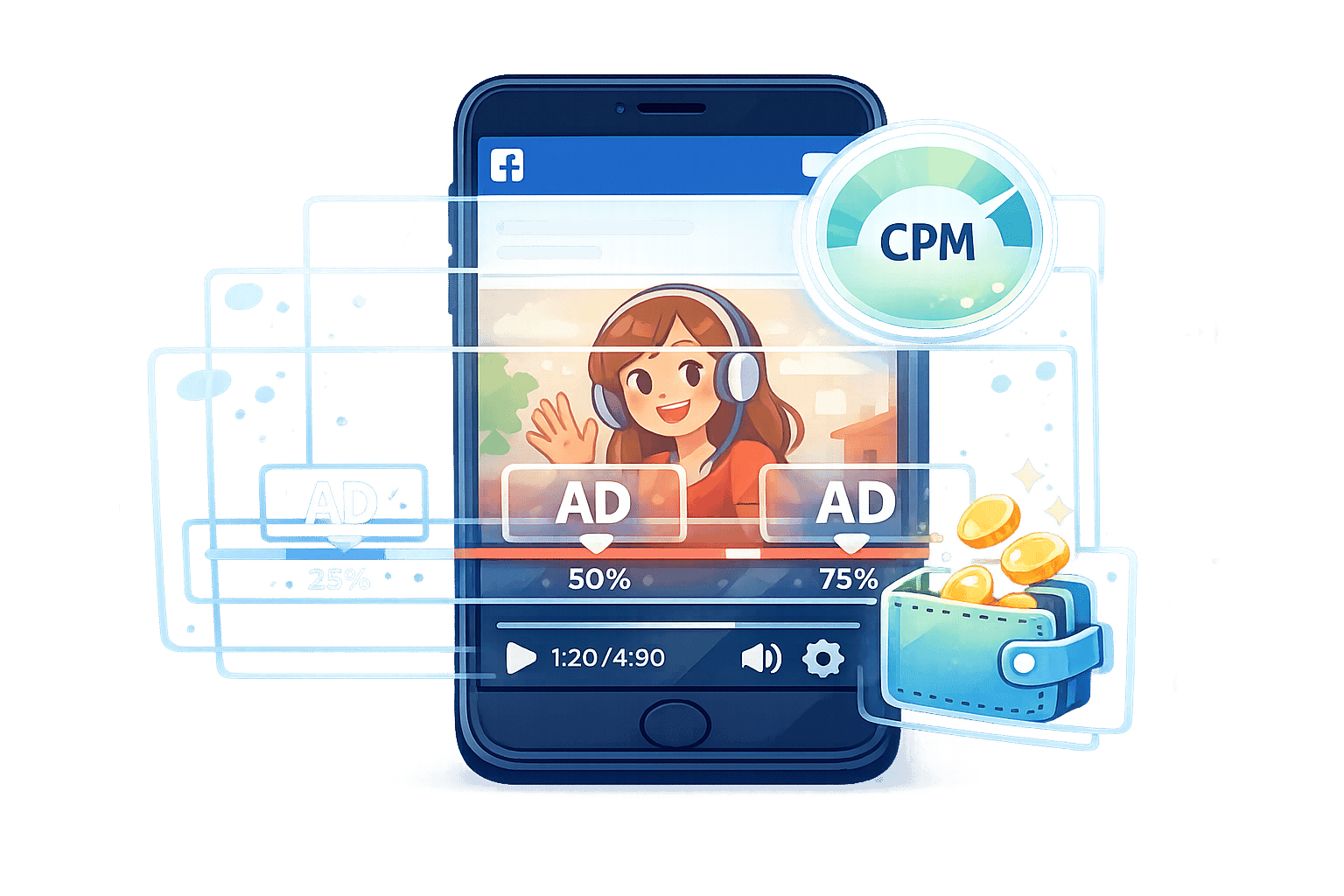
Want to earn from your Facebook videos? Facebook Ad Breaks can help you generate revenue by placing ads in your content. Here's what you need to know:
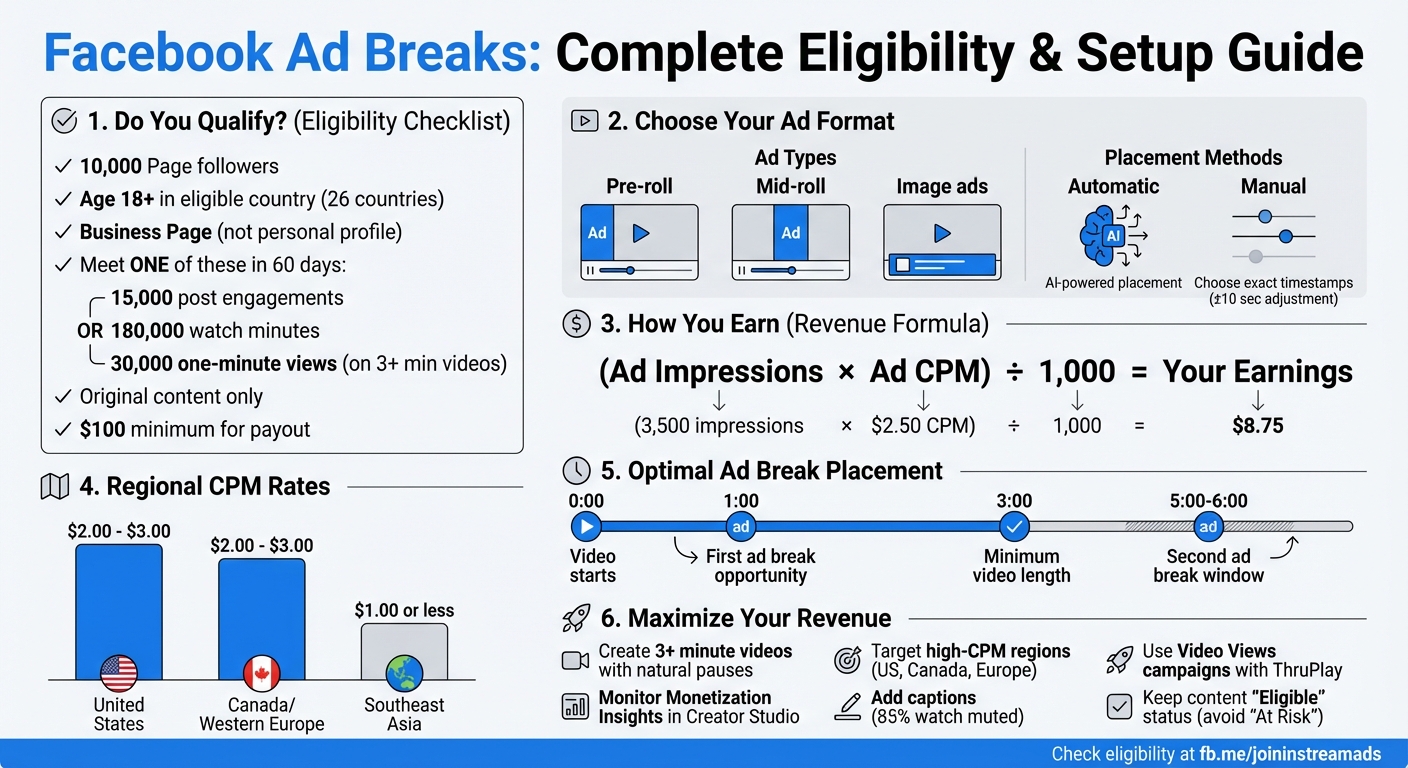
- Eligibility Requirements: Your Page needs 10,000 followers and 30,000 one-minute views on videos (minimum 3 minutes long) within 60 days. You must also meet a $100 earnings threshold for payouts.
- Ad Types: Choose from pre-roll (before videos), mid-roll (during natural pauses), or image ads (below videos).
- Earnings Formula: Ad revenue is calculated as (Ad Impressions x Ad CPM) / 1,000. CPM rates vary by region, with the U.S. offering $2–$3, while Southeast Asia averages $1 or less.
- Placement Options: Use Facebook's AI for automatic ad placement or manually select timestamps for better control.
- Best Practices: Create original, engaging videos with natural pauses for ad placement. Add captions to cater to muted viewers and focus on high-CPM regions for better earnings.
Start by checking your eligibility in Creator Studio, plan videos with natural breaks, and monitor ad performance to maximize revenue.
Facebook Ad Breaks Eligibility Requirements and Setup Process
Eligibility Requirements for Facebook Ad Breaks
Page and Content Requirements
To start earning through Facebook Ad Breaks, your Facebook Page must meet specific criteria. First, you need 10,000 followers, and all content must be published from a business Page - not a personal profile. Additionally, creators must be at least 18 years old and live in one of the 26 eligible countries.
Within a 60-day period, you must also meet one of these benchmarks: 15,000 post engagements, 180,000 total watch minutes, or 30,000 one-minute views on videos that are at least 3 minutes long. Keep in mind, only original video content qualifies - reshared or reposted material from other creators won't count toward monetization. Payouts are issued via PayPal or bank transfer, but only after you’ve reached a minimum balance of $100.
You can track your progress using the Monetization tab in Meta Business Suite or Creator Studio. Be aware that certain types of content - like static images, polls, slideshows, text montages, or looping videos - are not eligible for monetization.
Once you meet these thresholds, ensure your content complies with Facebook's monetization policies to maintain eligibility.
Policy Compliance and Best Practices
Meeting the initial requirements is just the first step. Your Page and content must also align with Facebook's monetization guidelines. There are two sets of policies to follow: Partner Monetization Policies (PMP), which apply to your entire Page, and Content Monetization Policies (CMP), which focus on individual videos. Additionally, your Page must have been active for at least 30 days before you can apply for monetization.
"Content that is unoriginal or reproduced without making meaningful enhancements (commentary, parody, creative editing, etc.) cannot be monetized." - Meta
Facebook strictly prohibits practices like manufactured sharing schemes. This includes coordinating content distribution for payment or using bots to artificially increase views or followers. Content flagged as misinformation, clickbait, false news, or sensationalism is also ineligible for monetization. Moreover, certain groups - such as elected officials, political candidates, political parties, and government agencies - are excluded from the program.
To maintain your status, regularly check your eligibility in Creator Studio. Aim to keep your content quality labeled as "Eligible" and avoid slipping into the "At Risk" category.
sbb-itb-94859ad
How to Set Up Ad Breaks
Submitting Your Page for Approval
Once you've confirmed that your Page meets the eligibility requirements, head to https://fb.me/joininstreamads to check your status. From there, open Creator Studio or Meta Business Suite, go to the Monetization tab, and submit your application. It's important to regularly check your status to ensure you remain in compliance with the Partner Monetization Policies.
After submitting your application, you'll want to decide on the best strategy for placing ad breaks in your videos.
Choosing Ad Break Placement Options
Facebook provides two placement options for ad breaks. Automatic Placement uses AI to insert ads during natural pauses lasting 1 to 2 seconds. This option works well for most content. Alternatively, Manual Placement allows you to take full control, letting you choose exact timestamps for ad breaks. This is particularly useful for scripted content where you can create cliffhangers or intentional pauses. You can also enable Facebook to adjust your chosen ad break points by up to 10 seconds to avoid disrupting key moments in your video. Additionally, you can use tools like Block Lists and Category Controls to filter out certain advertisers.
Once your placement strategy is ready, it's time to prepare and upload videos designed to make the most of these ad opportunities.
Uploading and Preparing Videos for Monetization
For optimal results, plan your videos to include natural pauses - these are ideal spots for ad breaks. Videos must be at least 3 minutes long, with pauses strategically placed around the 1-minute mark and again between the 5- and 6-minute mark. This not only optimizes ad insertion but also helps keep viewers engaged. Ensure your content is original and complies with copyright rules.
Once your video is published, Facebook will automatically start the monetization review process. Videos that quickly achieve 25 views within the first 10 minutes are prioritized for review.
How to Maximize Ad Break Revenue
Analyzing Performance Metrics
The Monetization Insights tab in Creator Studio is your go-to for tracking ad performance. It provides essential data like Ad CPM (cost per thousand impressions), total ad impressions, and estimated earnings - both for your page and individual videos. These metrics help you identify which videos are driving the most revenue.
Keep a close eye on the gap between your 1-minute views and ad impressions. Not every view generates revenue - ads won’t trigger for viewers from ineligible regions or those who don’t watch for at least a minute. This gap highlights how much of your audience is monetized, while also showing how geography impacts your earnings.
"The geographic location of 1-minute views also determines the CPM. It's typically higher if viewers are located in the U.S. ($2–$3) and lower if they're in southeast Asia ($1 or less)." – Maria Dykstra, Co-Founder of TreDigital
For instance, if a video generates 3,500 ad impressions at a $2.50 CPM, your earnings would total $8.75. Use the formula:
(Ad Impressions x Ad CPM) / 1,000
to calculate revenue and identify your top-performing content.
Increasing Video Views and Engagement
Once you’ve analyzed the data, focus on boosting video views and engagement. More views mean more ad impressions - and ultimately, higher earnings. One effective strategy is to promote monetized videos using Facebook Ads. Opt for Video Views campaigns with ThruPlay optimization, targeting users likely to watch at least 15 seconds. This helps meet the 1-minute view threshold required for monetization.
To grow a loyal audience, use the Invite feature on your video posts to turn engaged viewers into page followers. A larger follower base leads to more organic views and ad impressions over time. When running paid campaigns, consider leveraging Advantage+ Audience and Advantage+ Placements. These tools can reduce your cost per result by up to 14.8% and 11.7%, respectively.
For better earnings, prioritize ad spend in high-CPM regions like the U.S., Canada, and Western Europe. These areas generate more revenue per impression, making them a smart focus for your campaigns.
Best Practices for Ad Placement
Strategic ad placement is key to keeping viewers engaged while maximizing revenue. Manual placement works best right after cliffhangers or during natural pauses of 1–2 seconds. Alternatively, you can use Meta’s AI for automatic placement, which identifies the most natural spots for ad breaks. This approach minimizes viewer drop-off during ads. If you manually set ad breaks, Facebook can adjust them by up to 10 seconds to avoid interrupting critical moments.
Since 85% of users watch videos with the sound muted, design your content with captions and strong visuals. Longer, thematic videos perform better because they allow for multiple mid-roll ad opportunities without overwhelming the audience. Videos with a compelling hook in the first 3–5 minutes hold viewers long enough for ad breaks to trigger. Additionally, original content that sparks meaningful conversations tends to rank higher in Facebook’s algorithm, further boosting performance.
Conclusion and Key Takeaways
Final Thoughts on Facebook Watch Monetization
Facebook ad breaks provide a solid opportunity to earn revenue from your video content, but achieving success hinges on meeting eligibility requirements and adhering to Facebook's guidelines. Once you're approved in Creator Studio, the next step is to focus on placing ads strategically. You can either let Facebook's AI handle ad placement automatically or manually insert ads at points like cliffhangers to maintain viewer interest. For context, CPM rates in the U.S. usually range from $2 to $3, while audiences in Southeast Asia may bring in closer to $1 or less. By regularly reviewing performance metrics, you can pinpoint which content generates the most ad impressions and adjust your approach to maximize earnings.
Next Steps for Creators
To put these ideas into action, start by checking your eligibility in Creator Studio's Monetization tab. If you're eligible, set up your payment account to ensure you can receive monthly payouts once you hit the $100 threshold. Plan your videos with natural pauses - such as around the 1-minute and 5- to 6-minute marks - and make sure all your content is original, as Facebook heavily penalizes reused or shared videos. Use the Invite tool to turn engaged viewers into page followers, and consider running Video Views campaigns with ThruPlay optimization to speed up your eligibility process. For creators aiming to scale their output without sacrificing quality, tools like LongStories.ai can help you consistently produce high-quality videos that meet Facebook's standards. Uploading regularly is key to building a dedicated audience while staying compliant with monetization policies.
FAQs
Why am I eligible but still not seeing ads on my videos?
If you're eligible for ads but they aren't showing up, it might be because your page hasn't met all the necessary requirements. This could happen if your monetization setup isn't complete - like missing ad break configurations - or if there are temporary restrictions on your account, such as being blocked from in-stream ads. Double-check that all tools are set up correctly and look into any account issues that might need fixing.
How many ad breaks should I use without losing viewers?
Use ad breaks thoughtfully to keep your audience engaged. Place them during natural pauses or transitions in your video, ensuring they don't feel intrusive. Avoid cramming too many ads into your content, as this can frustrate viewers. The right number of ad breaks will vary depending on the length of your video and how much your audience is willing to tolerate. Test different placements and frequencies to find a balance that works for both you and your viewers.
How can I increase my Facebook Ad Breaks CPM?
To improve your Facebook Ad Breaks CPM, aim to produce videos that are over 3 minutes long with natural pauses where ads can fit smoothly. Target high-CPM regions such as the U.S. to maximize revenue potential. Additionally, create content that actively encourages viewer engagement - the more people interact with your videos, the better your overall performance. Finally, ensure that ad placements feel seamless and unobtrusive to maintain a positive viewer experience.
Related posts
LongStories is constantly evolving as it finds its product-market fit. Features, pricing, and offerings are continuously being refined and updated. The information in this blog post reflects our understanding at the time of writing. Please always check LongStories.ai for the latest information about our products, features, and pricing, or contact us directly for the most current details.