
Top LinkedIn Features for Video Monetization
LinkedIn is no longer just a professional networking site; it's now a growing platform for video creators to make money. With features like BrandLink, Sponsored Content Partnerships, and advanced video analytics, LinkedIn offers unique tools tailored for a professional audience. Video content on LinkedIn generates 5x more engagement than static posts, and the platform's algorithm prioritizes native video uploads, giving creators better reach.
Key highlights:
- BrandLink: Revenue-sharing program for pre-roll ads, launched in 2025, with creators like Gary Vaynerchuk.
- Sponsored Content Partnerships: Collaborate with brands using Thought Leader Ads and pre-roll ads.
- Video Analytics: New metrics like Total Watch Time help optimize performance.
- Audience Quality: LinkedIn users are decision-makers, offering 2x higher conversion rates than other platforms.
Creators can use these tools to attract sponsors, grow their audience, and monetize effectively by producing high-quality, short, and engaging videos with AI.
6 Ways to Monetize Linkedin in 2025!!
Sponsored Content Partnerships
With LinkedIn's rapid expansion in video content, sponsored content partnerships have become a powerful way to monetize. Recent spending data highlights a growing interest from brands in collaborating with professional creators. Matthew Derella, LinkedIn's Vice President of Marketing Solutions, shed light on this shift:
"The thing that is coming to LinkedIn is the rise of the B2B creator. Chief marketing officers want to align with the next generation of voices that are talking about business".
This trend underscores the importance of mastering LinkedIn's two main sponsored content formats.
How Sponsored Content Works
LinkedIn offers two primary sponsored content formats: Thought Leader Ads, which amplify your organic posts while maintaining authenticity, and BrandLink pre-roll ads, which share ad revenue with creators. These formats work well because they let creators keep their unique voice and credibility while giving sponsors direct access to a professional, targeted audience. Although LinkedIn hasn't disclosed exact revenue-sharing percentages, it has historically offered news publishers around 50% of the ad revenue their content generates.
To get the best results, use a mix of 4–5 different ads per campaign. This approach helps broaden your reach and provides valuable data for fine-tuning. Content that includes industry insights, curated information, or human-focused stories tends to perform better than purely promotional material. For video ads, keep them under 30 seconds - this length has been shown to drive a 200% increase in view completion rates compared to longer videos.
How to Attract Sponsors
Think of your LinkedIn profile as your storefront. Your headline should clearly communicate your value proposition - something specific like "Helping SaaS Companies Increase Customer Retention" is far more effective than just listing your job title. Activate the Service Page feature to make it easy for potential sponsors to contact you directly. Use the Featured section to display work samples, case studies, or client testimonials that showcase the results you can deliver.
Focus on brands that align with your values and engage with your audience regularly by sharing free insights and starting conversations. When negotiating sponsorship deals, don’t undervalue your influence. Make sure to account for your time and the unique professional authority you bring to your niche when discussing compensation.
BrandLink Ad Placements
BrandLink is LinkedIn's exclusive, invitation-only program that allows brands to run short pre-roll video ads (ranging from 3 to 30 seconds) alongside content from select creators. LinkedIn handpicks participants based on their expertise in topics that resonate deeply with professionals.
The program debuted in May 2025 with an initial group of 30 business-focused creators. Notable participants included Steven Bartlett, host of Diary of a CEO; Gary Vaynerchuk, CEO of VaynerMedia; and Guy Raz, host of How I Built This. Sharing his enthusiasm, Gary Vaynerchuk remarked:
"With the rise of video on LinkedIn, I'm excited to be included in BrandLink".
Additionally, BrandLink features five original shows led by creators like Shelley Zalis and Candace Nelson, covering topics such as female entrepreneurship and AI. Here’s a closer look at how the program works for both advertisers and creators.
How BrandLink Works
Advertisers have two main options: they can either collaborate directly with individual creators or dominate a specific topic category by partnering with multiple creators. Ads are uploaded through LinkedIn's Campaign Manager and require approval from the creators themselves. Unlike traditional ad placements, BrandLink offers a revenue-sharing model - typically around 50% - to reward publishers for producing consistently high-quality content.
To qualify, creators must regularly produce vertical videos lasting 15–30 seconds. LinkedIn emphasizes precise audience targeting over broad reach, ensuring that these videos connect with niche audiences who are more likely to engage. This targeted approach is one of the reasons BrandLink delivers such strong outcomes.
BrandLink Performance Metrics
BrandLink campaigns deliver results that far exceed those of standard video ads. Advertisers see a 130% higher video completion rate and a 23% higher view rate compared to typical in-feed video ads. Beyond these metrics, viewers who interact with BrandLink content are up to 18% more likely to convert into leads after engaging with a Lead Gen Form. For example, in 2024, luxury brand Cartier achieved a noticeable increase in ad recall among C-suite executives by placing pre-roll ads alongside premium publisher content through BrandLink.
sbb-itb-94859ad
Video Analytics and Performance Tools
You can access analytics for organic posts through the "Posts & Activity" section and for sponsored content via Campaign Manager's "Video" view. These tools provide insights into professional demographics like job titles, locations, and companies - valuable data to showcase your reach and appeal to potential sponsors. With LinkedIn's increasing focus on video, these analytics help you fine-tune your content to boost monetization opportunities.
Key Metrics for Video Success
On LinkedIn, a "view" is counted when a video is watched for at least 2 continuous seconds at 50% visibility, while a "completion" is defined as 97–100% of the video being watched. These definitions are critical because they directly affect your monetization potential.
Track several key metrics to understand and improve your video performance:
- Discovery: Includes impressions and the number of members reached, helping you measure your total audience size for brand awareness campaigns.
- Retention: Shows watch time at intervals like 25%, 50%, and 75%, helping identify where viewers lose interest so you can adjust content for better ad placement.
- Engagement: Tracks reactions, comments, and reposts, offering social proof of your influence.
- Demographics: Confirms you're reaching the right high-value professionals, which is essential for B2B sponsorships.
Starting January 6, 2026, Campaign Manager introduced two new metrics: Total Watch Time and Average Watch Time. Additionally, in March 2025, LinkedIn updated its "Video Completion Rate" calculation to align with Media Rating Council standards, now dividing completions by impressions instead of plays. Keep in mind that analytics data is available for 400 days for videos and 1,000 days for posts, giving you a defined window to refine your strategies. These metrics serve as a foundation for improving your video content.
Using Analytics to Improve Content
Retention data in Campaign Manager is particularly useful for identifying weak points in your videos. For example, if your 25% view rate drops significantly, it’s a sign that your opening hook needs improvement. For videos under 30 seconds, aim for completion rates between 35–45%, which is considered an industry standard. Export demographic data, such as job titles and industries, to create a media kit that aligns with sponsor goals.
You can also compare performance between LinkedIn Feed and the LinkedIn Audience Network to determine which platform delivers the best return on investment. Use "Matched Audiences" to retarget viewers based on how much of your video they watched - for instance, pitch sponsorships to those who watched 75% or more. Since about 80% of LinkedIn users watch videos with the sound off, always include captions and use high-contrast text to maintain viewer attention. Notably, video ads on LinkedIn generate 30% more comments per impression compared to static images, making engagement a strong indicator of monetization potential.
Comparing LinkedIn Monetization Features
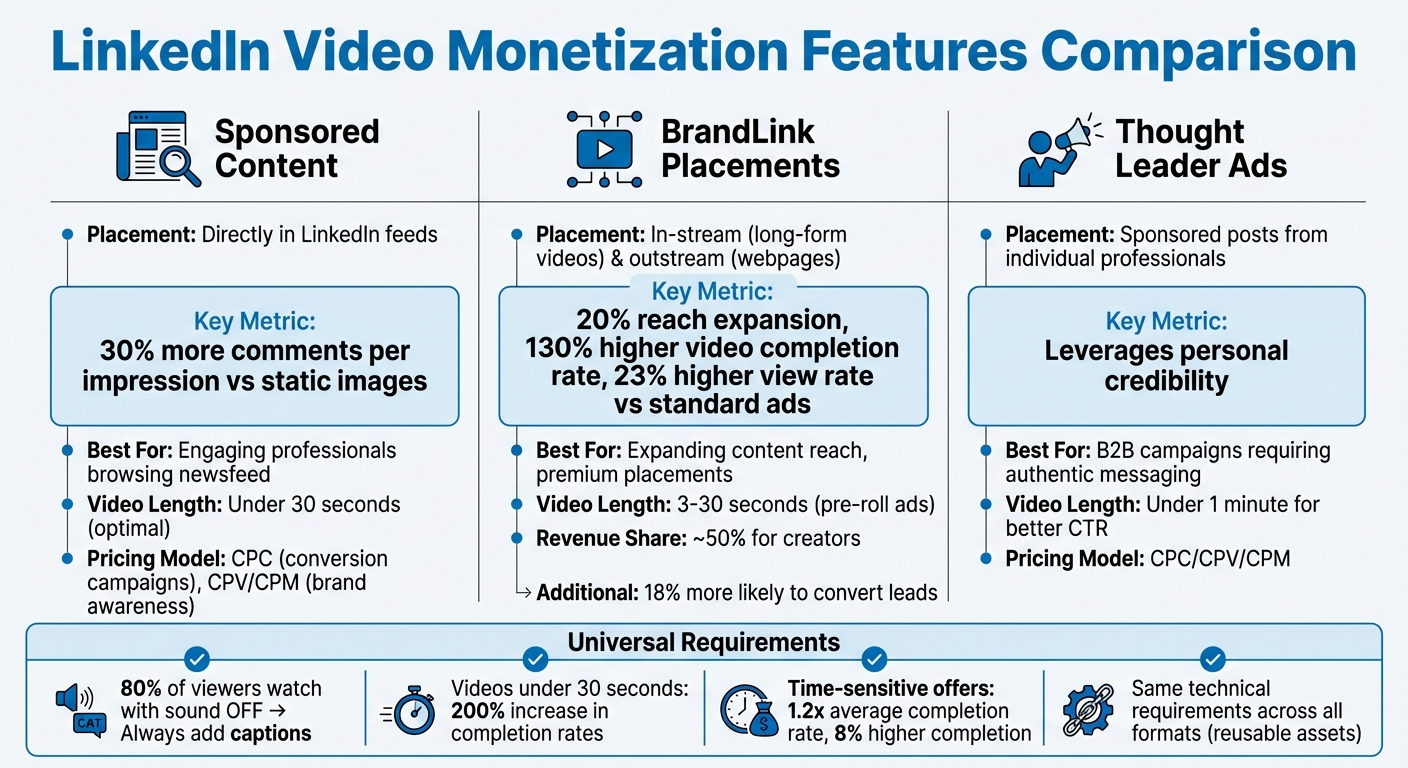
LinkedIn Video Monetization Features Comparison: Sponsored Content vs BrandLink vs Thought Leader Ads
Key Comparison Factors
LinkedIn provides three main options for monetizing videos, each tailored to different objectives and audiences. Let’s break them down:
Sponsored Content appears directly in users' LinkedIn feeds, making it a powerful tool for engagement. In fact, video ads on LinkedIn generate 30% more comments per impression compared to static images. This format is ideal if you’re aiming to engage professionals who are actively browsing their newsfeed.
BrandLink placements help expand your content’s reach by up to 20%. These placements include in-stream ads within long-form videos (like TV commercials) and standalone outstream ads on webpages. In-stream ads often perform better in terms of completion rates since viewers are already engaged with longer content.
Thought Leader Ads allow brands to sponsor posts from individual professionals rather than corporate pages, leveraging personal credibility to build trust. This method is particularly effective for B2B campaigns where authentic, personal messaging resonates more than traditional corporate advertising.
All three formats share the same technical requirements, meaning you can reuse your video assets across them. Shorter videos tend to perform better - those under 30 seconds see higher completion rates, while videos under one minute deliver stronger click-through and engagement metrics. Since 80% of viewers watch videos with the sound off, adding captions is crucial for all formats.
When it comes to pricing, conversion campaigns typically use a CPC model, while brand awareness campaigns rely on CPV or CPM pricing. Including a time-sensitive offer or promotion in your video headline can boost performance significantly, driving 1.2 times the average video completion rate and achieving an 8% higher completion rate than videos without such incentives. These insights can help you craft a winning strategy for monetizing your LinkedIn video content.
Getting Started with LinkedIn Video Monetization
Now that you're familiar with LinkedIn's monetization tools, it's time to dive into setting up your video campaigns. First, make sure you have the right permissions: you'll need Super Admin, Content Admin, or Sponsored Content poster access for your LinkedIn Page, along with Creative Manager (or higher) access for your ad account. Once you've confirmed these permissions, head over to Campaign Manager to start building your campaigns.
In Campaign Manager, you can sponsor existing videos or upload new ones as "Direct Sponsored Content" (which won't appear on your public feed). Be sure to select a campaign objective that aligns with your monetization goals - whether that's Brand Awareness, Video Views, Website Visits, Engagement, Lead Generation, or Website Conversions.
For better results, keep your videos short - aim for under 30 seconds. This can boost completion rates by 200%. Add burned-in subtitles so viewers can follow along silently, and make sure your key message lands within the first 10 seconds.
To expand your reach, consider enabling the LinkedIn Audience Network. This can extend your ads to trusted third-party apps and websites, increasing your audience by up to 20%. Additionally, install the LinkedIn Insight Tag to track conversions and measure your ROI effectively.
Want to refine your strategy? Use the Media Library to batch-create 4–5 video ads for A/B testing. This helps you quickly identify which content performs best. Finally, activate Creator Mode on your profile to boost visibility and unlock tools that can support long-term monetization.
FAQs
How can I participate in LinkedIn's BrandLink program?
If you're interested in joining LinkedIn's BrandLink program, the first step is to connect with your LinkedIn Sales Team. Since the program is still in its beta phase, you'll need to work closely with LinkedIn to get things rolling. Make sure to share your goals and explore how BrandLink can help you achieve success with video monetization.
What are the best ways to create engaging video content for LinkedIn?
To make LinkedIn video content that grabs attention, focus on short, high-quality videos designed for LinkedIn's professional crowd. Keep them brief - around 15–30 seconds - since this matches how long users typically stay engaged. Make the opening visually striking and include captions or subtitles so your message lands, even if someone watches without sound.
Use storytelling and clear, concise messaging to create an emotional connection or provide value, which helps keep viewers watching until the end. Don’t forget to include a strong call-to-action that ties into your goal, whether it’s boosting brand awareness or generating leads. Lastly, take advantage of LinkedIn’s analytics tools to monitor how your videos perform and tweak your approach to stay relevant and effective.
How can LinkedIn's video analytics help creators boost their monetization strategies?
LinkedIn's video analytics offer detailed insights into how your content is performing. Metrics like impressions, views, watch time, and engagement rates give creators a clear picture of what connects with their audience.
Using this data, creators can fine-tune their video campaigns, sharpen audience targeting, and create content that captures attention. This not only boosts results but also makes it easier to attract sponsors, grow a loyal audience, and, in turn, generate more revenue.
Related posts
LongStories is constantly evolving as it finds its product-market fit. Features, pricing, and offerings are continuously being refined and updated. The information in this blog post reflects our understanding at the time of writing. Please always check LongStories.ai for the latest information about our products, features, and pricing, or contact us directly for the most current details.