
Best Practices for Onboarding Video Platform Customers

- First impressions count: 77% of users abandon apps within 72 hours if they don’t see value quickly.
- Retention pays off: A 1% retention boost can increase a company’s valuation by up to 12% over five years.
- Video works best: 96% of people prefer learning through video, and video-based onboarding can improve retention by 15–30%.
Key Strategies:
- Welcome Emails: Send personalized emails within 24 hours of signup. Include a short video to build a connection and offer clear next steps.
- Interactive Tutorials: Use short, focused tutorials (2–4 minutes) with tooltips and progress bars to guide users to their “aha moment.”
- Live Demos: For complex setups, offer one-on-one sessions to address specific needs and build trust.
- Milestone-Based Content: Deliver tutorials and tips based on user actions, ensuring guidance is timely and relevant.
Why It Works:
- Personalization: Tailored content and real-life examples make onboarding feel relevant.
- Clarity: Clear, actionable workflows reduce confusion and help users see value faster.
- Engagement: Videos and interactive elements keep users interested and confident.
By combining these methods, video platforms can reduce churn, increase loyalty, and set users up for long-term success.
Transform Customer Onboarding with These Practical Steps
sbb-itb-94859ad
Personalized Welcome Emails
The first email you send to a customer is more than just a formality - it sets the foundation for your entire relationship. Timing is everything here. Aim to send this email within 2 hours of their first login, or at the very latest, within 24 hours. Why? Because reaching out while motivation is still high can significantly reduce early churn.
Make it personal. Use their name, company, and reference a specific pain point or goal they shared. For B2B platforms, have the message come from a real person, like an Account Executive or Customer Success Manager. This small but meaningful touch can boost your Net Promoter Score (NPS).
Skip the generic fluff. Instead, offer a clear, actionable 3-step roadmap for their first 30 days. Simplify any complex workflows and focus on one clear call to action - whether it’s booking a kickoff call or completing a specific activation task. Including direct contact information for a representative adds another layer of trust and helps prevent early churn.
"The first 30 days determine long-term retention. A generic welcome email loses to the excitement of engagement." – Outvid
To take things a step further, incorporating video into your welcome emails can make an even stronger impact.
Adding Video to Welcome Emails
Video can be a game-changer in your onboarding strategy. A short, engaging video (60–90 seconds) included in your welcome email can increase activation rates by 47% within the first 30 days. The focus of the video? Building a connection. As Outvid puts it, "The welcome video is about the relationship, not the product... The video's job is to say 'I've got you' not 'here's how to use the features.'"
For platforms managing high volumes of onboarding, AI-generated avatars or pre-recorded messages provide a scalable way to keep things personal. Companies that use video-driven onboarding sequences report a 15–30% improvement in 90-day retention compared to text-only emails. This approach not only reduces churn but also fosters the trust needed for lasting customer relationships. If you’re including workflow demonstrations, keep individual clips under 5 minutes to ensure they’re easy to follow.
Interactive Tutorials and Walkthroughs
After your welcome email sets the tone, interactive tutorials step in to bridge the gap between curiosity and mastery. These hands-on guides help users complete key tasks and experience that pivotal "aha!" moment when they truly grasp your product's value.
The numbers back this up: 93% of marketers say video improves user understanding, and 63% of people prefer learning about a product through video rather than text.
To make tutorials effective, keep them short and focused. Task-specific walkthroughs should be 2–4 minutes long - any longer, and you risk losing your audience's attention. Center each tutorial around a clear, actionable outcome. For instance, "How to produce your first video" resonates more than a generic "Overview of video features." Users want to achieve something tangible, not just consume information.
"Video doesn't just answer the 'what do I do' question; it answers the 'what does this mean for me' question. That's the difference between information and understanding." - WowTo
Interactive elements like tooltips, modals, and progress bars elevate the learning experience. By actively engaging with the interface - clicking, typing, and navigating - users build confidence and familiarity. Let’s dive into specific tutorial formats that boost engagement and speed up user success.
Screen Recordings with Annotations
One powerful format is screen recordings enhanced with annotations. These videos guide users step by step by highlighting buttons, zooming in on tricky areas, and emphasizing cursor movements. This approach ensures users know exactly where to focus and what actions to take.
For maximum clarity:
- Always include captions for users watching without sound, like during commutes or in shared spaces.
- Use visual aids like click highlights and focus indicators to emphasize interactions.
- Keep workflows concise. If a process takes more than 5 minutes to explain, break it into shorter, task-focused videos.
Interactive features like quizzes or action prompts can keep users engaged and ensure they’re absorbing the material. This approach isn’t just about learning - it’s practical too. 47% of businesses report that video FAQs reduce support queries, freeing up your team to tackle more complex issues.
Start each tutorial by explaining the "why" in the first 10–15 seconds - how the workflow saves time or delivers value - before diving into the "how". And don’t forget to regularly update your videos. Outdated tutorials can damage trust faster than having none at all.
Real-Life Use Case Examples
Interactive tutorials are powerful, but real-life examples take user education to the next level. By showcasing practical applications of your platform, you help users see exactly how they can achieve their goals.
For example:
- Slack walks users through creating a channel, posting a message, and uploading a document.
- Asana demonstrates how to set up a project and assign tasks.
- Figma teaches design basics by letting users manipulate shapes and text directly in the interface.
A standout example is LongStories.ai, which shows users how to create reusable "Universes" with consistent characters, styles, and voices. This tutorial addresses real challenges like maintaining brand identity across multiple videos. Similarly, a guide on producing long-form videos using bulk editing tools gives creators a clear roadmap from concept to publication.
The benefits of well-crafted use case tutorials are undeniable. Companies that implement personalized onboarding videos see 15–30% better 90-day retention rates, and 86% of users say they’re more loyal to brands that invest in post-sign-up education. These tutorials aren’t just helpful - they’re essential tools for building long-term user loyalty and retention.
Live Demos and One-on-One Sessions
Automated tutorials are great for covering the basics, but live demos bring a personal touch that's crucial for tackling more complex setups. Some customers need that human connection to address their specific needs. These live sessions turn onboarding into a collaborative experience, solving problems in real time while building trust.
This approach works especially well for enterprise clients, high-value accounts, or technical setups that require custom configurations. Having a dedicated success manager guide users through the process can ease the stress that often comes with learning a feature-packed platform.
The numbers back this up: 81% of teams report that interactive demos significantly improve onboarding and adoption.
"If your onboarding creates confusion instead of reducing friction, you're running corporate hazing, not customer success."
- Paulina Staszuk, Head of Customer Success, Supademo
While automated sequences handle repetitive tasks, live sessions shine in areas like complex technical discussions, strategic planning, and relationship building. Assigning specialists based on industry, company size, or specific use cases ensures that each demo feels tailored. This personalized approach complements earlier onboarding steps by addressing unique challenges and reinforcing the platform's value.
Focusing Demos on High-Value Features
Rather than walking through every feature, live demos should focus on outcomes that matter most to the customer. For instance, instead of showing every menu option, highlight how the platform can reduce video production time from hours to minutes. Use insights from sign-up forms to pinpoint the customer's main challenges. If a creator struggles with brand consistency, demonstrate how to build reusable Universes with consistent characters and voices. For those focused on scalability, showcase bulk editing tools and API integrations that simplify custom workflows.
Always start by explaining the "why" behind a feature - like how it can cut reporting time from two hours to fifteen minutes - before diving into the technical details. Referencing the customer's goals throughout the demo reinforces your commitment to their success. For advanced users, spotlight high-impact features such as animation quality tiers, API integrations, and bulk editing tools. These not only deliver immediate value but also encourage team engagement, creating internal champions who can advocate for the platform.
Platforms like LongStories.ai offer tools that are perfect for these sessions, such as reusable Universes for maintaining consistent brand identity. Showcasing these capabilities during live demos can address common pain points and highlight the platform's practical benefits.
Milestone-Based Content Delivery
Milestone-based content delivery builds on personalized emails and interactive tutorials by delivering resources precisely when users need them. Instead of overwhelming users with all tutorials at once, content is triggered by specific actions. For instance, a workflow guide might appear after a user creates their first project, or an advanced tutorial might unlock once they’ve mastered the basics. This approach aligns content delivery with individual progress, ensuring that users get the right guidance at the right time.
Timing plays a key role here. Personalized video sequences can boost 90-day retention rates by 15–30%. For example, if a user hasn’t engaged with a core feature within 48 hours, a targeted tutorial can help them overcome any barriers. Similarly, celebrating milestones - like completing a first major task - with a congratulatory message and clear next steps keeps users motivated and engaged.
Progressive disclosure is another essential strategy. By introducing advanced features only after users have mastered the fundamentals, you reduce cognitive overload and create a logical learning flow. Visual progress indicators, such as checklists or completion bars, further enhance the experience. They make the journey feel structured and rewarding, helping users track their progress and look forward to what’s next. In fact, 86% of users report greater loyalty to companies that invest in their onboarding and education after sign-up.
Core Workflow Videos
These videos should focus on one task at a time, with a clear and actionable outcome. For example, a video platform might guide users through creating their first project, uploading content, or setting up brand elements.
At this stage, it’s crucial to highlight the why before diving into the how. Framing videos around outcomes - like "How to See Your Most Important Metrics in Seconds" - helps users understand the value behind their actions.
Keep these videos concise, ideally between 2 and 4 minutes. Stretching beyond this risks losing attention, while shorter videos may skip important details. Use visual aids, such as click highlights and cursor emphasis, to simplify complex interfaces. Embedding these videos into onboarding checklists or tooltips ensures users can access guidance exactly when and where they need it.
Advanced Tutorials for Experienced Users
Advanced tutorials are best suited for users who have already had their "aha moment" and are ready to explore more sophisticated features. These videos, typically 4–8 minutes long, cover advanced capabilities like API integrations, professional animation tools, or bulk editing features. They’re designed to help experienced users unlock the platform’s full potential and become advocates for it.
Take LongStories.ai as an example. Their advanced tutorials showcase features like reusable Universes for consistent branding, multiple animation quality tiers for different production needs, and API access for custom workflows. These tools empower power users to scale their content creation and even generate income.
To maximize impact, trigger these tutorials based on user behavior. For instance, if someone has completed several projects and regularly engages with the platform, they might be ready for advanced automation or professional-grade tools. It’s also crucial to keep tutorials up to date - review and refresh your video library quarterly. Outdated content can undermine user trust and lead to frustration.
Here’s a quick guide to recommended video lengths for each onboarding phase:
| Onboarding Phase | Content Focus | Recommended Video Length |
|---|---|---|
| Welcome & Orientation | First login, setting expectations, simple actions | 60–90 seconds |
| Core Feature Discovery | Primary workflows, "aha" moments, basic tools | 2–4 minutes |
| Habit Formation | Advanced features, API integrations, pro tools | 4–8 minutes |
| New Feature Launches | Updates for existing users | 60–120 seconds |
Comparison of Onboarding Video Formats
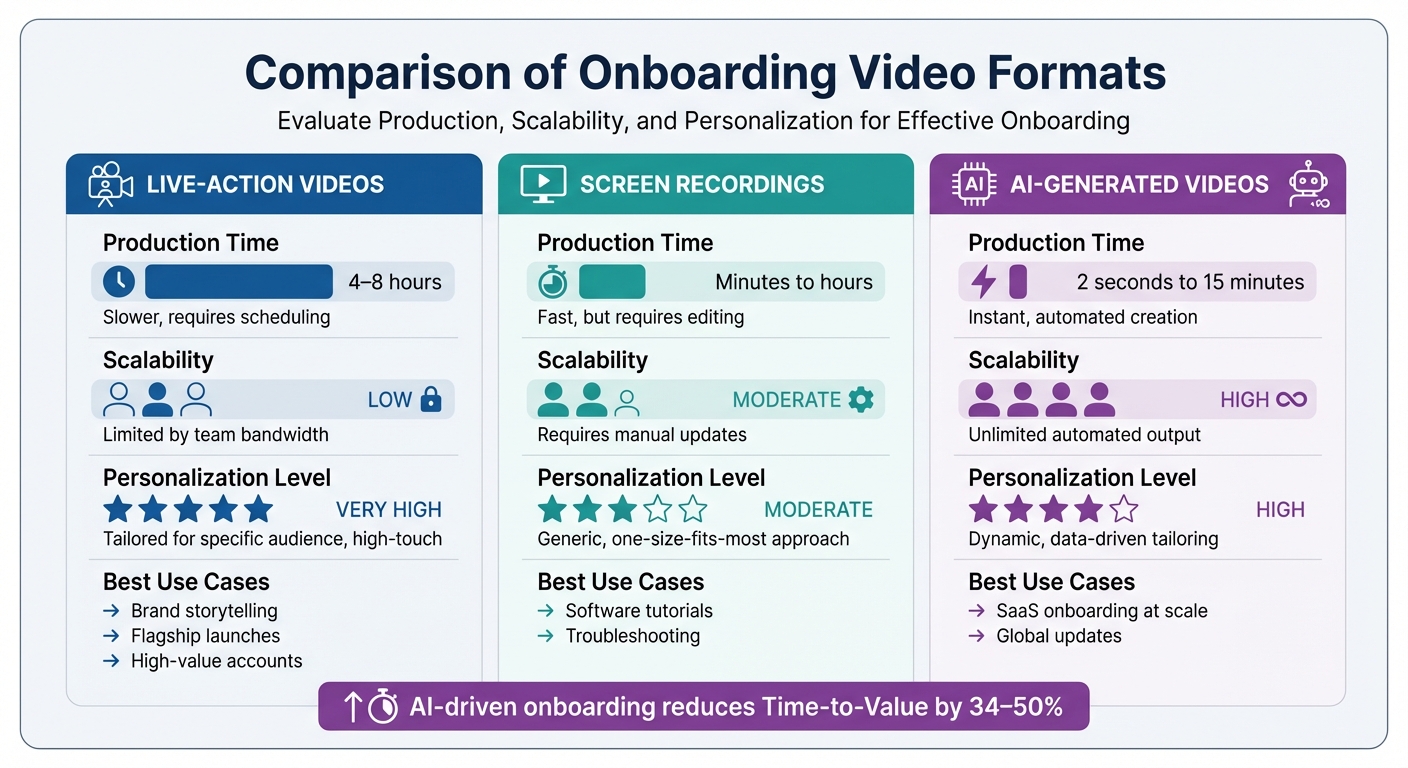
Comparison of Video Onboarding Formats: Production Time, Scalability and Use Cases
Selecting the right format for onboarding videos depends on factors like your team’s resources, how often updates are needed, and the number of users you’re onboarding. Each format comes with its own strengths and compromises in terms of production time, scalability, and how personalized the content can be. Here's a breakdown of the main formats:
Live-action videos are a great way to create an emotional connection with your audience. Featuring real employees, they’re ideal for welcoming high-value accounts or sharing your brand’s story. However, they’re time-intensive to produce, taking 4–8 hours per video. They’re also less practical if you need frequent updates or multi-language options.
Screen recordings are a go-to for software tutorials. They provide clear, step-by-step visual guidance and can be created relatively quickly - anywhere from minutes to a few hours. Tools like LongStories.ai make it easier to maintain consistency across tutorials by using reusable Universes. That said, screen recordings require manual updates whenever the software interface changes.
AI-generated videos are the fastest to produce, turning raw assets into polished content in as little as 2 seconds to 15 minutes. They excel at creating personalized content at scale and support multi-language output without additional recordings. Businesses using AI-driven onboarding have seen a 34–50% reduction in Time-to-Value, making this format ideal for companies onboarding large numbers of users each month.
Here’s a quick comparison of the three formats to help you decide which one fits your needs:
| Format | Production Time | Scalability | Personalization Level | Best Use Cases |
|---|---|---|---|---|
| Live-Action | 4–8 hours | Low (limited by team bandwidth) | Very High | Brand storytelling, flagship launches, high-value accounts |
| Screen Recordings | Minutes to hours | Moderate (requires manual updates) | Moderate | Software tutorials, troubleshooting |
| AI-Generated | 2 seconds to 15 minutes | High (unlimited automated output) | High | SaaS onboarding at scale, global updates |
Conclusion
Strong onboarding practices are the backbone of long-term retention for subscription-based video platforms. Starting with personalized welcome emails and videos, companies can create an immediate sense of connection while clearly outlining what users can expect during their first 30 days. In fact, platforms that adopt personalized onboarding strategies often see improved retention rates. Additionally, 86% of users report that they’re more likely to stay loyal to brands that take the time to welcome and educate them after sign-up.
But onboarding doesn’t stop there. Interactive tutorials take user engagement to the next level, turning passive viewers into active participants. Research shows that video content significantly enhances message retention compared to text. Pairing these tutorials with milestone-based content delivery helps users quickly reach their "aha moment" - the key point where they first experience the value your platform offers.
For more complex setups, live demos and dedicated support provide an extra layer of assistance, especially for high-value accounts. These sessions transform onboarding into a collaborative experience. As Paulina Staszuk, Head of Customer Success at Supademo, aptly states:
"If your onboarding creates confusion instead of reducing friction, you're running corporate hazing, not customer success".
The first 30 days are critical. By combining personalized communication, interactive tutorials, milestone-driven content, and live support, you can build trust and confidence in your platform. This approach not only simplifies the user experience but also lays the foundation for long-term loyalty.
FAQs
What should I measure to know onboarding is working?
To measure how well onboarding is working, focus on key metrics like user engagement with onboarding materials, time-to-value (how quickly users see the platform's benefits), completion rates for onboarding steps, and progress toward activation milestones. These indicators reveal how effectively users are adopting the platform and achieving important objectives.
How do I personalize onboarding without extra headcount?
You can make onboarding feel personal without hiring more staff by leveraging automated, targeted videos and sequences. Start by creating a welcome sequence that delivers customized content at critical milestones, helping users navigate essential steps. Pinpoint areas in the onboarding process where users often get stuck, and provide pre-recorded video support to address those challenges. By automating these steps, you can deliver a scalable and tailored onboarding experience that increases engagement and minimizes churn - all without adding to your team’s workload.
When should I use live demos instead of tutorials?
When customers hit a snag, feel overwhelmed, or start to lose interest, live demos can be a game-changer. They offer real-time, tailored assistance right when it matters most, making it easier for users to understand and take the necessary steps.
On the flip side, tutorials work best for broader, self-paced learning. They’re great for walking users through features at their own speed, without the pressure of immediate action.
By blending the two - live demos for immediate support and tutorials for continuous education - you can clear up confusion, keep users engaged, and lower the chances of churn.
Related posts
LongStories is constantly evolving as it finds its product-market fit. Features, pricing, and offerings are continuously being refined and updated. The information in this blog post reflects our understanding at the time of writing. Please always check LongStories.ai for the latest information about our products, features, and pricing, or contact us directly for the most current details.