
Best Practices for AI Voice and Lip-Sync Consistency
Maintaining consistent voice and lip-sync quality is critical for serialized video content. Viewers notice mismatches within 45 milliseconds, and poor synchronization can reduce message retention by up to 40%. AI tools now simplify this process, cutting production time by 80% and ensuring precise alignment.
Here’s what you need to know:
- Phoneme Matching: AI maps sounds to mouth shapes for natural speech synchronization. Use high-quality audio (48kHz, 16-bit or higher) to improve accuracy.
- Facial Analysis: Advanced models add realistic details, like jaw and tongue movements, ensuring your characters feel lifelike.
- Waveform Syncing: Aligns audio peaks with visuals, achieving over 95% accuracy in minutes compared to manual methods.
Key Tips for Success:
- Record in quiet environments and clean audio with tools to remove background noise.
- Use consistent AI voices or voice cloning with at least 20 minutes of high-quality samples.
- Stick to front-facing or 3/4 camera angles for better lip-sync accuracy.
- Standardize technical settings (e.g., 48kHz, 24-bit audio, 4K video) across episodes.
For serialized projects, tools like LongStories.ai streamline workflows by saving reusable settings for characters, voices, and styles. This ensures every episode looks and sounds consistent, keeping your audience engaged.
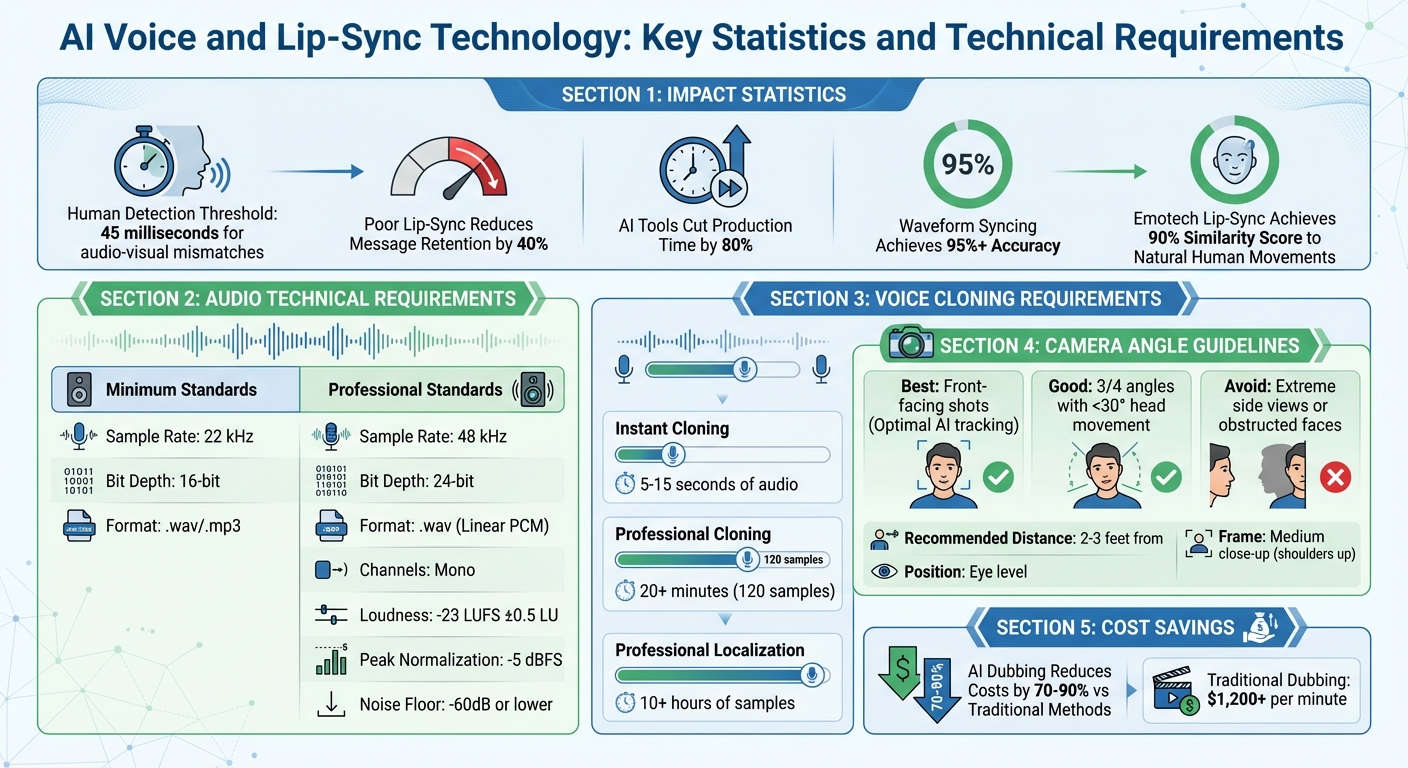
AI Voice and Lip-Sync Technology: Key Statistics and Technical Requirements
The BEST AI Video Lip Sync Techniques (Pro Tutorial)
How AI Voice and Lip-Sync Technology Works
Grasping how AI manages voice and lip-sync can help you pick the right tools and address any hiccups that come up. Today’s AI systems rely on three main technologies to create smooth, believable synchronization between audio and visuals. These methods work together to produce natural-looking video content.
Phoneme-Based Matching
AI breaks speech into smaller sound units called phonemes and matches them with corresponding mouth shapes, known as visemes. For example, sounds like /m/, /b/, and /p/ require the lips to close entirely, while /s/ and /t/ involve specific tongue and teeth positions.
Advanced tools like NVIDIA's Audio2Face-3D use prediction models to determine phoneme probabilities from audio features. This is especially crucial for sounds like bilabials, which need precise lip closure. These systems also apply motion loss functions to create smoother transitions between movements.
The accuracy of this technology is impressive. Humans can notice audio-visual mismatches within just 45 milliseconds, and poor lip-sync can reduce message retention by as much as 40%. To counter this, systems like Emotech's lip-sync tech achieve a 90% similarity score compared to natural human lip movements.
To get the best results, use high-quality audio (recorded at 48kHz, 16-bit or higher) and eliminate background noise or music that could interfere with phoneme detection. Plan to spend 20-30% of your project time fine-tuning opening lines and emotionally charged scenes.
AI-Driven Facial Analysis
While phoneme matching takes care of basic mouth movements, AI-driven facial analysis adds the subtle details that make lip-sync feel real. These systems rely on machine learning models trained on thousands of video hours to predict mouth movements based on audio, accounting for accents, speaking styles, and emotions.
The AI maps facial features - like the tongue, jaw, and eyes - into 3D displacements from a neutral base mesh. Through identity conditioning, a single AI network can handle multiple characters by using one-hot identity vectors, ensuring seamless animation across various styles.
"The model performs best when the character in the video appears to be talking naturally. It will preserve the speaker's style during lipsync." - Sync.so
To ensure smooth animation, loss functions are used to minimize velocity errors between frames, preventing the mouth from drifting out of sync during longer clips. Modern diffusion-based models are now preferred over older GAN-based approaches because they maintain finer details like teeth, wrinkles, and even facial hair.
For optimal results, position characters at front-facing or 3/4 angles. Extreme side views or objects covering the face can disrupt the accuracy of facial analysis. NVIDIA’s regression-based network can estimate a facial pose using just 0.52 seconds of audio, making it highly efficient for real-time applications.
Waveform Synchronization
Waveform synchronization aligns the peaks in audio with visual cues, forming the backbone of matching voice-over tracks to footage. Even minor desynchronization can create an unsettling "uncanny valley" effect, breaking viewer immersion.
For serialized content, maintaining consistency means standardizing technical settings like frame rates and audio sample rates across episodes. Advanced synchronization modes can even adjust playback speed, stretching or compressing video to perfectly align with audio.
AI-based waveform synchronization achieves 95%+ accuracy in just minutes, compared to manual frame-by-frame syncing, which can hit 99%+ accuracy but takes hours or days. This makes AI an excellent choice for social media, marketing, and batch projects, while manual methods remain the gold standard for high-end film requiring precise emotional nuance.
To keep synchronization clean, trim silent buffers at the start and end of audio clips to avoid unnecessary mouth movements. If movements seem too subtle, amplifying the audio can help the software better detect speech peaks.
Audio and Voice Consistency Checklist
When it comes to AI lip-sync, the quality of your audio can make or break the final output. Poor recordings leave the AI guessing, which leads to mismatched mouth movements and awkward visuals. To ensure your serialized content maintains a polished and professional look, follow these steps to keep your audio consistent.
Remove Background Noise from Audio
Background noise can confuse AI systems, masking the phonemes they rely on to sync speech accurately. Even minor sounds like air conditioning, fan hum, or keyboard clicks can disrupt the process. For the best results, aim for a noise floor level of -60dB or lower.
Start by recording in a quiet environment with soft furnishings to dampen echo. Position your microphone about a hand’s width (12–18 inches) from your mouth to minimize plosives and other interference. After recording, use AI-powered denoising tools to clean up the audio.
"The quality of your input media has a direct impact on the final lipsync output." - Sync.so
Trim any silent sections at the beginning and end of your clips to avoid the AI attempting to lip-sync to background hiss. If your audio was recorded at a low volume, amplify it before processing. Low volume can limit lip-sync accuracy as the AI struggles to map speech patterns to mouth movements.
Once your audio is clean, focus on maintaining natural speech pacing for better synchronization.
Maintain Natural Speech Pacing and Pronunciation
Clean audio is just the first step - natural pacing is equally important for creating believable lip-sync. A conversational rhythm helps AI-generated voices sound more human. Use punctuation strategically: ellipses (...) and dashes ( - ) create natural pauses, while exclamation points convey energy and emphasis. For added realism, include filler words like "uh" or "um" and non-verbal cues like [sigh] or [clears throat].
To avoid mispronunciation, spell out numbers, currency, and dates. For instance, write "$5.50" as "five dollars and fifty cents". For specific names or terms that need consistent pronunciation, upload pronunciation dictionaries (e.g., .PLS or .TXT files) or use SSML phoneme tags with CMU Arpabet.
Adjust speed sliders - typically between 0.7 and 1.2 - to balance emotional expressiveness with steady delivery. Break long scripts into smaller sections to reduce latency and maintain consistent pacing. Always match the AI voice's native language to your text for accurate pronunciation.
Use High-Quality Sample Rates and Avoid Compression
The quality of your audio file directly affects how well AI systems can analyze and replicate speech. While 22 kHz at 16-bit is the minimum standard for instant voice cloning, professional-grade results require 48 kHz at 24-bit in uncompressed WAV format with a Linear PCM codec. Avoid compressed formats like MP3, as they introduce artifacts that degrade voice quality and disrupt lip-sync accuracy.
| Feature | Instant Voice Cloning (Minimum) | Professional Voice Cloning (Optimal) |
|---|---|---|
| Audio Format | .wav/.mp3 | .wav |
| Sample Rate | 22 kHz | 48 kHz |
| Bit Depth | 16-bit | 24-bit |
| Codec | Standard | Linear PCM (Uncompressed) |
| Channels | Mono or Stereo | 1 (Mono) |
Record in mono to give the AI a clean, single voice source without spatial interference. Keep loudness levels at -23 LUFS ±0.5 LU and normalize peaks to -5 dBFS to avoid clipping while preserving signal strength. If your source audio includes background music, isolate the vocal track first, as music can interfere with accurate lip-sync mapping.
Select Consistent AI Voices or Voice Cloning
Consistency in voice is key to maintaining viewer immersion in serialized content. Switching between voices or using inconsistent cloning samples can disrupt the flow and feel of your project. For instant cloning, provide 5 to 15 seconds of flawless audio; for professional-grade models, supply at least 20 minutes (about 120 samples) of high-quality recordings.
When recording your own voice for cloning, turn off auto-gain and auto-exposure settings on your devices to keep the audio profile consistent. Document the specific AI voice model, version, and settings you use. This makes it easier to replicate the same voice characteristics in future episodes. Platforms like LongStories.ai allow creators to save reusable "Universes" with consistent voices, eliminating the need to reconfigure settings for every new project.
For multilingual projects, opt for multi-language phoneme models that can maintain voice consistency across languages instead of switching to entirely different voice models.
Visual and Lip-Sync Consistency Checklist
When it comes to creating serialized content, keeping visuals consistent is just as critical as maintaining audio quality. Any missteps - like awkward camera angles, fluctuating character designs, or mismatched styles - can pull viewers out of the experience. Just as steady audio builds trust, uniform visuals ensure your series stays immersive and professional.
Create Reusable Character Universes
For serialized content, your characters need to look the same in every episode. Even small changes in their features or outfits can feel jarring to viewers. To avoid this, lock in the defining traits of your characters before production begins.
Start by creating neutral, front-facing "passport shots" to act as visual reference points. These baseline images help prevent AI from altering character features when generating new scenes. For even better results, consider using tools like LoRA or DreamBooth with 10–30 carefully selected images that show your characters from different angles and under various lighting conditions.
Detailed descriptions are also key. Use specific identifiers like "short curly hair, red varsity jacket, small scar above left eyebrow" to reinforce character identity. Platforms such as LongStories.ai allow creators to build reusable "Universes", where characters, styles, and even voices stay consistent across multiple videos - saving you time and effort.
Once you've nailed down your character designs, make sure your camera angles highlight these features effectively.
Use Front-Facing or 3/4 Angles
Camera angles play a huge role in lip-sync accuracy. Front-facing shots give AI models the clearest view of the mouth and jaw, making it easier to sync speech sounds with facial movements. For variety, three-quarter (3/4) angles work well, but keep head movements minimal - no more than 30° - to avoid tracking issues. Beyond that range, the AI may struggle to interpret the hidden side of the mouth, leading to errors like jittery or misaligned animations.
For best results, frame your shots as medium close-ups, capturing the character from the shoulders up. This strikes a balance between showing enough detail and minimizing potential synthesis errors. Position the camera at eye level and maintain a distance of about 2 to 3 feet to avoid distortion caused by the lens.
"The first 15 seconds of your video are critical - minimize blinking and excessive movement to maintain focus and clarity when speaking." - Jay Richardson, Creative Technologist
Even subtle audio-visual mismatches can throw viewers off. Research shows that people can detect misalignments within 45 milliseconds, and poor lip-sync can reduce message retention by up to 40%. Getting the angle right from the start saves time and money on fixes later.
Define Persistent Styles and Mouth Shapes
Consistency in visual style is just as important as character identity. If your animation style shifts between episodes - say, from photorealistic to cartoonish or from detailed to simplified - it can be distracting. Stick to one style throughout the series. Photorealistic styles tend to work better because AI models handle realistic mouth shapes more accurately than heavily stylized designs.
For 2D projects, using a standardized mouth chart can help keep speech movements consistent. For example, Phoneme A represents sounds like "m", "b", and "p", while Phoneme G corresponds to "f" and "ph".
Document all your visual parameters - such as resolution (aim for 4K), lighting setup (soft, indirect natural light), and color grading - to ensure future episodes match the established look. Tools that enforce shot-to-shot consistency can prevent subtle changes in a character's appearance between frames. Breaking long narratives into shorter segments and using keyframes to propagate visual identity helps maintain coherence across episodes.
sbb-itb-94859ad
Tool Selection and Workflow Optimization Checklist
Picking the right tools for your serialized video workflow is a game-changer. The right tools cut down on manual tasks, giving you more time to focus on the heart of your project: storytelling.
Choose Platforms with Long-Form Support
Many AI video tools limit clips to 5-20 seconds, forcing you to piece together multiple short clips for a single episode. This can disrupt narrative flow and create unnecessary work. For serialized content, platforms with long-form support are essential to maintain consistency and streamline production.
Take LongStories.ai, for example. It supports videos up to 10 minutes long - perfect for meeting YouTube's monetization requirements. Its reusable "Universe" system ensures that characters, voices, and visual styles stay consistent across all your videos, cutting out repetitive setup tasks.
Synthesia is another standout option, offering version control and one-click updates for entire video libraries. It’s trusted by 90% of Fortune 100 companies and supports translation into 140+ languages.
"What used to take 4 hours now takes 30 minutes" - Rosalie Cutugno, Global Sales Enablement Lead
For workflows requiring frequent edits, Descript simplifies the process by letting you edit video through a text transcript. This approach keeps long sequences consistent without the hassle of manual splicing.
Once you've narrowed down your options, test each tool's ability to handle lip-sync accuracy under challenging conditions.
Compare Lip-Sync Accuracy Across Tools
Lip-sync accuracy is critical for creating polished, professional videos. Test how tools handle fast-paced dialogue and strong accents - these scenarios often expose weaknesses in audio-to-visual alignment.
LatentSync excels in this area, using latent diffusion models and OpenAI's Whisper for precise synchronization. It’s particularly effective for tasks like movie dubbing and localization. Plus, it works with as little as 8GB of VRAM, making high-quality sync accessible even on lower-end hardware.
Another option, LTX-2, generates synchronized 4K video at 50 FPS in a single process, eliminating the need to layer audio separately. It also supports LoRA training, allowing you to customize character visuals for consistent appearances across episodes.
Use Automation for Scalability
Once you've selected tools that meet your needs, automation can take your workflow to the next level. By automating repetitive tasks like asset conversion, batch processing, and localization, you can scale production without adding more manual effort. Platforms with API access are particularly useful for building custom pipelines capable of processing hundreds of videos at scale.
For example, WaveSpeedAI and LatentSync both offer REST APIs designed for high-volume workflows, ensuring immediate processing for serialized batches. VEED's LipSync, powered by WaveSpeedAI, features a REST API with zero cold starts, so requests are processed instantly. Pricing is straightforward at $0.15 per 5 seconds of video, making it easy to plan budgets.
Tools like Colossyan's "Doc to Video" and HeyGen's "PPT/PDF to video" transform presentations into video scenes complete with scripts and animations. HeyGen even includes a Batch mode for processing multiple assets at once, saving significant time.
Automation also makes localization far more cost-effective. AI-powered solutions can cut traditional dubbing costs by 70-90%, a huge savings compared to manual services that can exceed $1,200 per minute.
"100 hours of translation done in 10 minutes!" - Geoffrey Wright, Global Solutions Owner
For serialized content aimed at a global audience, automation isn’t just a convenience - it’s the key to making large-scale production financially viable.
Troubleshooting Common Lip-Sync Issues
Even with the best settings and tools, minor lip-sync problems can still pop up. These steps can help resolve some of the most common challenges.
Fix Jittery Movements
Erratic or jittery mouth movements often stem from poor audio quality. Background noise, echoes, or low-resolution video can throw off the AI's ability to detect phonemes, leading to inconsistent mouth shapes. Boosting the audio clip's volume can encourage smoother and more accurate mouth movements.
Another trick is to trim any silent sections at the beginning or end of the clip, as these can cause unintended mouth movements. For longer clips, some systems might experience "drift", where lip-sync accuracy decreases over time. Using medium or 3/4 shots instead of tight close-ups can help hide subtle imperfections in the synthesis. If your dialogue includes varied speech patterns, you might need to tweak the settings further.
Adjust for Accents and Fast Dialogue
Fast-paced speech and regional accents can be tricky for many AI models, as they’re often trained on more standardized speech patterns. If rapid speech causes sync issues, try stretching the audio by 5–10%. This gives the AI more time to process complex phoneme transitions.
Amplifying the audio can also improve phoneme detection, especially for accented or fast speech. Using high-quality audio - 48 kHz at 16-bit or higher - ensures subtle phonetic details are captured. Research shows that audiences can notice even slight audio-visual mismatches, as small as 45 milliseconds, and poor lip-sync can reduce message retention by up to 40%. These adjustments help maintain alignment, even with challenging speech patterns.
Verify Audio-Visual Alignment
Getting the timing right between audio and visuals is crucial for smooth lip-sync. If the audio and video durations don’t match, you may notice a gradual misalignment. Many tools offer sync modes to fix this. For example, "remap" mode adjusts the video playback speed to match the audio, while "bounce" or "loop" modes fill visual gaps when the audio runs longer.
Use sound scrubbing in your editing software to check that specific phonemes - like /oo/ or /b/ - line up with mouth movements on the timeline. Watch out for frame rate mismatches, too, as they can cause micro-stutters. Optimizing your video at 1080p with a frame rate of 30 or 60 fps can help avoid these issues. For particularly tricky words or phrases, consider inserting B-roll or cutaway shots to mask any sync errors.
Maintaining Brand Consistency Across Serialized Content
When creating a series of videos, keeping recognizable characters and consistent voices is what separates polished, professional content from amateur attempts. Netflix’s dubbing practices offer a great example: "The dub or artistic director is the ship's captain... their goal is to build a dub that sounds unified, authentic, and clear". This same "captain's-eye view" is crucial for AI-generated serialized content. Every episode should work together seamlessly to reinforce your brand identity.
Document Voice Characteristics and Style Guides
To maintain consistency across serialized content, start by documenting the essential voice details. A "Show Guide" or Production List can help you capture key traits like volume, pitch, articulation, and "attack" for each character. Record voice samples that showcase a range of emotions - this avoids flat or monotone performances in future episodes. Technically, your audio should meet professional standards: 48 kHz sampling rate, 24-bit depth, and -23LUFS loudness.
Pronunciation is another key piece. Building a pronunciation dictionary with lexicon files (.PLS or .TXT) using phonetic alphabets like CMU Arpabet or IPA ensures consistent pronunciation of brand names, character names, and acronyms. Emotional cues can also be standardized by including consistent audio tags like [whispers], [sighs], or [excited] in your scripts. These tags guide the AI model to deliver the intended tone and emotion across episodes.
Standardize Processing Parameters
Creative consistency is important, but so is technical precision. Document the AI model version you’re using - such as lipsync-2-pro versus lipsync-2 - and lock in slider settings for Stability and Style Exaggeration. Even minor variations between episodes can lead to noticeable differences in how characters look and sound. Stick with a default sync mode, like remap for segmented generations, to ensure smooth audio-visual alignment. These consistent settings help maintain a polished, uniform look and sound throughout your series.
Platforms like LongStories.ai simplify these challenges by letting creators build reusable "Universes." In these Universes, characters, voices, and styles are automatically preserved across videos, eliminating the need to reconfigure settings for each new episode.
Use Multi-Language Phoneme Models for Localization
For reaching international audiences, advanced phoneme models can adapt lip-syncing for different languages while keeping your brand’s visual identity intact. With the global localization market projected to hit $5.7 billion by 2030, it’s worth investing in high-quality voice synthesis. Achieving professional results typically requires at least 10 hours of clean voice samples. For multilingual content, standardize configuration files (like tts_model_id and language codes) and use uniform prompts to expand abbreviations and format numbers consistently, reducing pronunciation errors.
If your content involves multiple speakers, you’ll need "speaker diarization" to assign different synthetic voices to each character. While current automated pipelines often support only one speaker per video, planning for these details early can save significant time later. By standardizing localization workflows, you ensure your serialized content stays aligned with your brand’s identity, no matter the language.
Conclusion
Maintaining consistent voice and lip-sync quality is essential for effective storytelling. According to Emotech researchers, even minor synchronization errors can trigger the uncanny valley effect, leading audiences to disengage from otherwise well-crafted avatars. For creators producing serialized content, this consistency is crucial in keeping viewers invested and eager for the next episode.
This guide's checklists combine creative and technical strategies to ensure seamless AI video production. From fine-tuning technical settings to documenting character details, these practices work together to uphold your brand identity across episodes. Advanced lip-sync technology can achieve up to 90% accuracy in mimicking human movement, but success relies on creators following structured workflows.
"Character consistency isn't just a technical problem for us creators; it's the bedrock of good storytelling. When a character's appearance keeps changing, it shatters the illusion." - Arsturn
By prioritizing precision, you not only enhance your visuals but also strengthen the narrative you’re building.
For YouTube creators and digital storytellers working on serialized projects, tools like LongStories.ai simplify the process by standardizing voices, styles, and character traits. These solutions help ensure that each episode reinforces your brand's continuity.
Neglecting audio consistency can undermine both content quality and monetization opportunities. Adopting these strategies lays the groundwork for reliable, monetizable long-form content that resonates with audiences and meets platform expectations.
FAQs
How do AI tools ensure accurate lip-syncing in video content?
AI tools bring a new level of precision to lip-syncing by leveraging advanced deep-learning models. These models analyze audio and match phonemes to specific mouth movements, creating smooth and lifelike synchronization that feels natural to viewers.
By automating tasks like timing adjustments and handling multiple faces at once, AI not only reduces the chance of human error but also significantly accelerates the production process. For creators working on serialized content, platforms like LongStories.ai ensure consistent character voices and expressions, simplifying workflows while maintaining top-tier quality.
How can I ensure accurate and consistent lip-sync in AI-generated videos?
To create precise and consistent lip-sync in AI-generated videos, the foundation lies in high-quality audio. This means using clean, full-bandwidth recordings that are free from background noise and have balanced amplification. On the visual side, opt for high-resolution footage. Clear, front-facing shots with proper lighting, sharp focus on the mouth, and steady character expressions are key. For the best results, aim for 4K resolution and a frame rate of 60 fps to ensure smooth, natural motion.
For serialized content, maintaining a consistent style and feel is much easier with tools like LongStories.ai. These tools let creators reuse characters, styles, and voices across multiple projects, simplifying production while keeping the visuals and audio cohesive.
Why is it important to keep characters and voices consistent in a video series?
Consistency in characters and their voices is key to keeping viewers hooked and preserving the immersive feel of a video series. When the voices match the characters perfectly and lip-syncing is on point, it builds trust in the characters and elevates the quality of the content.
This level of consistency strengthens the bond with your audience, making your brand and story more memorable while fostering viewer loyalty. By keeping your characters recognizable from one episode to the next, you create a seamless and polished series that leaves a lasting impression.
Related posts
LongStories is constantly evolving as it finds its product-market fit. Features, pricing, and offerings are continuously being refined and updated. The information in this blog post reflects our understanding at the time of writing. Please always check LongStories.ai for the latest information about our products, features, and pricing, or contact us directly for the most current details.