
How Audio Quality Impacts LinkedIn Engagement

Poor audio can ruin your LinkedIn videos - even if your visuals are perfect. By 2026, LinkedIn's algorithm penalizes videos with bad sound, reducing their reach and engagement. Viewers are quick to scroll away if they hear echoes, background noise, or muffled voices. Research shows:
- 35% more cognitive effort is needed to process bad audio, leading to faster drop-offs.
- Clear audio improves memory recall by 10% and boosts word recognition.
- Videos with high-quality audio perform better, increasing completion rates and dwell time.
Even though most videos are initially watched on mute, the moment someone unmutes, poor sound quality can instantly drive them away. Simple fixes like an external microphone or basic editing tools can make a huge difference. Prioritizing sound clarity could mean the difference between your video thriving or being ignored.
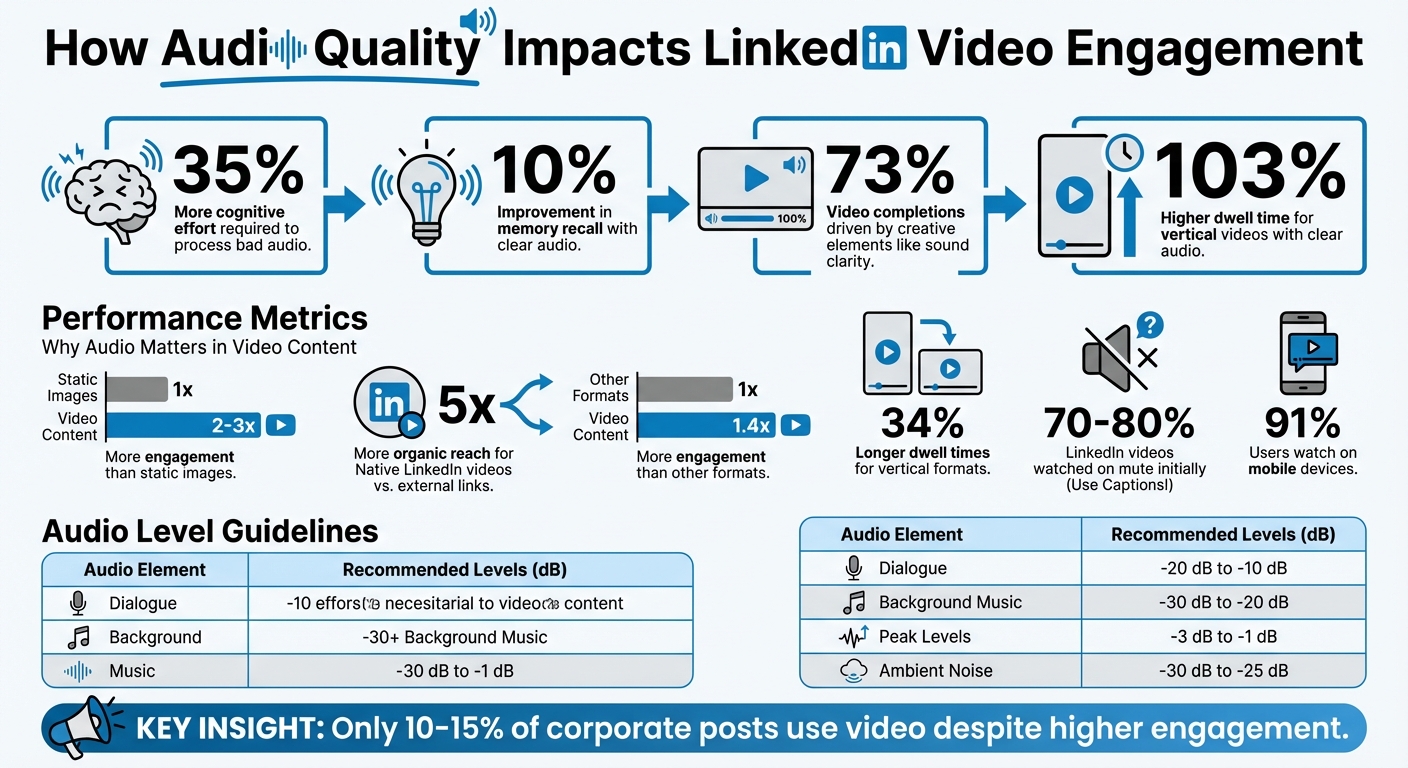
How Audio Quality Impacts LinkedIn Video Engagement: Key Statistics
How Audio Quality Affects Viewer Behavior
Let’s dive into how audio quality shapes the way viewers interact with content.
Bad audio is a dealbreaker. Think about it - if a video has echo, background noise, or muffled sound, most people won’t stick around. They’ll scroll past without hesitation. And it’s not just viewers who react poorly. LinkedIn’s algorithm flags videos with subpar audio and reduces their visibility, making it even harder for your content to gain traction.
Here’s why audio matters so much: research shows that poor sound quality increases cognitive load by 35%. In noisy or distracting environments, this extra mental effort makes viewers lose interest fast, no matter how great the visuals or insights are.
On LinkedIn, video completion rate is a major factor in determining distribution. Videos with clear, crisp audio consistently perform better in this area. Even though 70–80% of LinkedIn videos are watched without sound initially, viewers who unmute expect high-quality audio. If they don’t get it, they’re likely to move on.
Audio's Effect on Viewer Retention
Clear audio doesn’t just prevent viewers from dropping off - it actively keeps them engaged. It also enhances memory recall by 10% and improves word recognition. This is especially critical for B2B content, where professionals are looking for actionable, easy-to-understand information.
According to LinkedIn, creative elements like sound clarity and storytelling have a bigger impact on video performance than production budgets. In fact, 73% of video completions and 49% of engagement are driven by these factors. A simple smartphone video with excellent audio can easily outperform a high-budget production plagued by sound issues. Moreover, “real talk” vertical videos with clear, mobile-friendly audio generate 103% higher dwell time compared to overly polished, generic ads.
With the rise of vertical, mobile-first videos, sound quality has become even more critical. Vertical formats deliver 34% longer dwell times, and since up to 91% of users watch on mobile devices, even small audio flaws stand out. Investing in a $50 external microphone can make a bigger difference in reach and engagement than spending $500 on a camera.
Measuring Audio Quality: Key Metrics
To ensure your videos meet both LinkedIn’s algorithm requirements and viewer expectations, focus on these audio metrics:
| Audio Element | Recommended Level (dB) | Purpose |
|---|---|---|
| Dialogue | -20 dB to -10 dB | Keeps speech clear and distinct |
| Background Music | -30 dB to -20 dB | Adds depth without overpowering |
| Peak Levels | -3 dB to -1 dB | Prevents distortion and clipping |
| Ambient Noise | -30 dB to -25 dB | Maintains realism without distractions |
To make your voice the star, keep dialogue levels between -20 dB and -10 dB. If you’re using background music, make sure it stays between -30 dB and -20 dB so it complements rather than competes with your speech. Peak levels should remain between -3 dB and -1 dB to avoid any distortion.
For the best results, aim for a 24-bit depth and a 48kHz sample rate in your recordings. These settings capture a wider range of sound and ensure your audio is clear and sharp, even on mobile devices.
sbb-itb-94859ad
Case Studies: Audio Quality and Engagement Results
Before and After: Audio Upgrades and Results
The connection between audio quality and viewer behavior is undeniable, as these case studies show how improving audio can significantly boost LinkedIn engagement.
Video content on LinkedIn generates 2-3 times more engagement than static images, yet only 10-15% of corporate posts leverage video. Creators who focus on producing consistent video content with good audio tend to outperform those who delay for "perfect" production setups. The evidence is clear: strong audio quality plays a critical role in driving successful LinkedIn video interactions.
Native LinkedIn videos also enjoy 5 times more organic reach compared to external links, and video content outperforms other formats with 1.4 times more engagement. When creators prioritize audio quality, their videos can reach nearly three times as many viewers as their best-written posts.
What B2B Creators Learned About Audio
Professional creators have discovered that LinkedIn's 2026 algorithm can detect when poor audio causes viewers to abandon a video, which then reduces its reach. This realization has reshaped how creators approach video production.
"Invest in a $50 external microphone before you invest in a $500 camera setup." - Synergist Digital Media
Today’s top B2B creators follow a strategy that emphasizes visuals but treats audio as essential. Even though many viewers watch videos on mute, those who unmute expect clear, high-quality sound. Bad audio, often described as "conference room sound", is now widely recognized as a leading cause of viewer drop-off.
Human-reviewed captions have also become a must-have for maximizing reach. LinkedIn’s algorithm can tell the difference between raw AI-generated captions and those refined by humans for accuracy. Neal Schaffer highlights the importance of captions with this insight:
"Captions aren't optional - they're essential for reach"
Another key takeaway is that speaking slightly slower than normal conversation speed improves both viewer understanding and the accuracy of automated caption tools. These lessons provide a roadmap for creators looking to raise their audio game and achieve better engagement.
How to Improve Audio Quality for LinkedIn Videos
Audio Editing and Tools to Polish Your Sound
When it comes to fine-tuning audio for LinkedIn videos, creators often rely on tools like Audacity, Adobe Audition, and Descript. These programs handle tasks like noise reduction, echo removal, and volume adjustments effectively.
If you're looking for a quick way to clean up filler words and distracting sounds, Gling is a great option. This AI-powered software identifies and removes "ums", "ahs", and similar interruptions automatically. It’s a time-saver for creators who want their videos to sound polished and professional without spending hours on manual edits.
Professional Standards and Techniques for Audio Production
After editing, it’s important to meet technical benchmarks to ensure your audio sounds great on LinkedIn. Using the right format and settings can make a noticeable difference. For LinkedIn videos, aim for AAC or MP3 audio formats with a bitrate of 128 to 192 kbps and a sample rate of 44.1 kHz or 48 kHz.
When recording, keep your audio levels between -12dB and -6dB. This range prevents distortion while keeping your voice clear and loud enough, especially for mobile viewers. These settings not only align with LinkedIn’s algorithm preferences but also help keep your audience engaged.
Delivery speed is another crucial factor. A pacing of 130–140 words per minute works best for LinkedIn’s professional audience. Speaking too quickly might make you sound rushed, while going too slow can risk sounding overly deliberate or even patronizing.
Your recording environment also plays a big part in achieving high-quality audio. Use a cardioid microphone like the Shure SM7B or Audio-Technica AT2020USB+ to focus on your voice and block out background noise. Record in a quiet space with minimal echo, and consider adding sound-absorbing materials to your setup. Proper mic positioning and a test recording can help you catch any issues before you start your full session.
AI Tools to Streamline and Enhance Audio Quality
AI tools have made it easier than ever to keep your audio consistent and professional across multiple videos. For example, ElevenLabs TTS offers thousands of voice options along with customizable clarity and stability settings. For LinkedIn content, try setting Stability to 0.75–0.80 and Clarity to 0.70–0.75. These settings help create a clear, authoritative tone that works well for professional audiences.
When layering audio, maintain balance by setting your voiceover at 0dB, sound effects at -8dB, and background music between -15dB and -18dB. This approach ensures your voice stays front and center while subtle audio elements enhance the overall production without becoming a distraction.
For creators managing large-scale content production, tools like LongStories.ai simplify the process. This platform allows you to save and reuse custom voice settings, ensuring consistency across multiple videos. By streamlining audio production, you can maintain a cohesive brand voice without the hassle of recording new voiceovers for every project.
Conclusion
Audio quality plays a major role in LinkedIn engagement. Poor sound, like echo or background noise, can make content harder to follow, leading to early drop-offs and lower completion rates. Given that LinkedIn's 2026 algorithm favors videos with higher completion rates, even small audio issues can hurt your organic reach.
Research shows that clear audio improves engagement by boosting memory recall by 10% and helping viewers retain information longer. While professional audiences may accept lower video resolution, they are far less forgiving when it comes to distorted or unclear sound.
This highlights a key insight about LinkedIn video content: good audio builds trust and signals professionalism. As video becomes increasingly important for B2B creators, those who prioritize audio quality will see better engagement. Investing in tools like external microphones, editing software, or AI-based audio fixes doesn’t have to break the bank but can make a noticeable difference.
In fact, 73% of video completions are influenced more by creative choices, like sound clarity, than by high production budgets. By focusing on clear, high-quality sound, you’ll keep your audience engaged and improve your content’s performance on LinkedIn.
FAQs
What’s the fastest way to fix bad audio on LinkedIn videos?
Clear audio can make or break your LinkedIn videos. The fastest way to improve poor audio is by either upgrading your audio equipment or applying post-processing techniques, such as noise reduction and volume adjustments. High-quality sound keeps viewers engaged, while bad audio drives them away and lowers retention. Fixing audio issues quickly can have a big impact on how your video performs.
How can I tell if my audio levels are “good enough” for LinkedIn?
If you want your LinkedIn content to shine, clear and consistent audio quality is a must. Abrupt volume shifts, background noise, or muffled sound can ruin the viewing experience and push people away from your message.
To avoid these pitfalls:
- Invest in good equipment: A decent microphone can make a world of difference.
- Eliminate background noise: Use noise reduction tools during post-production to clean up your audio.
- Keep the sound balanced: Ensure your audio is distortion-free and at a consistent volume throughout.
When your audio is clear and easy to listen to, your audience is more likely to stay engaged and connect with your content.
Do captions help even if my video audio is high quality?
Captions can dramatically boost the reach of LinkedIn videos - by as much as 112% - even when the audio quality is excellent. They enhance passive viewing time and drive engagement by making videos accessible for those watching without sound or in noisy settings.
Related posts
LongStories is constantly evolving as it finds its product-market fit. Features, pricing, and offerings are continuously being refined and updated. The information in this blog post reflects our understanding at the time of writing. Please always check LongStories.ai for the latest information about our products, features, and pricing, or contact us directly for the most current details.