
How AI Tools Help Refine Audience Targeting
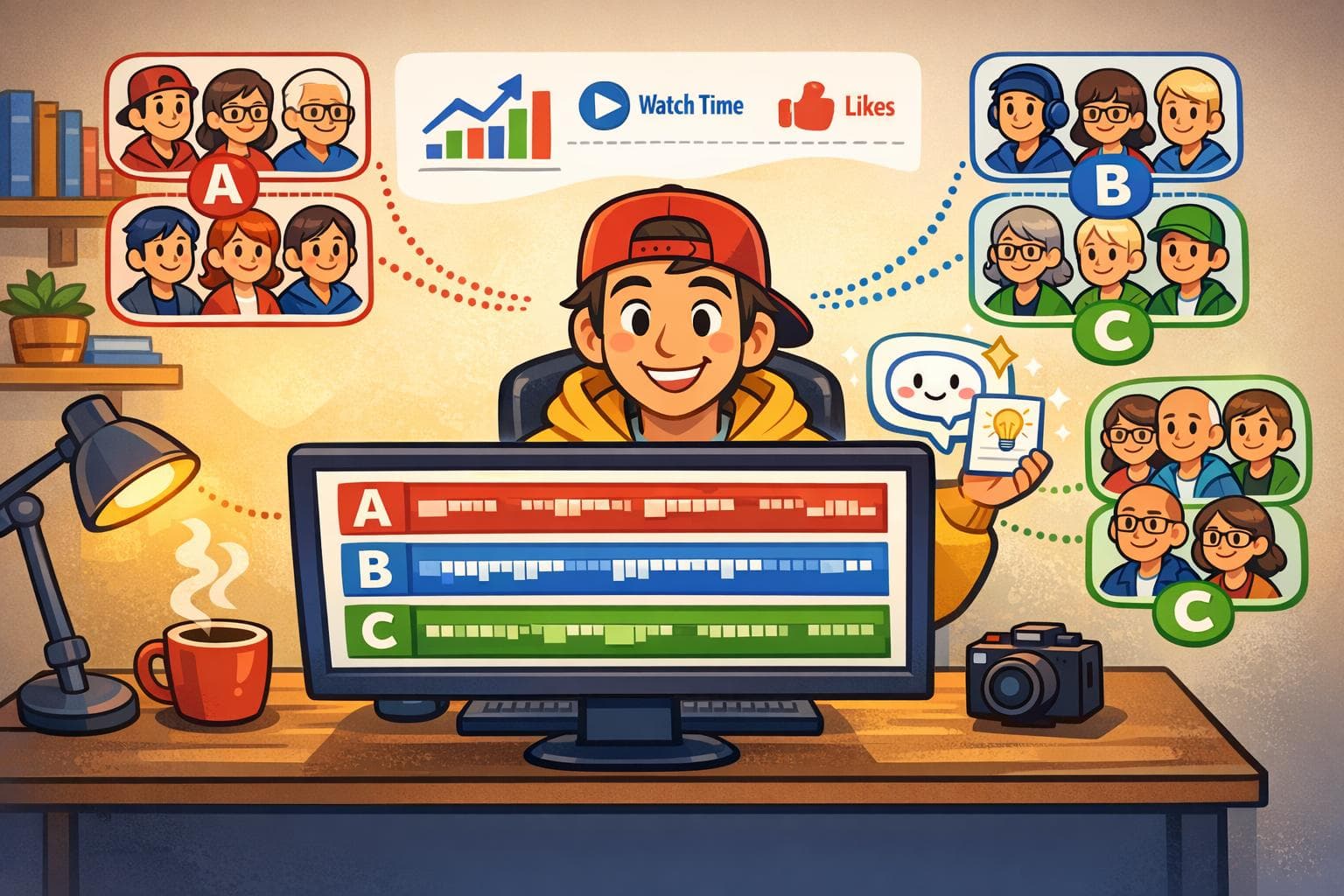
AI tools are changing the way YouTube creators connect with their audience. Instead of relying on outdated demographic data, these tools analyze real-time behaviors to identify viewers who are most likely to engage. Here's the key takeaway: AI-driven targeting leads to better engagement, higher ROI, and smarter content strategies.
Key Insights:
- Boost Engagement: Creators using AI see click-through rates exceed 10% and report up to 32% longer view durations.
- Smarter Audience Segmentation: AI identifies viewer intent and creates detailed personas, moving beyond basic demographics.
- Optimized Content Creation: Tools like LongStories.ai allow creators to maintain consistent branding while producing videos faster.
- Cost Savings: AI reduces customer acquisition costs by 12–30% and increases ROI by 15–20% in just 90 days.
- Real-Time Feedback: AI dashboards help creators adjust content quickly, improving performance metrics like retention and conversions.
By focusing on behavior, AI helps creators refine their strategies, personalize videos for different audience segments, and scale production efficiently. Whether you're analyzing viewer patterns, testing content formats, or monitoring results, AI simplifies the process and delivers measurable results.
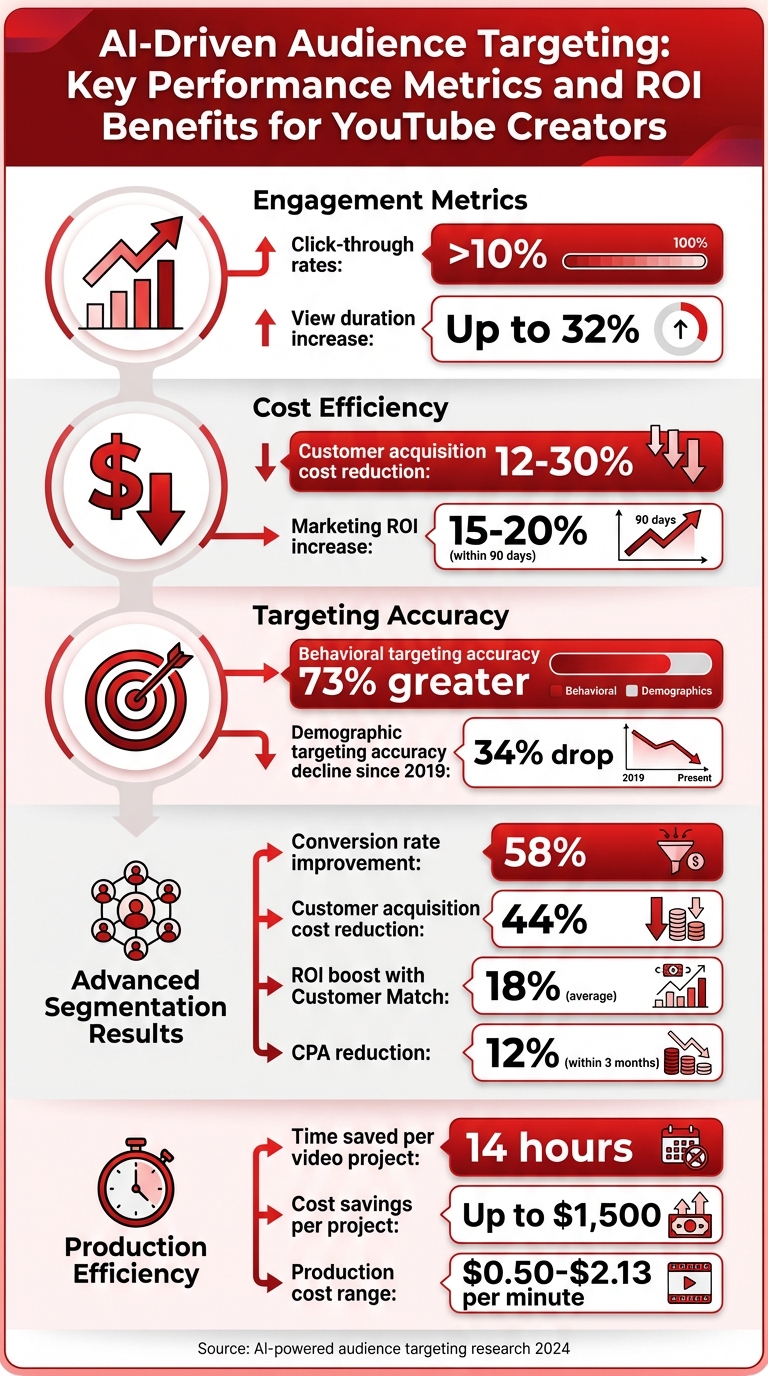
AI-Driven Audience Targeting: Key Performance Metrics and ROI Benefits
Step 1: Analyze Your Current Audience Data with AI
AI Analytics for Understanding Viewer Behavior
YouTube Analytics provides a wealth of numbers, but AI tools help explain the "why" behind those numbers. For example, instead of just seeing that viewers dropped off at the two-minute mark, AI can help pinpoint whether it was due to slower pacing, repetitive content, or an unengaging introduction. This kind of analysis turns raw data into actionable insights, giving you a clear path for improvement.
One key feature is real-time subscriber tracking. If you notice sudden spikes in subscribers, it’s a strong indication that your content is striking a chord. AI tools can flag these spikes instantly, acting as an early alert system - often faster than standard dashboards.
"Watch time per impression... combines retention and click-through rate into one brutal metric that tells you if people both click and stick around. That's your trust signal in the algorithm's eyes." – AIJ Guest Post
AI also shines when it comes to device analysis. If most of your viewers are on mobile, your videos might benefit from faster cuts and tighter pacing. On the other hand, viewers on larger screens might prefer a slower, more narrative-driven approach. These insights help you tailor your content to match how and where your audience watches.
By understanding these patterns, you can go beyond fixing problems and start creating content that truly connects with your viewers.
Find Content That Connects with Your Viewers
AI tools can also help identify what’s working in your videos by analyzing retention graphs. For instance, if certain moments are rewatched repeatedly, those "golden moments" might be a well-timed joke, a standout visual, or an engaging story element. Repeating or building on these moments in future content can boost engagement.
Retention graphs also reveal weak spots. If there’s a sharp drop-off in the first 15–30 seconds, it’s often a sign your intro isn’t grabbing attention. AI-recommended changes to pacing or structure can lead to improvements - some creators have seen average view duration increase by up to 32%. YouTube Studio’s Advanced Mode even lets you analyze up to 500 videos at once, helping you spot consistent trends across your channel.
AI can also streamline testing. Instead of manually trying out different transitions or styles, AI tools can use historical data to generate scenarios that are more likely to succeed. This approach has been shown to boost click-through rates above 10%, saving you time while improving results.
Step 2: Define Target Audience Segments with AI
Build Audience Personas
While traditional YouTube Analytics provides basic demographic data, AI tools take it further by uncovering why viewers engage with your content. For instance, tools like Proxona leverage Large Language Models to analyze unstructured data, such as comments, and create detailed audience personas. Instead of generic categories like "males aged 25–34", you gain insights into personas such as "novice hobbyists seeking step-by-step tutorials" or "experienced professionals looking for advanced techniques".
This process relies on a dimension-value framework. AI categorizes audience data into broad dimensions like expertise, interests, or motivations, and assigns specific values such as "beginner" or "expert." This structured approach reveals audience clusters that traditional dashboards often overlook.
One standout feature of this method is the ability to test concepts before full production. Creators can present early-stage ideas to simulated personas, evaluating whether the tone, pacing, or storyline aligns with a particular segment. For long-form video creators, this feedback loop minimizes wasted effort on content that might miss the mark.
By understanding these personas, you can break down your audience into actionable, well-defined groups.
Divide Audiences into Specific Groups
Once you've refined your personas, AI tools enable even deeper segmentation. Behavioral patterns now outperform demographics, predicting conversion likelihood with 73% greater accuracy. This shift is significant - demographic targeting accuracy has dropped 34% since 2019 as viewer behaviors have become more nuanced.
Modern AI segmentation focuses on real-time viewer behaviors, such as preferred video themes, sentiment trends, and micro-actions that indicate intent. For example, YouTube's Optimized Targeting feature identifies and scales micro-segments based on how users engage with your content. This approach has been shown to improve conversion rates by 58% while cutting customer acquisition costs by 44%.
The key to effective segmentation is high-quality data. By using Customer Match lists - comprising your most engaged viewers or past buyers - you provide AI models with a clear profile of an ideal viewer. Media brands that pair Customer Match with creative automation have seen an average 18% boost in ROI and a 12% drop in CPA within three months. AI systems can even update these audience segments as frequently as every four hours.
"Finding the right audience isn't about who someone was, it's about what they're engaging with now." – Qortex
This advanced segmentation, combined with earlier AI-driven insights, sharpens your strategy for long-form content. Platforms like LongStories.ai take this further by allowing creators to define consistent character traits and narrative elements within a "Universe." This setup ensures content remains aligned with your brand while catering to different audience groups. The initial setup takes just 10–15 minutes, with subsequent adjustments requiring only about five minutes per video, making it both efficient and effective.
Step 3: Create Targeted Content with LongStories.ai
Use Reusable Universes for Consistent Branding
Once you’ve pinpointed your audience segments, the next step is creating content that speaks directly to them - without losing your brand’s voice. LongStories.ai makes this easier with its "Universes" feature. This tool acts as a reusable template where you define key elements like characters, visual styles, and voices just once. From there, you can generate unlimited videos with minimal effort.
The setup process takes about 10–15 minutes, but after that, producing a new video is lightning-fast - around 30 seconds. For instance, one creator went from releasing one episode per week to producing one every single day. This method ensures your content stays aligned with each audience segment while keeping production efficient.
If you cater to multiple audience groups, you can create separate Universes for each series. This keeps the tone, visuals, and messaging distinct for every segment. Plus, the Bulk Edit feature allows you to make sweeping changes - like updating a character’s outfit or appearance - across an entire video with just one tweak.
Once you’ve nailed down branding consistency with Universes, you can focus on fine-tuning your storytelling by experimenting with different animation styles.
Test Different Content Formats with AI
LongStories.ai offers three animation modes, giving creators the flexibility to test and refine their content before committing to full production. Here’s how they work:
- Just Storyboard Mode: Generates static scenes - about seven minutes of content per 1,000 credits. Perfect for testing scripts or pacing.
- Fast Animation: Produces 4–5 minutes of animated content per 1,000 credits, offering a quicker way to visualize ideas.
- Pro Animation: Delivers high-quality, fully animated content - 1–2 minutes per 1,000 credits - for polished results.
This tiered system allows you to experiment with different narrative styles and monitor key metrics like viewer retention and engagement. By testing multiple approaches within a single Universe, you can identify which formats resonate most with your audience. The platform supports videos up to 15 minutes, aligning well with YouTube’s ideal 8–10 minute range for maximizing ad revenue.
Step 4: Personalize Video Content with AI
Adjust Content for Different Audience Segments
AI tools allow you to tweak various elements in a video - like text overlays, product colors, backgrounds, or even the spokesperson - making it easy to adapt a single video for different audience groups. This strategy pays off, as videos showcasing diverse perspectives perform 35% better than those with a uniform approach.
You can also fine-tune the tone and messaging to better connect with your audience. For instance, AI can help make your video more casual and conversational for social media, while keeping it professional and detailed for product demos. Scripts can even be customized based on expertise levels - creating beginner-friendly "how-to" clips or more advanced "performance" videos from the same original footage. To expand your reach globally, AI-powered voiceovers and lip-syncing can translate your content into multiple languages, eliminating the hassle and cost of reshooting.
Once these personalized elements are in place, the next step is to scale this approach without losing efficiency.
Scale Personalization Efficiently
Scaling personalization becomes much easier when you adopt the principle of build once, produce variations repeatedly. By defining your brand elements within a reusable template, you can create multiple versions of your video without the time-consuming manual edits that typically slow down production. Companies using AI video tools report saving an average of 14 hours per video project, with cost reductions reaching up to $1,500 per project.
For creators producing content at scale, API integration is a game-changer. By linking AI video generation to automation platforms like Zapier or Make, you can eliminate manual steps entirely. This setup allows you to batch-create variations - whether for different product shots or campaign themes - quickly and efficiently. Even better, this approach keeps production costs manageable, averaging between $0.50 and $2.13 per minute.
sbb-itb-94859ad
Step 5: Monitor Performance and Adjust Targeting with AI
Track Key Metrics with AI Dashboards
AI dashboards provide real-time insights into how your content is performing, helping you identify trends much faster - sometimes within hours of publishing. For example, one creator saw their subscriber count jump by over 17% in less than an hour, a clear indication that their content was hitting the mark.
"Watch time per impression... combines retention and click-through rate into one brutal metric that tells you if people both click and stick around." - AIJ Guest Post
AI tools can also pinpoint where viewers lose interest, such as lengthy introductions or parts of a video that may cause fatigue. With this level of detail, you can spot patterns within 24–48 hours and tweak your next video accordingly.
This rapid feedback loop allows for quick adjustments, as highlighted in the next section.
Make Improvements Based on AI Feedback
Once you identify underperforming areas, AI can streamline the process of testing fixes without stretching your budget. Tools like LongStories.ai offer tiered animation options. For instance, their "Just Storyboard" mode is a low-cost way to test scripts and pacing before investing in full production. If the initial feedback is positive, you can progress to "Fast Animation" to test audience engagement with motion, and finally, use "Pro Animation" for polished, monetized content.
Another game-changer is the "Bulk Edit" feature, which simplifies updates across multiple scenes. If AI analytics reveal that a character design or visual style isn’t resonating with viewers, you can make sweeping changes without editing each scene individually. One creator used AI suggestions to shorten intros and adjust pacing, leading to a 32% increase in average view duration.
McKinsey research supports the power of AI in targeting, showing that integrating conversion signals into AI-driven campaigns can reduce cost per acquisition by 25–30% and boost marketing ROI by 15–20% in just 90 days. However, while data is invaluable, it’s essential to balance these insights with your brand’s voice. If an AI recommendation feels off-brand, trust your instincts.
Comparison of AI Tools for Audience Targeting
Feature Comparison Table
When it comes to refining audience targeting, selecting the right AI tool depends heavily on your specific goals and the stage of your content strategy. Here’s a breakdown of how some leading AI tools stack up in helping you optimize your approach.
LongStories.ai stands out for its ability to maintain consistent branding in long-form series. Its "Universes" feature lets creators reuse characters, styles, and voices, making it a go-to for YouTube channels or projects that rely on recognizable elements across multiple episodes. For example, one studio using LongStories.ai scaled up from producing one episode per week to several daily episodes.
Pictory, on the other hand, shines in repurposing long-form videos into shorter, engaging clips - perfect for creators looking to expand their reach across platforms. Meanwhile, Async focuses on viewer engagement by analyzing drop-off points, helping creators fine-tune pacing and retain their audience. Lastly, Azure AI Video Indexer specializes in extracting deep metadata, making it ideal for technical teams handling large-scale projects.
| Feature | LongStories.ai | Pictory | Async | Azure AI Video Indexer |
|---|---|---|---|---|
| Primary Focus | Consistent long-form storytelling | Repurposing long-form content into clips | Engagement-driven editing | Deep metadata extraction |
| Max Video Length | Up to 15 minutes | Varies (focus on clips) | Varies | No fixed limit |
| Targeting Capability | Character/style consistency | Content repurposing | Drop-off analytics | Discoverability optimization |
| Pricing | $9–$99/month | $20–$79/month | From $11.99/month | Free trial (2,400 min), then pay-as-you-go |
| Best For | Series creators needing brand continuity | Creators testing multi-platform hooks | Optimizing viewer retention | Technical teams needing scalability |
Pricing is another key factor. Azure AI Video Indexer offers a free trial with up to 2,400 minutes via API before switching to a pay-as-you-go model, making it an appealing choice for teams with variable needs. In contrast, LongStories.ai charges between $9 and $99 per month, depending on the required credits.
Ultimately, the best results often come from combining tools tailored to specific audience segments. Many top creators strategically mix and match these platforms to maximize their reach and impact.
The Next Era of AI Audience Targeting
Conclusion
AI tools are transforming how creators target audiences for long-form videos. By diving deep into viewer behavior, defining audience segments with precision, and scaling personalized content effortlessly, these tools replace guesswork with clear, data-driven strategies. The result? Better engagement, improved retention, and content that truly resonates.
Take LongStories.ai, for example. This platform tackles a major hurdle for creators: balancing consistent branding with the relentless posting demands of YouTube's algorithm. Its Universe system simplifies the process by letting you define characters, styles, and voices upfront. From there, it can generate countless videos that feel like part of the same cohesive series. This kind of consistency strengthens audience recognition and helps build loyalty over time.
The combination of AI efficiency and strategic thinking is a game-changer. AI analytics can pinpoint what works, storyboard modes allow inexpensive testing of new formats, and successful concepts can be scaled up seamlessly. This approach doesn't just save time - it delivers results. For instance, AI-driven production has been shown to significantly boost click-through rates, with increases of up to 38%.
Real-time dashboards take it a step further, offering creators the ability to refine strategies continuously. These insights are the backbone of smarter content optimization.
The formula is simple: feed your best-performing content into AI tools, experiment with audience segments, and let the data guide your next steps. Creators who embrace AI are better equipped to deliver the right content to the right audience at the perfect time.
FAQs
How can AI help YouTube creators engage their audience more effectively?
AI is transforming how YouTube creators connect with their audiences. By analyzing viewer behavior, it pinpoints trends and preferences, offering creators actionable tips. For instance, it can suggest ways to refine video hooks, adjust pacing, or tweak content structure to keep viewers engaged for longer periods.
Beyond engagement, AI simplifies the production process. Tasks like scriptwriting, visual creation, and editing can be automated, freeing up creators to focus on crafting compelling stories. This combination of efficiency and creativity helps maintain high-quality, consistent content, boosting audience retention and driving channel growth.
How can AI tools save money while improving audience targeting?
AI tools are a game-changer for creators and marketers looking to cut costs. By automating tasks like audience analysis and segmentation, these tools help focus marketing efforts on the audiences most likely to engage, cutting down on wasted resources spent on campaigns that don’t deliver.
With AI handling data analysis, there’s less need for time-consuming manual work. This means budgets can be allocated more wisely. Plus, AI-powered insights allow for sharper targeting, boosting engagement rates and improving overall return on investment.
How can AI tools help creators target the right audience with video content?
AI tools are transforming how creators connect with their audiences by diving deep into viewer data - like preferences and behavior - to craft video content that strikes a chord with specific groups. These tools make personalized storytelling possible by tweaking elements such as visual styles, characters, or narratives to align with what the audience loves, leading to stronger engagement.
Take platforms like LongStories.ai, for example. They simplify the creation of high-quality, long-form videos with consistent characters, voices, and styles. Plus, they save time by automating tasks like animation and editing. This means creators can spend more energy on building content that resonates with their viewers, boosting retention and strengthening brand loyalty.
Related posts
LongStories is constantly evolving as it finds its product-market fit. Features, pricing, and offerings are continuously being refined and updated. The information in this blog post reflects our understanding at the time of writing. Please always check LongStories.ai for the latest information about our products, features, and pricing, or contact us directly for the most current details.