
How AI Builds Genre-Specific Storyboards

AI has transformed storyboarding by drastically reducing the time and effort required. Tasks that once took hours can now be completed in under an hour, with AI generating up to 120 boards per hour. Beyond speed, AI tools adapt to genre-specific needs, such as pacing for horror or expansive visuals for sci-fi, ensuring storyboards align with the tone and structure of the narrative.
Key points:
- Efficiency: AI reduces manual sketching time by over 50%.
- Genre-specific insights: Adjusts visual pacing, camera angles, and shot composition for each genre.
- Consistency: Maintains character designs and visual styles across hundreds of frames.
- Adoption: Over 70% of top films and ad campaigns now use AI-driven storyboarding tools.
AI also supports script analysis, precise prompt crafting, and character consistency, making it a vital tool for modern filmmakers and advertisers. By blending AI-generated outputs with human oversight, creators can ensure visually aligned and emotionally impactful storyboards.
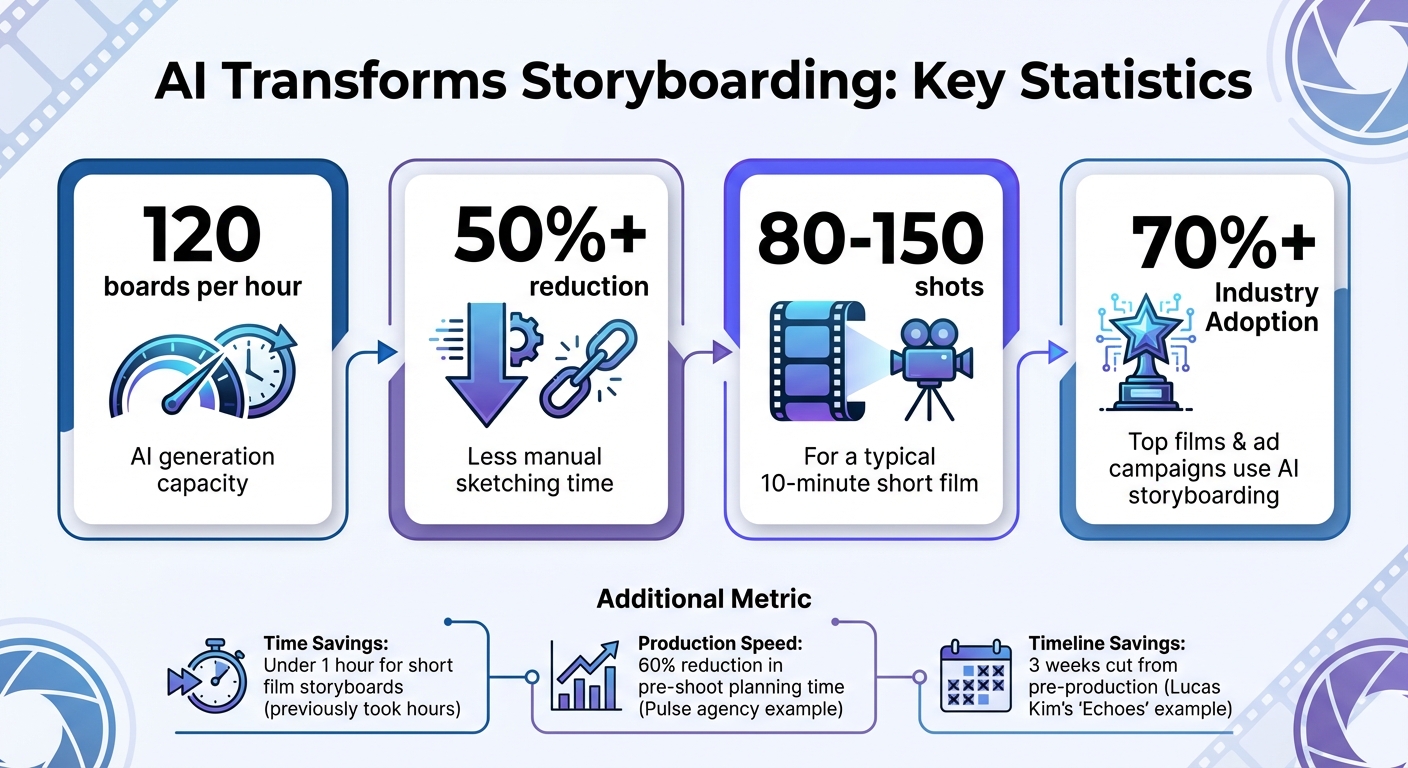
AI Storyboarding Statistics: Efficiency, Adoption, and Time Savings
How to Create Storyboards with AI | Generate Storyboard from a Script
sbb-itb-94859ad
Step 1: Analyze Your Script for Genre Elements
Before diving into AI storyboard generation, break your script into visual beats - each beat representing a distinct moment. For a typical 10-minute short film, expect to create 80–150 shots for your long AI videos, depending on the pacing you’re aiming for.
Identify Genre Tropes and Themes
Start by tagging your script with markers that clarify its intent. Use labels like [SFX] for sound effects, [VO] for voiceovers, and [Action] for movements. These tags help AI models differentiate between dialogue and visual cues, minimizing misinterpretations.
Most AI tools can process industry-standard formats like Final Draft or Celtx, using NLP (natural language processing) to pull scene dynamics from your script. However, you can improve the results by applying the "Cinematic Triplet" formula to each beat. This involves identifying three key elements: the Shot Type (wide, close-up, etc.), the Action/Emotion (what’s happening and the mood), and the Environment Details (setting, lighting, weather).
For example:
- Thriller: "Close-up: protagonist's fearful face in a dimly lit hallway with shifting shadows."
- Sci-fi: "Wide shot: futuristic control room bathed in blue ambient light with holographic screens".
These specific descriptions help train the AI to recognize and replicate patterns that match your genre.
Another key step is creating a character bible early in the process. Provide 3 to 5 lines for each character, describing their age, clothing style, and overall vibe. This ensures your characters remain consistent in appearance and tone, even as they move through different settings and emotional states.
Once you’ve nailed down the genre elements and character details, align the emotional tone and camera language of each beat for a unified storyboard.
Map Emotional and Visual Beats
Chart the emotional flow of your story - its highs and lows - by translating feelings into camera language. For example, instead of writing "sad scene", describe it visually: "Extreme close-up on eyes to show vulnerability" or "low-angle shot to suggest power".
AI tools can also compare your script to data from successful films, helping predict how specific scenes will resonate emotionally with viewers. Markus Etter from Story-boards.ai explains:
"AI can automatically identify where to place tense, suspenseful moments and where to build in moments of relief or humor, ensuring the story feels balanced and engaging".
To enhance pacing and precision, include shot-level metadata for each beat. This could cover details like the action, subject, emotion, camera angle, time of day, and approximate duration (in seconds). Early on, lock in your visual triangle - standardizing character references, color palette, and lens type (e.g., 35mm for a cinematic feel) across all beats.
Before adding color, test your emotional beats in grayscale to refine composition and framing. This step ensures your visuals are cohesive and ready for the next phase.
Step 2: Select Art Styles and Templates for Your Genre
Visual style plays a key role in defining a genre's identity. As Team Questas puts it, "Visual style is the glue that holds that experience together". Think about it - just a glance at a neon cityscape with sharp contrasts and lens flares screams cyberpunk, while soft watercolor forests instantly transport you to a cozy fantasy world. Here's how you can align art styles with the mood of your genre.
Match Art Styles to Genre Moods
Start by embedding the emotional tone of your story into your prompts. A simple one-line description like "A high-contrast neon sci-fi heist for adult players" can set the stage for every visual element.
- Fantasy: Use terms like "painterly" or "storybook illustration" paired with warm, saturated tones.
- Sci-fi/Cyberpunk: Highlight "neon accents" and "high contrast" with cool color palettes.
- Horror: Focus on "grainy textures" and "low-key lighting" for a chilling effect.
- Mystery/Thriller: Emphasize "moody" atmospheres and "film noir lighting."
- Comedy: Opt for "clean vector style" with bright, pastel colors for a lighthearted vibe.
You can also tweak the tone further using visual scales. For lighter narratives, aim for higher brightness and open compositions. For darker, serious stories, use lower brightness, tighter framing, and more subdued colors. Bold, stylized characters can also add depth to intense narratives.
Once you've nailed the tone, built-in templates can help ensure visual consistency across your project.
Use Built-In Templates for Visual Consistency
A consistent visual language is critical for storytelling. Many advanced AI tools allow you to treat characters and art styles as fixed elements, ensuring they remain cohesive throughout your project.
Spend about 10 minutes creating reference images for each main character. This step helps lock in their appearance and ensures they stay visually consistent. Next, generate 5–8 sequential scenes as a test run. This will let you confirm that the style and character designs work well together. At this stage, focus on getting the composition and action right - don't sweat the details of individual panels just yet.
Finally, write prompts with precision. Include specifics like camera angles, lighting, subject positioning, and shot movements to maintain a logical and cohesive visual flow.
Step 3: Write Genre-Specific Prompts for AI
Now that you’ve nailed down your art style and templates in Step 2, it’s time to focus on crafting precise AI prompts. These prompts are the key to capturing your genre's unique visual essence. Generic prompts often lead to random, unfocused results. On the other hand, detailed prompts like "Close-up of an elderly man with teary eyes in a dim kitchen using an 85mm lens" can deliver cinematic clarity and emotional depth.
To achieve this, rely on the Cinematic Triplet: shot type, action/emotion, and environment details. For example, instead of a vague prompt like "detective in alley", try something more specific: "Medium shot of a detective in a rain-soaked alley, harsh neon reflections, Dutch angle, 35mm lens." By refining prompts in this way, and aligning them with your chosen art style, you’ll guide the AI to generate visuals that perfectly match your narrative goals.
Incorporate Genre Tropes in Prompts
Every genre has its own recognizable visual language. Tapping into these tropes will help the AI create imagery that feels authentic to your story. For example:
- Thrillers: Use dramatic chiaroscuro lighting and heavy shadows.
- Fantasy: Add details like enchanted forest glows or beams of sunlight breaking through trees.
- Sci-fi: Opt for neon rim lighting, metallic textures, and cool, futuristic color palettes.
- Comedy: Bright primary colors and exaggerated facial expressions work well.
Adding technical terms can further refine your prompts. For horror, phrases like "low-key lighting" or "bird's eye view" can evoke tension and unease. For drama, include "soft window light" or "golden hour glow" paired with "shallow depth of field" to create an intimate atmosphere. A great example of this method comes from director Lucas Kim, who, in 2025, used annotated script uploads to generate 120 storyboards for his indie sci-fi short film Echoes. This approach cut three weeks off his pre-production timeline.
Don’t forget to include negative prompts like "no text" or "no watermarks" to ensure clean, professional-looking frames.
Set Visual and Narrative Tone
Beyond genre-specific tropes, your prompts should establish the emotional tone of each scene. Specify lens types, such as "35mm" for wide cinematic shots or "85mm" for capturing emotional close-ups. Be sure to define aspect ratios too - "2.39:1" for widescreen storytelling or "9:16" for vertical social media formats.
You can also reference well-known directors or films to give the AI a clear aesthetic direction. For instance, adding "in the style of Blade Runner" or "Ghibli-inspired" at the end of your prompt sets a clear visual target. In 2025, the creative agency Pulse successfully used this approach with Boords AI for a GreenWave sustainability campaign. By doing so, they generated four storyboard variations and reduced their pre-shoot planning time by 60%.
With these precise and well-thought-out prompts, you’ll create storyboards that are not only visually consistent but also emotionally aligned with your narrative. This strong foundation will be crucial for maintaining character continuity in the next step.
Step 4: Maintain Character Consistency Across Scenes
Once you've nailed down your prompts, the next step is ensuring your characters stay consistent throughout your scenes. AI tools can sometimes introduce subtle changes in characters between scenes, which can disrupt the narrative flow you've worked so hard to establish. Keeping your characters visually and thematically consistent is key to maintaining the story's integrity.
Create Reusable Character Profiles
Start by defining your characters in detail and locking in their appearance. A strong character profile should include four key elements: name, role, physical appearance, and clothing. Save these detailed descriptions as reusable templates so you can apply them consistently across all scenes.
Tools like LongStories.ai make this process easier with features like Universes, which act as persistent templates. By spending just 10–15 minutes creating your first Universe - where you define characters, visual styles, and voices - you can generate unlimited, cohesive videos. For example, with a simple prompt like "Episode 5: Professor discovers time travel", you can ensure the professor looks and feels the same as in earlier episodes.
Adapt Characters to Genre Settings
While the core traits of your characters - such as their face, body type, and personality - should remain consistent, you can tweak elements like clothing or props to fit the genre. For instance, you might add a "futuristic visor and laser pistol" for a sci-fi setting or swap those out for period attire in a historical drama. These adjustments allow your characters to fit seamlessly into different settings without losing their identity.
Maintaining this balance between core traits and genre-specific details enhances the story's visual tone and ensures the pacing stays aligned with the narrative.
Tools like Storyboarder.ai allow you to refine character images while keeping shot details intact, offering endless opportunities for adjustments. Similarly, Adobe Firefly lets you remix panels to tweak character styles or compositions without starting from scratch. By reviewing your shot breakdowns, you can fine-tune costumes and accessories to match the genre. For example, a fantasy wizard might wear a "tiny wizard hat" in one scene and a "velvet cape" in another, yet still remain instantly recognizable as the same character. This method ties seamlessly with earlier steps, ensuring that every frame supports the story's visual and emotional continuity.
Step 5: Refine Storyboards for Pacing and Emotional Impact
Once your characters are consistent, it's time to focus on fine-tuning your storyboard's pacing and emotional depth. AI-generated frames provide a solid foundation, but they often need adjustments to achieve the right rhythm and emotional tone. This step ensures that every frame works in harmony to support your narrative.
Adjust Scene Timing for Genre Requirements
Pacing isn't one-size-fits-all - it varies depending on the genre. For example, thrillers thrive on quick cuts to heighten tension, while dramas benefit from extended shots that let emotions linger. To achieve this, you can tweak your AI prompts. Adding descriptors like "fast-paced with lots of movement" or "slow and suspenseful" can help the AI generate frames that align with your intended tempo.
Transitions also play a key role in shaping the overall rhythm. For action-packed sequences, CUTS keep the energy high, while DISSOLVES or FADES work better for slower, emotional scenes. Want to compress time and add urgency? Swap a dissolve for a JUMP CUT. You can even reference specific directors to guide the AI toward a particular style. For instance, "Edgar Wright-style jump cuts" can inject high-energy humor, while "Hitchcock-style match cuts" can intensify suspense.
| Transition Type | Best For (Genre/Mood) | Emotional/Pacing Impact |
|---|---|---|
| CUT | Action, Thriller, Suspense | Quick, energetic shifts that maintain urgency |
| DISSOLVE | Drama, Romance, Flashbacks | Creates a dreamy or nostalgic tone; suggests time passing |
| JUMP CUT | Comedy, Music Videos, Action | Modern and dynamic; compresses time |
| MATCH CUT | Sci-Fi, Mystery, Psychological | Builds creative visual connections between scenes |
| FADE IN/OUT | All Genres | Signals a location change or the end of a sequence |
Once your frames are generated, annotate each panel with specific timing notes. For example, "Hold for 3 seconds" or "Quick 0.5-second cut" can guide your final edits or serve as detailed prompts for AI video tools. These annotations transform static storyboards into actionable production plans.
Iterate on Emotional Beats
After adjusting the pacing, focus on refining the emotional impact of each frame. Emotional resonance comes from the details. A helpful technique is the "Cinematic Triplet" formula, which combines the shot type, the action or emotion, and environmental specifics like lighting or props. For example, a prompt like "Close-up of a tearful protagonist with soft focus and warm lighting" gives the AI clear direction to capture the emotion you're aiming for.
Camera angles and movements also influence how emotions are conveyed. Close-ups highlight subtle expressions, while wide shots emphasize scale or isolation. Adding notes like "slow dolly-in" or "rack focus" can guide the viewer's attention and amplify emotional moments. Similarly, lighting choices - such as "warm and intimate" for heartfelt scenes or "high-contrast with shadows" for suspense - can dramatically change a frame's tone.
To refine further, generate 2–3 iterations of each scene. Negative prompts like "no crowd" or "exclude reflections" can help remove distractions and keep the focus on the emotional core. A great trick is to start with grayscale frames to evaluate composition and lighting without the distraction of color. Once you're satisfied, you can add color to enhance the mood.
"The real leap in 2026 isn't just speed - it's fidelity. AI now creates boards that look and feel like the final product, making client buy-in and production planning far more accurate." - Mila Tan, Head of Visualization, Imagine Studios
Best Practices for AI-Driven Genre Storyboarding
Balance AI Outputs with Human Review
Once you've nailed down your prompts and ensured character consistency, it's time to refine your storyboard by blending AI outputs with human oversight. AI can handle the heavy lifting for physical elements like locations, props, and basic blocking with an accuracy of 80–90%. However, when it comes to emotional staging, its accuracy drops to 60–70% - a gap that requires human intervention.
The key is adopting a "human-in-the-loop" approach. Let AI create the framework of your scene - blocking and composition - and then step in to add emotional nuance. For instance, AI might generate a technically accurate image of two characters talking, but it may miss subtle emotional undertones like tension or hesitation unless you refine the prompts with specific cues. A study from the USC School of Cinematic Arts revealed that 57% of creators using AI storyboards face challenges in maintaining visual continuity across sequences.
"AI doesn't replace taste. It replaces friction. The best win I've seen is speed-to-first-draft." – Dora, Content Creator, CrePal
One effective method is the "Anchor Shot" technique. Start by generating a single, polished reference frame with the right lighting, character design, and style. Use this frame as a template for the rest of the sequence to maintain consistency while allowing AI to handle variations. Another tip? Timebox your initial AI generation phase - limit it to 60 minutes to avoid getting bogged down in perfecting individual panels. This keeps your focus on the broader narrative instead of small details.
With the foundation set, the next step is addressing common pitfalls that could undermine your storyboard's quality.
Avoid Common Genre Pitfalls
Even with human oversight ensuring emotional depth, it's important to steer clear of common issues that can weaken your scenes. While AI can churn out genre beats quickly, speed doesn't always translate to originality. Generic prompts like "a scene in a cafe" often lead to bland, forgettable visuals. Instead, revisit Step 3 for tips on crafting detailed and specific prompts that yield more engaging results.
Another frequent problem is character drift - where details like your protagonist's hair color or outfit change between frames. To combat this, rely on fixed reference images, stick to a consistent color palette, and use the same lens type throughout, as previously discussed. Additionally, include exclusions in your prompts, such as "no text in background", "no reflections on screen", or "no crowds", to avoid unnecessary distractions.
Finally, watch out for genre logic failures. These include issues like excessive exposition in sci-fi, unbalanced character agency in romance, or unearned plot twists in mysteries. Clearly define your story's core premise - e.g., "A woman discovers her reflection ages faster than she does" - to keep your narrative on track. This clarity helps prevent structural breakdowns, a common flaw in many AI-generated works that tend to "stop" rather than conclude decisively.
Use LongStories.ai for Consistent Genre Storyboards
Reusable Universes for Long-Form Content
When producing a series where keeping the same tone and style is crucial - be it a noir mystery, a fantasy saga, or a sci-fi thriller - LongStories.ai’s "Universes" feature solves a common problem in AI video production: maintaining consistency in visuals, characters, and overall feel across episodes. The "Universe" acts like a blueprint where you define your characters, visual style, and world-building rules once. After an initial setup that takes about 10–15 minutes, you can create unlimited videos without having to reintroduce characters or reset the tone each time. This ensures that your series maintains a cohesive visual identity and narrative flow from start to finish.
One film studio shared that they went from producing one episode per week to several episodes a day by using this workflow. LongStories.ai supports videos up to 15 minutes in length, giving creators enough time to tell intricate stories while meeting YouTube monetization standards. Setting up additional Universes is quick too - each one takes just about five minutes.
Making changes across your series is also simple. For example, if your detective needs a wardrobe update for a specific episode, the platform’s bulk editing tools let you apply that change across all scenes instantly. This kind of flexibility not only keeps your visuals consistent but also saves time. With Universes as the foundation, LongStories.ai enables creators to scale their productions effortlessly, supported by flexible animation options.
Scale Production with Animation Tiers
LongStories.ai offers three different animation modes to suit various stages of production:
- "Just Storyboard": Ideal for static scene testing, costing 134 credits per minute.
- "Fast Animation": Great for early drafts, costing 294 credits per minute.
- "Pro Animation": Best for polished, final outputs with advanced AI orchestration and sound design, costing 594 credits per minute.
To give you an idea of credit usage, 1,000 credits can produce about 7 minutes of storyboard content, 4–5 minutes of fast animation, or 1–2 minutes of pro animation.
The platform also supports bulk editing and API integration, making it easy to automate workflows and connect with tools like Zapier. Additionally, you can download assets in bulk for use in external editing software such as Premiere Pro or CapCut. This feature allows creators to further refine their content to match specific genre requirements, making it easier to scale production while staying within creative and budgetary limits.
Conclusion: Using AI for Genre-Specific Storyboarding
AI has reshaped how creators tackle genre-specific storyboarding by cutting production time to under an hour for short films, all while delivering consistent visuals that traditional methods often struggle to achieve. By moving away from vague prompts and instead providing detailed shot-level descriptions - like specifying "Medium shot, woman in her 40s reads a letter, film noir lighting" instead of just "woman reading" - AI can produce panels that align closely with the visual language of your genre.
Platforms offering reusable character profiles or "Universes" take these advancements further. They eliminate repetitive manual adjustments across scenes, turning storyboarding from a static PDF into an interactive production pipeline. This pipeline integrates video clips, audio, and timing into a single timeline, which is especially valuable for creators working on serialized content. Maintaining visual and thematic consistency becomes much easier, ensuring regular posting schedules while preserving brand identity.
The workflow typically starts with initial storyboards for quick concept testing. From there, creators can move to faster animations for drafts before using professional-quality modes for polished results. Adding details like shot types and camera movements to panels transforms them into actionable production guides. Tools like LongStories.ai even offer a 400-credit free trial - no credit card required - so creators can experiment with this streamlined process on their own projects before committing to a subscription.
FAQs
What AI inputs give the biggest quality boost?
To get the best results from AI-generated storyboards, start by offering detailed and thorough inputs. This includes providing a well-crafted script, clear descriptions of each scene, and defining the art style you're aiming for.
Key elements to focus on include:
- Cinematographic details: Mention camera angles, shot types, and framing preferences to guide the visual composition.
- Character consistency: Ensure characters maintain a uniform appearance throughout the storyboard by describing their features and attire in detail.
- Genre-specific details: Highlight any stylistic or thematic elements unique to the genre you're working within.
By combining these elements and using advanced AI tools, you can create polished, visually compelling storyboards tailored to your narrative.
How do I keep characters consistent across scenes?
To keep characters consistent in AI-generated storyboards, it’s essential to start with a strong foundation. Define each character’s core traits, backstory, and unique communication style. This ensures every character feels authentic and distinct from the outset.
Centralized reference libraries can be a game-changer for maintaining consistency. These libraries should include key assets like multi-view angles, a range of expressions, and other visual details that make each character identifiable across scenes.
AI tools can also help streamline the process. Features like reusable 'Universes' or 'Character Memory' allow you to store and recall character details easily, reducing the risk of inconsistencies. Finally, regular quality checks are crucial. These reviews ensure that characters remain faithful to their original design and don’t unintentionally evolve or "drift" over time.
How do I adjust pacing for different genres?
The search results outline the general process of AI storyboarding and touch on how genre impacts AI-driven filmmaking. However, they don't dive into the specifics of adjusting pacing based on genre. Details on how to tailor pacing for different genres remain unexplored.
Related posts
LongStories is constantly evolving as it finds its product-market fit. Features, pricing, and offerings are continuously being refined and updated. The information in this blog post reflects our understanding at the time of writing. Please always check LongStories.ai for the latest information about our products, features, and pricing, or contact us directly for the most current details.