
Checklist for Personalizing Video Scripts

Want to keep your viewers hooked and boost video performance? It all starts with a personalized script. Generic scripts often fall flat because they lack flow and fail to connect with your audience. By tailoring your video content to your viewers' needs, preferences, and challenges, you can double retention rates and improve engagement.
Key Takeaways:
- Understand Your Audience: Research demographics, interests, and pain points to address specific needs. Tools like YouTube Studio and OutlierKit can help.
- Craft a Strong Hook: Grab attention in the first 5 seconds with curiosity gaps, bold claims, or direct promises.
- Align Tone and Style: Match your tone to your audience and platform. Use conversational language for platforms like YouTube.
- Personalize Content: Add dynamic elements like names or roles, and use relatable examples tailored to your audience's expertise.
- Structure for Engagement: Follow a problem-solution-CTA flow and include retention loops every 60–90 seconds.
- Leverage AI Tools: Platforms like LongStories.ai streamline personalization at scale with reusable templates and dynamic content variables.
Quick Tip:
Run a read-aloud test to ensure your script sounds natural. Awkward phrasing or overly complex sentences can hurt retention.
Personalized scripts aren't just about adding names - they're about creating content that feels relevant and engaging. Follow this checklist, and your videos will resonate with viewers while keeping them watching longer.
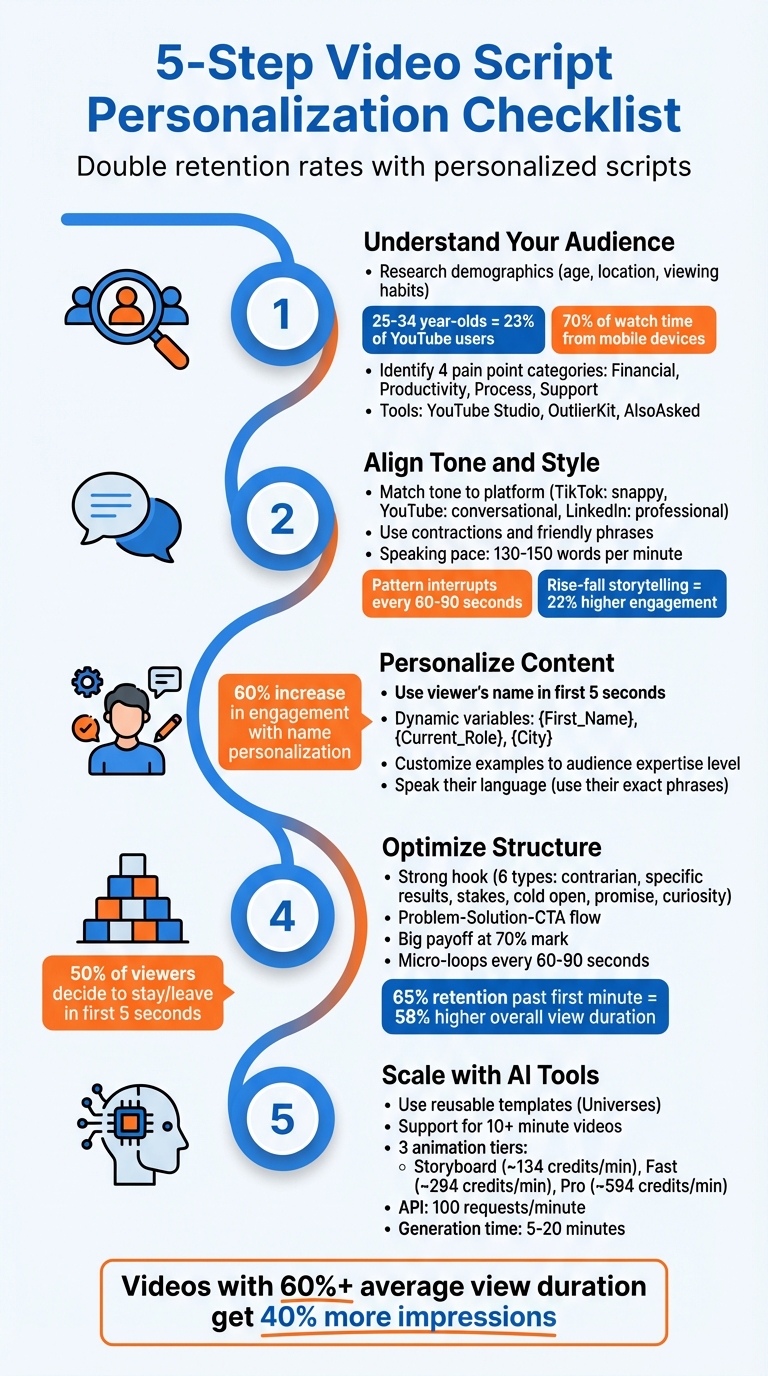
5-Step Video Script Personalization Checklist
Understand Your Audience
Research Demographics and Interests
Before you start writing, take time to understand who your audience is. Focus on basics like age, location, gender, and viewing habits. If you're analyzing your own YouTube channel, the Audience Tab in YouTube Studio is a great, free resource for gathering this data. Here's an interesting fact: 25–34-year-olds make up 23% of YouTube users, and 70% of watch time comes from mobile devices. This means your approach should adapt based on your audience. For instance, younger viewers (ages 13–24) often prefer content that's fast-paced and casual, while professionals in the 35–54 age range respond better to a more authoritative and value-driven tone.
To go deeper, psychographics can help you understand motivations, preferences, and content habits. Tools like OutlierKit (starting at $19/month for the Hobby Plan) let you analyze any YouTube channel, even competitors, to find patterns in video length, tone, and format. Another option, InstantViews Video Analyzer, uses AI to match content types with specific audience segments, helping you discover which topics resonate most.
"The best content strategy serves the audience you have, not the audience you wish you had. Demographics tell you who's actually watching - listen to that data." – YouTube Creator Strategy Team
Don’t stop there. Cross-check your findings with search behavior. Platforms like AlsoAsked or AnswerThePublic can reveal the exact questions your audience is typing into Google or ChatGPT. Dive into Reddit threads and industry forums to see how they talk about their interests, and review feedback on sites like G2, Capterra, or Trustpilot to identify recurring frustrations and the specific terms they use.
With both demographic and psychographic insights, you’ll be ready to pinpoint exactly what your viewers need.
Identify Pain Points and Goals
Once you’ve mapped out your audience, the next step is to figure out their biggest challenges and what they want to achieve. This is where your script can really connect. Begin by identifying their pain points. These often fall into four main categories:
- Financial: Spending too much money
- Productivity: Wasting time
- Process: Dealing with overly complex workflows
- Support: Lacking proper guidance
To uncover these, listen to sales and customer success call recordings, analyze feedback logs, and participate in online communities where your audience gathers. You can also ask direct questions like, "What makes you want to give up?" Conducting 5–30 interviews per audience role can reveal patterns; most insights emerge after the first five, with diminishing returns after thirty.
"Content that empathizes with a target audience's pain point is engaging in an authentic way, showing the audience that your brand understands the unique challenges they face." – Tabitha Whiting, Freelance Content Writer and Strategist
Finally, think about your audience’s goals. Are they trying to reduce support calls? Increase sign-ups? Save time on repetitive tasks? Focus your script on one or two specific objectives rather than trying to cover everything. Aligning your content with a clear, measurable outcome - backed by data like job titles, roles, or behaviors - makes your message far more relevant and impactful than a one-size-fits-all approach.
sbb-itb-94859ad
How to Script Videos That Actually Get VIEWS!
Align Tone and Style
Getting the tone and style right is essential for creating a script that connects with your audience. This builds on the insights gained from audience research to craft content that truly resonates.
Choose the Right Tone
The tone you choose should align with both your audience's expectations and the platform where your video will appear. For example, TikTok thrives on snappy, energetic scripts, while YouTube allows for more detailed storytelling. LinkedIn, on the other hand, leans toward a polished and professional tone. The tone also depends on your video's purpose: use an educational tone for clear explanations, a motivational tone for inspiring messages, or a step-by-step tone for tutorials .
For YouTube, a conversational tone often works best. Think of it as talking to a friend over coffee rather than delivering a lecture. Use contractions and friendly phrases like "here's the thing" or "honestly" to keep it relatable. First-person narration ("I'll show you") is ideal for talking head or AI avatar videos, while second-person narration ("You'll click on") fits screen recordings .
"A solid script doesn't make you sound robotic - it makes you sound prepared. The best scripts feel spontaneous because they're designed to sound exactly like natural speech." – SwiftCopy
Before finalizing your script, run a read-aloud test. If a sentence feels awkward or leaves you out of breath, rewrite it to improve flow and clarity.
Add Style Elements That Match Your Audience
Once you've nailed the tone, enhance your script's style to keep your audience hooked.
Use varied sentence rhythms to hold attention - short sentences can create suspense, while longer ones add depth and context. Every 60–90 seconds, include a pattern interrupt like an unexpected fact, a thought-provoking question, or a visual shift to re-engage viewers .
Simplify complex ideas with relatable analogies before diving into technical details. Avoid overused filler phrases like "it's important to note that" or "leverage", as these can disrupt the conversational flow . If you're using AI tools for scripting, assign them a specific persona (e.g., "a casual but knowledgeable entrepreneur in their 30s") and direct them to avoid clichés.
Aim for a speaking pace of 130–150 words per minute, and mix up sentence lengths to maintain a natural rhythm. Including a viewer's name early in the video can increase engagement by up to 60%. Additionally, using a "rise-fall" storytelling structure - where the narrative builds, dips, and resolves - can boost engagement by 22% compared to a straightforward, linear approach.
Personalize Script Content
The next step is to weave personalized elements directly into your script. This transforms a generic message into something that feels tailor-made for each viewer.
Use Personalization Hooks
The first few seconds of your video are critical - half of your viewers decide whether to keep watching within the first 5 seconds. Including a viewer's name right at the start can increase engagement by 60%. This kind of direct personalization immediately shows that the content was created with them in mind.
An effective hook can spark curiosity, create urgency, promise specific value, or challenge existing beliefs. For example, instead of saying, "Here's how to improve your workflow", try, "You're managing tasks the wrong way, and it's costing you valuable time." This approach creates tension and offers a clear benefit, making it hard for viewers to look away.
For a more subtle approach, covert personalization adjusts content based on details like job roles or recent activity without explicitly pointing it out. This ensures relevance without being too obvious.
Avoid hiding your personalization hook behind lengthy intros or logo animations. Algorithms favor immediate engagement, so lead with your customized message right away.
Customize Examples and Scenarios
Generic examples can lose your audience's interest. If you're speaking to a specific group, avoid broad statements like "imagine you run a business." Instead, focus on relatable, specific challenges. For instance, if you're targeting e-commerce managers, highlight issues like cart abandonment or inventory management and offer actionable solutions.
Tailor your content to your audience's level of expertise. Beginners may need simpler language and explanations, while experienced viewers will appreciate advanced strategies without basic definitions. Use the "Show, Don't Tell" approach - visual metaphors or demonstrations often convey ideas more effectively than long explanations.
Speak your audience's language. If research shows they use phrases like "getting ghosted by clients" instead of "client retention issues", reflect their wording in your script. This instantly builds a connection and shows you understand their world.
To further enhance this personalization, dynamic content variables can take your script to the next level.
Use Dynamic Content Variables
Dynamic content variables act as placeholders in your script that automatically fill in with personalized data, such as {First_Name}, {Current_Role}, {City}, or {Recent_Purchase}. This approach allows you to create multiple versions of a video from one script, saving time while keeping it personal.
"By adding the viewer's name to a video in the first few seconds, there's an uplift of 60% in engagement to watch the video until the end." – Idomoo Academy
Make sure the data points you're using are accurate and set defaults for missing information. For instance, if a viewer's name isn't available, use a friendly fallback like "friend."
Only use variables when they genuinely add value. Just because you can insert a company name doesn't mean you should - ensure it makes the content more engaging or relevant. A flowchart can help you organize these personalized elements and track where variables trigger different scenes. Also, read your script aloud to confirm that the variables fit naturally and avoid awkward phrasing.
For creators managing large-scale projects, tools like LongStories.ai (https://longstories.ai) can streamline the process. They let you build reusable templates with consistent characters and styles, making it easier to create hundreds of personalized videos while maintaining your brand identity. This modular approach ensures your content stays fresh and engaging without starting from scratch every time.
Optimize Script Structure for Engagement
Getting your video structure right can make a massive difference in how viewers respond. A well-organized script can prevent the roughly 20% of early drop-offs and even boost view duration by up to 3.2x, leading to 40% more impressions from YouTube’s algorithm. Interestingly, it’s not just about having better information - it’s about presenting it in a way that keeps viewers hooked. If your video achieves a 60%+ average view duration, you can expect about 40% more impressions compared to videos that hover around 35%. In short, the way you structure your script can turn a decent video into one that truly performs.
Start with a Strong Hook
Your opening seconds are everything. In fact, 50% of viewers decide whether to stay or leave within the first 5 seconds. That means there’s no room for generic intros like, “In this video, we’ll discuss…” Instead, you need an opening line that grabs attention right away and builds tension.
The most effective hooks fall into one of six categories:
- Contrarian statements: Challenge a common belief.
- Specific results: Use concrete numbers to back up your claim.
- Stakes escalation: Highlight the consequences of not watching.
- Cold opens: Jump straight into the action.
- Direct promises: Clearly state the outcome viewers can expect.
- Curiosity gaps: Tease surprising results while holding back details.
For example, instead of saying, “Today I’ll show you how to save money,” you could say, “Dollar-cost averaging is costing you money.” That short, 8-word opener creates instant intrigue.
“The hook - those critical first 15 to 30 seconds - determines whether someone watches your entire 10-minute video or adds to your abandon rate.” - Channel Farm
Here’s a quick test: read your opening sentence aloud. If it doesn’t create tension or spark emotion within 5 seconds, rewrite it. Channels that keep 65% of viewers past the first minute enjoy a 58% higher average view duration overall. Your hook must immediately deliver on the promise made by your title and thumbnail, or viewers will leave before the main content even starts.
Follow a Problem-Solution-CTA Flow
Once you’ve nailed the hook, the rest of your script needs to hold attention. A proven way to do this is by following a simple flow: problem, solution, call to action (CTA). This approach not only keeps viewers engaged but also avoids the dreaded “sagging middle” where drop-offs tend to occur.
- Define the problem: Start by clearly identifying the challenge your audience is facing.
- Escalate the stakes: Show why obvious solutions don’t work and introduce complications.
- Deliver the solution: Save your strongest insight or “big payoff” for the 70% mark - around minute 7 of a 10-minute video. This keeps viewers motivated to stick around.
To maintain engagement, use micro-loops every 60 to 90 seconds. These are quick forward references like, “I’ll show you how to automate this in a second, but first…” They help reset attention and keep viewers focused. Videos with three or more of these retention loops see a 35% higher average view duration.
Finally, wrap things up with a single, clear CTA. Whether you’re asking viewers to subscribe, watch another video, or visit a link, stick to one ask. Multiple CTAs can overwhelm viewers and reduce the chance of action. Also, read your script aloud to ensure it flows naturally.
For creators scaling long-form content, tools like LongStories.ai can help. They let you create reusable script templates with consistent characters and styles, ensuring every video maintains a tight, engaging structure while staying personalized.
Use AI Tools for Personalization at Scale
AI tools make it possible to personalize scripts on a large scale while keeping everything consistent. They offer features like persistent character definitions, support for long-form videos, and programmatic access to streamline the process.
How LongStories.ai Supports Script Personalization
LongStories.ai simplifies repetitive tasks with its "Universes" feature. These reusable templates allow you to define characters, visual styles, and voices just once. After an initial setup of 10–15 minutes, you can generate videos in as little as 5 minutes, all while ensuring character consistency.
To meet monetization standards, LongStories.ai supports videos up to 10 minutes long. It offers three animation quality tiers: Storyboard (~134 credits/min), Fast Animation (~294 credits/min), and Pro Animation (~594 credits/min). This tiered pricing lets you create cost-effective prototypes before committing to high-quality final animations. For instance, you can test personalization hooks using the lower-cost Storyboard mode to refine your approach before moving to more polished animations.
For creators managing large-scale projects, the platform’s API can handle up to 100 requests per minute. This includes uploading customized scripts via the userScript parameter and creating characters from photos with the image-to-character endpoint. Depending on the complexity, video generation takes 5–20 minutes. These features automate repetitive tasks like maintaining consistent character details and integrating dynamic content, saving time and effort.
Comparison of AI Personalization Tools
When comparing AI video tools, LongStories.ai stands out for its ability to maintain consistency and handle long-form content. Many other tools require re-prompting for each video, which can lead to inconsistent results. LongStories.ai’s Universe system eliminates this issue by letting you set up characters and styles once and reuse them indefinitely.
Other platforms like Runway Gen-3, Pika Labs, and Google Veo focus on short clips and lack persistent character features, while HeyGen relies on avatar-based outputs. These limitations make them less suited for projects requiring long-form videos or consistent character visuals.
If you're evaluating AI tools for personalization, look for these key features:
- Support for long-form videos (at least 10 minutes to meet monetization needs)
- Systems for consistent character visuals
- Flexible animation quality options to manage budgets
- Robust API capabilities for automating workflows
Using a storyboard mode to prototype can also help you save credits and identify script issues before committing to higher-cost animations.
Choosing the right AI tool is essential for scaling personalized content while maintaining quality and consistency. Platforms like LongStories.ai offer the features needed to streamline this process and meet creative goals effectively.
Conclusion and Final Checklist
Throughout this discussion, we've covered the essentials of crafting personalized video scripts - focusing on audience insights, tone alignment, and effective script structure. Let’s bring it all together.
Creating a personalized video script isn’t just about adding a name here and there. It’s about truly understanding your audience - their challenges, preferences, and expectations. By tailoring your tone and structuring your content to maintain engagement, you can transform generic scripts into ones that resonate deeply. The payoff? Metrics speak for themselves: scripts designed with visual-audio synchronization see 20% better viewer retention, while narratives that build and resolve tension can increase engagement by 22%.
"A checklist doesn't replace quality control but reminds you to verify every detail, reducing the risk of errors and ensuring professional, audience-focused videos." - Team Personate
Before recording, make sure you’ve covered the essentials: dig into your audience’s demographics and interests, select a tone that meets their expectations, and include personalization hooks early on - these can boost engagement by 60%. Don’t forget to read your script aloud; if it feels clunky, simplify it. And always ensure your visuals and narration are in sync by using a two-column format.
Key Takeaways
Personalized scripts thrive on targeted research, a tailored tone, and a well-thought-out structure.
Start by understanding your audience. Write in a conversational, natural style that avoids jargon and feels approachable. Tools like LongStories.ai can streamline this process by creating reusable "Universes", ensuring consistency and reducing repetitive tasks. This approach not only saves time but also helps maintain a cohesive brand identity across multiple videos.
Final Checklist for Personalizing Scripts
Here’s a quick checklist to ensure your script hits all the right notes:
Audience & Goals:
- Defined your target audience’s demographics, interests, and pain points.
- Identified a single, clear objective (e.g., educate, persuade, or instruct) with measurable KPIs.
Tone & Style:
- Selected a tone that aligns with audience expectations (e.g., conversational, authoritative, or friendly).
- Incorporated personalization hooks (e.g., viewer’s name or specific data) within the first 5 seconds.
Script Structure:
- Opened with a strong hook to build curiosity or tension.
- Followed a proven framework (e.g., 3-Act or 5-Act structure) to maintain engagement.
- Used a problem-solution-CTA format with a clear next step.
Delivery & Production:
- Read the script aloud to catch awkward phrasing or tricky sentences.
- Used a two-column format to align visuals with narration.
- Maintained a speaking pace of 130–150 words per minute.
- Included pattern interrupts every 30–60 seconds to retain attention.
AI & Automation:
- Used AI tools with persistent character features to ensure consistency across videos.
FAQs
How do I choose the best hook for my audience?
To grab attention right away, focus on making an impact within the first 3–5 seconds. Spark curiosity, deliver a surprise, or tap into emotions. Kick things off with a bold question, an eye-opening fact, or a striking statement. Skip the dull, generic openings - dive straight into an intriguing story or a daring claim. Using tried-and-true templates like "Did you know…" or "3 mistakes everyone makes" can work wonders, especially for short-form content.
What dynamic variables are worth personalizing in a script?
When creating a script, there are several dynamic variables you can tweak to make your content resonate more with your audience. These include audience demographics, viewer retention data, comments and questions, channel tone and personality, and specific audience interests. By tailoring these aspects, you can ensure your content feels more relevant and keeps viewers engaged.
How can I personalize lots of videos without losing consistency?
To create personalized videos at scale without losing consistency, start by defining clear themes, tone, and style guidelines. Tools like LongStories.ai can help by allowing you to build reusable "Universes" featuring consistent characters, styles, and voices. Additionally, structured storytelling frameworks - similar to those employed by leading creators - can ensure your content remains engaging and well-organized. By blending these approaches, you can produce a large volume of tailored videos while staying true to your brand's identity and maintaining high-quality standards.
Related posts
LongStories is constantly evolving as it finds its product-market fit. Features, pricing, and offerings are continuously being refined and updated. The information in this blog post reflects our understanding at the time of writing. Please always check LongStories.ai for the latest information about our products, features, and pricing, or contact us directly for the most current details.