
Top AI tools for Long AI Videos

Creating long-form videos is challenging, but AI tools now simplify the process by improving consistency, saving time, and reducing costs. Here's a quick overview of the best AI platforms for long video creation:
- LongStories.ai: Best for YouTube creators needing up to 10-minute videos with reusable characters and styles. Plans start at $9/month.
- LTX Studio: Offers scene-by-scene control for extended videos. Free personal tier available; paid plans start at $15/month.
- Domo AI: Focused on short clips that can be stitched into longer videos. Great for stylized content.
- Sora by OpenAI: Delivers cinematic realism but limits clips to 16 seconds. Costs $200/month for Pro users.
- Runway Gen-4.5: Excels in character consistency and lifelike motion. Pricing starts at $15/month.
- Morphic: Provides precise control with keyframe-to-video features. Pricing starts at $24/month.
Each tool caters to different needs, from quick social media clips to professional-grade cinematic projects. For YouTube storytelling, LongStories.ai and Runway Gen-4.5 are standout options. If you need scene-level control, LTX Studio is a strong choice. Explore free trials to find the best fit for your workflow.
Quick Comparison
| Tool | Max Clip Length | Pricing (Monthly) | Key Feature | Best Use Case |
|---|---|---|---|---|
| LongStories.ai | 10 minutes | $9–$99 | Reusable characters/styles | YouTube storytelling |
| LTX Studio | Full movies | Free–$125 | Scene-by-scene control | Episodic content, advertising |
| Domo AI | Short clips | Varies | Stylized short videos | Social media intros, animations |
| Sora | 16 seconds | $200 | Cinematic realism | High-budget, lifelike visuals |
| Runway Gen-4.5 | 10–16 seconds | $15–$95 | Character consistency | Previsualization, VFX |
| Morphic | 12 seconds | $24–$150 | Keyframe control | Multi-scene animations |
These tools are reshaping video production, offering tailored solutions for creators at all levels.
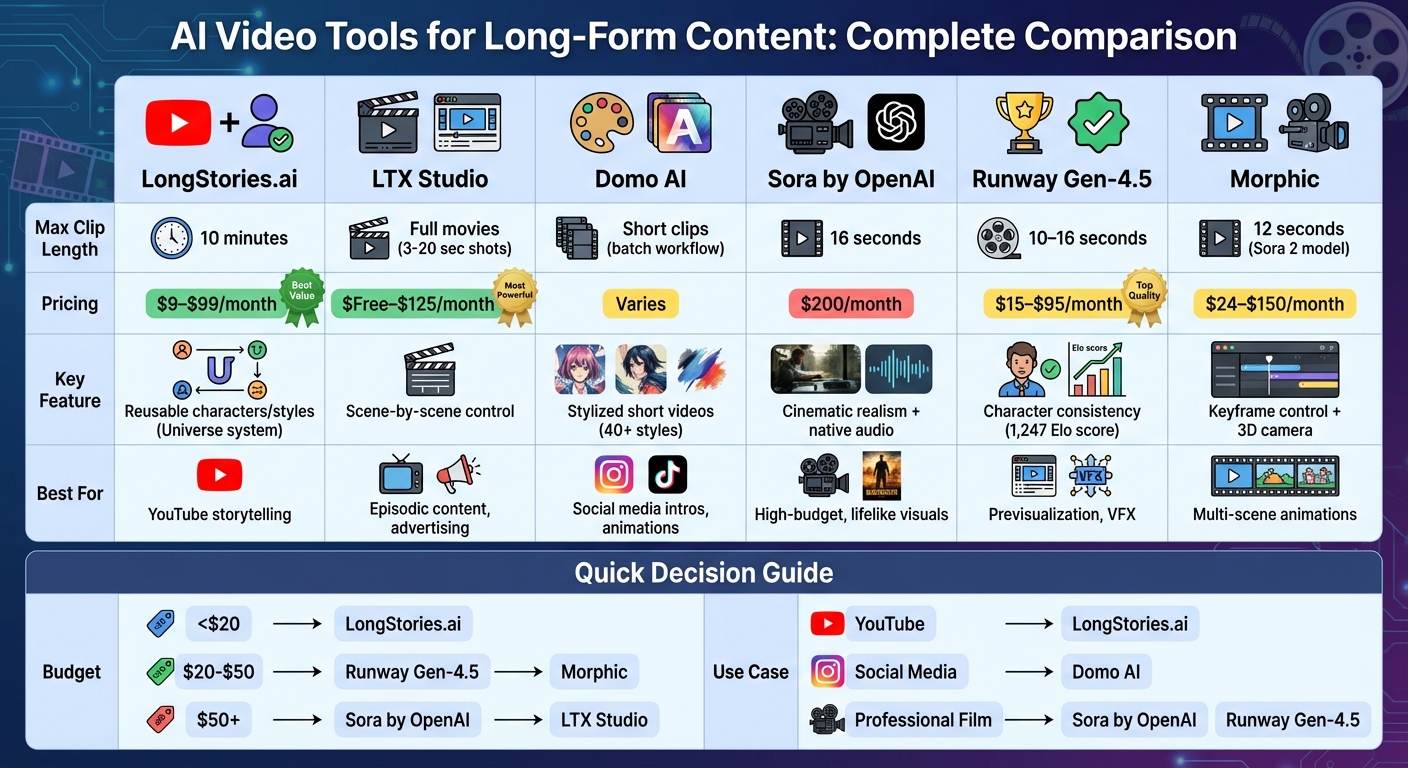
AI Video Tools Comparison: Features, Pricing, and Best Use Cases
The Best AI Video Generators in 2026 (Ranked)
1. LongStories.ai

LongStories.ai caters to creators focused on producing long-form content. It supports videos up to 10 minutes long, making it ideal for projects aligned with YouTube's monetization requirements, unlike tools designed for shorter clips.
Character Consistency
One of the platform's standout features is its "Universe" system. This allows users to define characters, visual styles, and voices once and reuse them across projects. This eliminates the need for repetitive setups while ensuring a consistent look and feel throughout a series.
As music video creator Andrew shared, "I created a full music video with LongStories. The character consistency across clips made editing so much easier."
Animation Quality
LongStories.ai offers three levels of animation to suit different creative needs:
- No Animation: A basic storyboard mode for testing narrative flow.
- Fast Animation: A cost-effective option for quick motion.
- Pro Animation: A premium tier with full orchestration and integrated sound design.
Filmmaker Bryce commented, "The timing, the looks, the sound effects... it's all coming together in a way that actually feels directed."
Pricing
New users can explore LongStories.ai with a free trial offering 400 credits. Subscriptions are available to meet a variety of needs:
- Starter Plan: $9/month
- Creator Plan: $25/month
- Pro Plan: $59/month
- Studio Plan: $99/month
All plans include watermark removal, full commercial rights, and immediate monetization options for platforms like YouTube. Additional credits can also be purchased without expiration.
Long-Form Use Cases
LongStories.ai has already helped over 2,500 creators produce more than 9,000 videos, showcasing its utility for a wide range of projects.
Vilma from a movie studio noted, "We went from 1 episode per week to 1 per day. LongStories has been the biggest help in our workflow."
This platform is a great fit for music videos, episodic series, educational tutorials, and documentaries - any project that benefits from maintaining a cohesive visual identity across multiple episodes. With its robust features and scalability, LongStories.ai stands out as a valuable tool for creators tackling long-form video production.
2. LTX Studio
LTX Studio is a filmmaking platform tailored for long-form video creation. With over 135,000 users, a 4.4/5 rating on G2, and recognition as an Official Google Partner, it’s a standout choice for creators.
Max Video Length
The LTX-2 model allows individual shots ranging from 3 to 20 seconds. However, the Timeline Editor lets you combine these clips into longer pieces, like trailers, short films, or YouTube series. The platform operates on "computing seconds", which function as credits. For instance, the free plan includes 800 one-time computing seconds.
Character Consistency
LTX Studio ensures consistent storytelling with two standout features: Visual Continuity Tracking and AI Character Casting.
- Visual Continuity Tracking: Automatically monitors elements like character appearance, props, and lighting to maintain a cohesive look across scenes.
- AI Character Casting: Lets you define and customize characters - adjusting poses, facial expressions, and costumes that stay consistent throughout your project.
"The consistency, so you can create your own universe."
– Pierre-Jean Bernard, Head of Digital & AI at L'Oréal–McCann Paris
The Standard plan supports up to 8 trained actors per month, while the Pro plan offers unlimited trained actors for larger projects.
Animation Quality
LTX Studio relies on the LTX-2 Diffusion Transformer for smooth spatial tracking and lifelike motion. It offers two modes:
- Fast Flow: For quick iterations.
- Pro Flow: For high-quality results.
The system generates synchronized 4K video approximately 18× faster than comparable tools. Audio and visuals are created simultaneously, ensuring perfect alignment. Both modes support resolutions up to native 4K at 50 FPS.
"It's amazing how fast it can generate ideas - it can accelerate the whole creative process."
– Taika Waititi, Academy Award-winning Filmmaker & Director
Pricing
LTX Studio offers five pricing options:
- Free Plan: $0/month (800 one-time computing seconds; personal use only).
- Lite Plan: $15/month (8,640 computing seconds/month; personal use).
- Standard Plan: $35/month (28,800 computing seconds/month; includes 8 trained actors; commercial license).
- Pro Plan: $125/month (90,000 computing seconds/month; unlimited trained actors; commercial license).
- Enterprise Plan: Custom pricing (unlimited access; custom LTXV model training).
Paid plans remove personal-use restrictions and include commercial licensing. Enterprise plans also feature enhanced privacy compliance (GDPR/ISO/SOC 2) and SSO login options.
Long-Form Use Cases
LTX Studio simplifies script-to-video workflows with its built-in script editor, which links text elements to visual storyboards. This feature is ideal for advertising agencies, filmmakers, and YouTube creators who need to ensure consistency across episodic content. Users reportedly achieve 200% faster creative iterations and a 3× faster collaboration process, with up to 90% accuracy in translating concepts into visuals.
These tools make LTX Studio a powerful option for narrative-focused video production.
3. Domo AI
Domo AI stands out by focusing on stylized short-form content for platforms like TikTok, Instagram Reels, and YouTube Shorts. It’s designed to create eye-catching clips with a consistent artistic style, which can also serve as building blocks for longer videos.
Max Video Length
This platform is tailored for short animated clips rather than lengthy footage. Instead of producing long videos, creators typically generate 10–20 brief segments per session. These clips can later be stitched together into a cohesive long-form video. It’s perfect for YouTube intros, music visuals, or themed social media series.
Character Consistency
One of Domo AI’s standout features is its "Character to Video" tool, which ensures characters maintain their identity across multiple clips. Additionally, its Reference Image Style Transfer allows users to upload a specific character design to guide the visual style throughout a video. Another feature, Video-to-Video (V2V) Stylization, transforms existing footage into new styles - like anime or 3D cartoon - while keeping the original motion and timing intact.
Animation Quality
Domo AI’s rendering engine goes beyond generic AI outputs by reinterpreting textures and redrawing edges for a polished, artistic look. With over 40 styles available for Video-to-Video restyling, users can explore aesthetics like Japanese anime or PS2-era graphics. Advanced effects include parallax depth (creating a sense of cinematic layering), cinematic lighting (e.g., golden hour, neon highlights), and atmospheric elements like rain, snow, or fog. The platform’s 2.5D rendering technique adds depth by moving the foreground faster than the background, enhancing the cinematic feel.
Pricing
Domo AI offers a free tier with starter credits, making it easy to test the platform. Paid plans provide more credits, faster processing times, and extended commercial rights. Pro users also gain licenses for marketing and client-based projects.
Long-Form Use Cases
While Domo AI isn’t a full video editing platform, it supports long-form workflows by enabling creators to produce a series of stylized short clips. These clips can be edited together into a cohesive narrative using external tools. Users often work in batches, leveraging the project history to compare versions before finalizing their edits. This workflow allows creators to integrate visually consistent short segments into broader narratives, making it a valuable tool for long-form projects.
4. Sora by OpenAI
Sora stands out for its hyperrealistic physics and cinematic visuals, but it comes with a key limitation: short clip lengths. Extended projects often require piecing together multiple clips, which sets it apart from tools designed for seamless long-form storytelling.
Max Video Length
For Pro users, Sora generates clips ranging from 16 to 20 seconds. ChatGPT Plus subscribers, however, are limited to 10-second clips at 480p resolution. To create longer content, users need to rely on features like "Re-cut", Storyboard linking, or API-based extensions.
Character Consistency
Sora uses a "patches" system to ensure characters remain consistent, even when they temporarily leave the frame. The "Cameos" feature allows users to insert specific individuals into videos by providing reference photos. However, the tool struggles with more complex interactions, such as showing a bite mark on a cookie after someone takes a bite.
Animation Quality
Sora delivers impressive photorealistic motion and intricate environmental details, but it’s not without flaws. Users may encounter artifacts like characters walking in place or random objects appearing in busy scenes. It also occasionally confuses spatial details, such as left versus right orientation, and has difficulty maintaining precise camera movements over time. That said, Sora 2’s standout feature is its ability to synchronize dialogue and sound effects directly with the video, eliminating audio-visual sync issues. By late 2025, Sora 2 had surpassed 2.1 million users, with 95% of viewers reportedly unable to distinguish its AI-generated videos from real footage.
Pricing
Sora is on the pricier side compared to its competitors. ChatGPT Pro costs $200 per month, and each 5-second 1080p clip consumes around 200 credits, translating to an effective cost of about $4.00 per segment. Alternatives like Runway Gen-4 offer more budget-friendly options. API access follows a similar pricing model, and render times can exceed 10 minutes per clip, making long-form projects both time-consuming and expensive.
Long-Form Use Cases
Sora is ideal for creators who value cinematic realism and narrative depth over speed or cost efficiency. If you’re working on a YouTube documentary or a brand story that demands lifelike visuals and synchronized audio, Sora’s physics-accurate rendering might justify its premium cost. Additionally, the platform includes safety measures that block prompts involving real people (public figures), copyrighted characters, or extreme violence.
Next, we’ll take a closer look at Runway Gen-4.5, a strong alternative that balances quality and efficiency.
sbb-itb-94859ad
5. Runway Gen-4.5
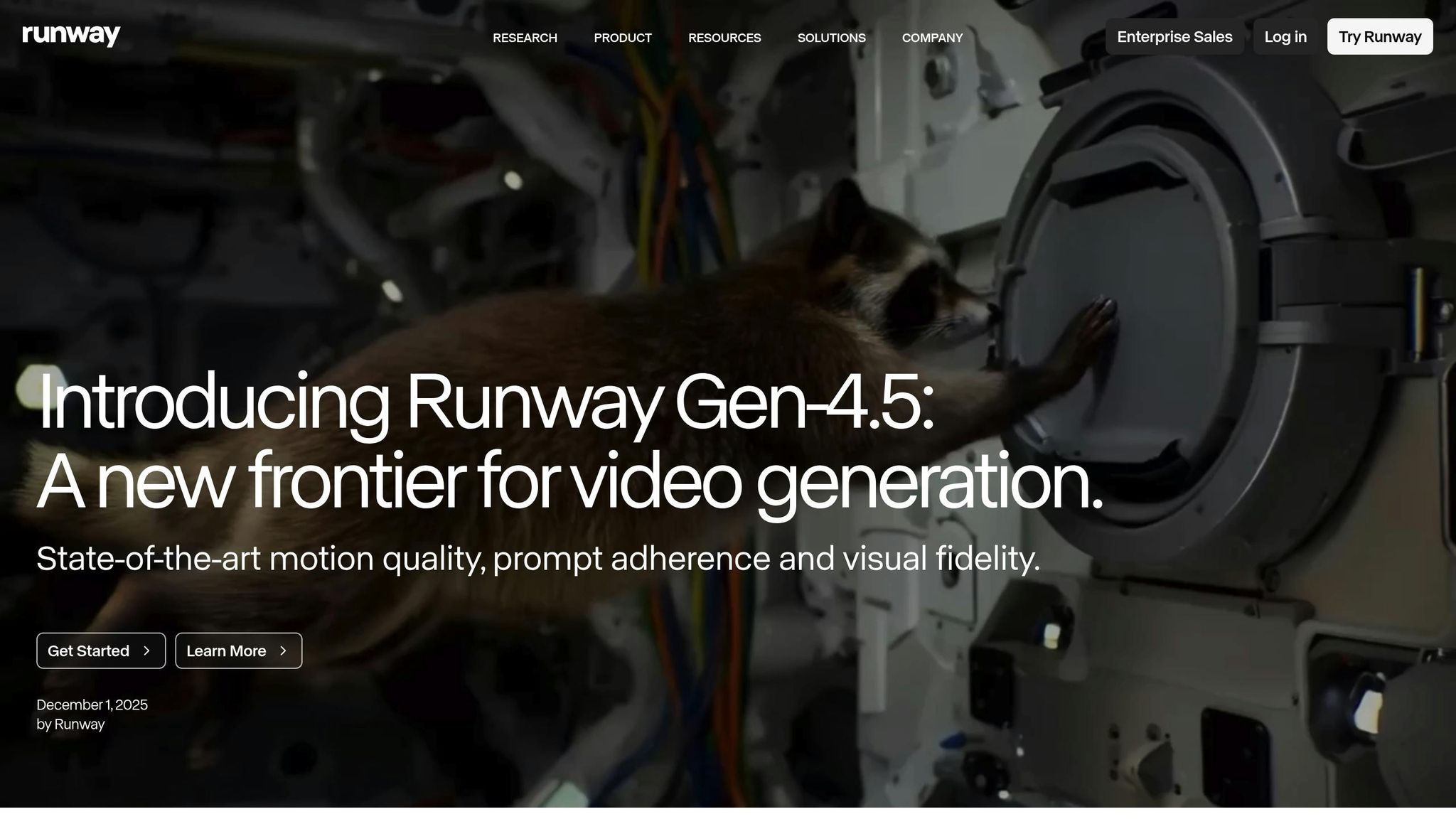
Runway Gen-4.5 ranks as the top performer on the Artificial Analysis Text-to-Video benchmark, scoring 1,247 Elo points and surpassing competitors like Google Veo 3 and OpenAI Sora 2 Pro. While its clips are capped at 10 seconds per generation, the platform is designed with professional workflows in mind, allowing users to stitch multiple clips seamlessly. In September 2024, Lionsgate collaborated with Runway to utilize Gen-4 models for production, reportedly saving millions in VFX costs thanks to consistent character and environment generation. Let’s dive into how Runway Gen-4.5 tackles key aspects of video production.
Max Video Length
Runway Gen-4.5 generates videos in 10-second increments. For longer projects, users can combine clips. High-fidelity rendering takes 6–7 minutes per clip, but Turbo mode speeds things up, delivering results in 30–90 seconds. The "Extend Video" feature allows users to add extra seconds to existing clips while preserving visual consistency.
Character Consistency
The platform uses reference image locking to ensure characters remain consistent across various angles and lighting conditions. In tests, 70% of generated clips maintained perfect character consistency. Director Jeremy Higgins relied on Runway Gen-4 technology to produce the animated series Mars and Siv, maintaining character identity across hundreds of shots without needing a traditional animation pipeline. However, side profiles and extreme close-ups can occasionally cause precision issues.
Animation Quality
Runway Gen-4.5 stands out for its lifelike motion, capturing realistic object weight and subtle facial micro-expressions.
"Gen-4.5 finally delivers motion that looks believable - complex camera movements and human actions render with unprecedented fidelity." – Film director Sarah Chen
Despite its strengths, the model sometimes struggles with causal reasoning and object permanence, leading to characters or objects disappearing across frames. On average, 53% of clips are ready for use without additional edits, with most requiring 2–3 iterations to achieve final quality.
Pricing
Runway offers flexible pricing options to suit different needs.
- Standard plan: $15/month, includes 625 credits (equivalent to 52 seconds of Gen-4.5 video)
- Pro plan: $35/month, includes 2,250 credits (about 187 seconds of video)
- Unlimited plan: $95/month, provides priority credits and relaxed-mode generations with wait times of 15–20 minutes
Gen-4.5 costs 12 credits per second, meaning a 10-second high-fidelity clip uses 120 credits. For Pro plan users, this translates to approximately $1.90 per clip.
Long-Form Use Cases
Runway Gen-4.5 shines in cinematic storytelling, previsualization, and VFX work, where accuracy in physics and character consistency are critical. Marketing teams have reported a 60% reduction in briefing and revision cycles due to the platform’s precise prompt-to-video alignment.
"Best 'first-draft footage' tool in my workflow right now. I explore scene blocking, camera direction, and mood before committing to production." – Storyboard artist David Park
Solo creators can create scenes almost 90% faster, and creative teams have cut preproduction time by nearly 70%. By prototyping with Gen-4 Turbo (a more cost-effective option) and finalizing with Gen-4.5, users can achieve high-quality results efficiently. This combination of detail and workflow optimization makes Gen-4.5 a strong choice for storytellers aiming to move from short clips to full-length projects.
6. Morphic
Morphic stands out among long-form video tools by giving creators the ability to control keyframes and camera dynamics, making it a powerful option for storytelling.
This tool serves as an all-in-one editor tailored for animators and filmmakers who need precise control over video creation. Unlike platforms that rely solely on text-to-video generation, Morphic takes a "Frames to Video" approach. Creators can select 2–5 keyframes, and the AI generates seamless motion between them for smooth transitions. Additionally, its 3D motion technology allows users to upload a still image and map multiple camera angles in 3D space, creating depth-based movement with ease.
Max Video Length
Morphic integrates advanced AI models like Sora 2, which generates 12-second clips, and Veo 3.1, which produces 8-second clips. For longer projects, creators can stitch these clips together using the Canvas interface, which simplifies organizing complex narratives. As AI artist 0xFramer shared:
"The Canvas completely changed how I plan and organize animations."
Character Consistency
To maintain consistent character designs or visual styles across scenes, Morphic offers a feature called Models. Users can train the AI on unique characters, and all paid plans include access to custom models. The Pro Max plan even supports up to 100 trained characters, making it ideal for large-scale productions.
Animation Quality
Morphic provides detailed camera controls - such as pan, tilt, zoom, and pedestal - along with editing tools for inpainting, resizing, and colorization. While the manual keyframe selection process offers unparalleled precision, it can also slow down workflows compared to tools that generate videos from a single prompt. These features give filmmakers and animators the ability to fine-tune their projects while accommodating various production needs.
Pricing
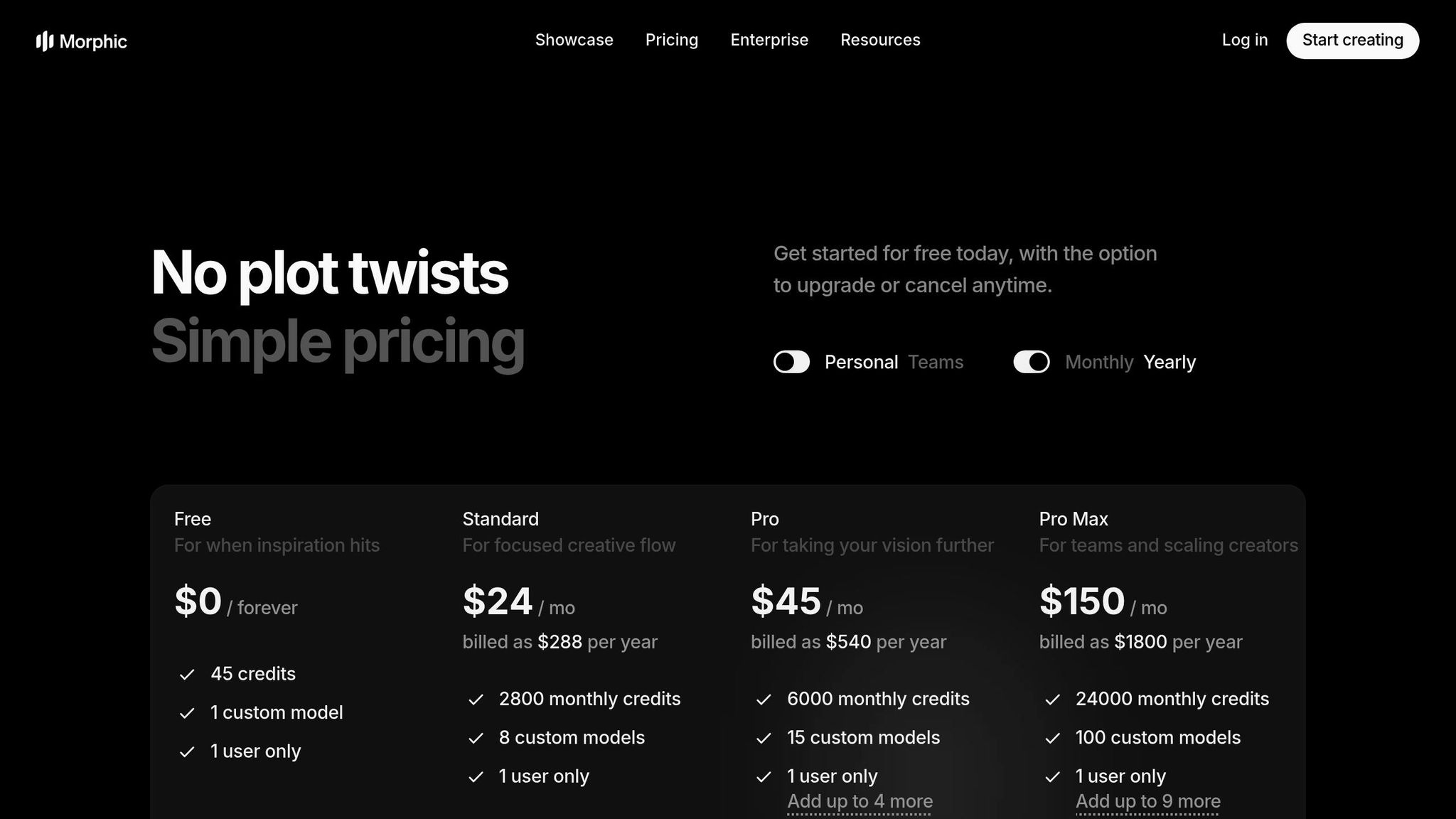
Morphic uses a credit-based subscription system. For example, creating a 1080p video with the Sora 2 model costs 100 credits, while basic 720p videos start at just 5 credits. The Pro Max plan, priced at $150 per month (or $1,800 annually), includes 24,000 credits - enough for around 240 high-quality 12-second clips, totaling roughly 48 minutes of raw footage per month. All paid plans come with commercial usage rights and watermark-free exports.
| Plan | Monthly Cost | Credits | Custom Models | Best For |
|---|---|---|---|---|
| Free | $0 | 45 (one-time) | 0 | Testing the platform |
| Standard | $24 | 2,800 | 8 | Solo creators |
| Pro | $45 | 6,000 | 15 | Regular production |
| Pro Max | $150 | 24,000 | 100 | High-volume projects |
Long-Form Use Cases
Morphic is particularly effective for projects that require precise control over character poses and camera angles. Its Frames to Video feature, which costs between 20 and 60 credits, is often more credit-efficient than generating entirely new clips for each second of content. This makes it a practical choice for extended narratives. For creators working on complex, multi-scene projects, the Canvas tool ensures narrative flow and visual consistency throughout production.
Pros and Cons
Here’s a quick breakdown of the strengths and weaknesses of each tool, based on the analysis above.
Sora stands out for its cinematic realism, offering simultaneous audio and video generation. However, it comes with a hefty price tag of $200 per month for the Pro tier, which is invite-only. Clips are capped at 16 seconds, and it consumes a significant amount of credits - approximately 250 seconds of video per 10,000 credits.
Runway Gen-4.5 is praised for exceptional character consistency and features like Motion Brush and 4K upscaling. Its drawbacks include the lack of native audio generation and high credit use (150 credits for a 10-second clip). Additionally, quality diminishes after 12 seconds, and the AI sometimes struggles with logical sequences - like doors opening before handles turn.
LTX Studio allows precise scene-by-scene control for entire movies and has a strong 4.8/5 accessibility rating. It offers a free tier with 800 computing seconds for personal use. However, its performance heavily depends on your hardware, and the quality of its AI-generated content can vary.
Kling AI 2.5 delivers realistic human faces and movements for just $10 per month. However, free users face long queues of two to three days, while paid users may still experience several-hour waits. It struggles with complex motions, such as fight scenes, and credits can expire if unused. Additionally, its operation under Chinese jurisdiction has raised data privacy concerns.
Here’s a summarized comparison to help you decide which tool best suits your video creation needs:
| Tool | Max Clip Length | Monthly Cost | Key Strength | Main Limitation |
|---|---|---|---|---|
| LongStories.ai | 10 minutes | $9–$99 | Reusable Universes; bulk editing | Beta stage; newer platform |
| LTX Studio | Full movies | Free (Personal) | Scene-by-scene control | Hardware-dependent performance |
| Domo AI | Varies | Varies | Animation flexibility | Limited documentation |
| Sora | 16 seconds | $200 | Cinematic realism; native audio | High cost; invite-only availability |
| Runway Gen-4.5 | 16 seconds | $12–$15 | Character consistency; 4K upscaling | Lacks native audio; quality degrades with extensions |
| Kling AI 2.5 | 10 seconds | $10 | Realistic human animation | Long queues; struggles with complex motion; credit expiration; privacy concerns |
Conclusion
Choosing the right AI video tool ultimately depends on your content goals and priorities. If you're focused on scaling YouTube storytelling, LongStories.ai ($9–$99/month) offers standout features like reusable Universes and bulk editing, making it a strong contender for efficient content creation.
Maintaining brand and character consistency emerged as a critical theme in this review. Runway Gen-4.5 ($15–$95/month) excels in this area, achieving about 80% character consistency with its reference image system. It currently holds the top spot on the Artificial Analysis Video Arena leaderboard, boasting 1,247 Elo points. For creators needing precise control over visual continuity, LTX Studio shines with its scene-by-scene editing capabilities. As Pierre-Jean Bernard, Head of Digital & AI at L'Oréal–McCann Paris, remarked:
"What we like about LTX is the consistency, so you can create your own universe".
For those on a tighter budget, free trials are an excellent way to explore and test workflows. Meanwhile, creators aiming for professional-grade cinematic results with synchronized audio should consider Google Veo 3.1 ($19.99–$249.99/month) or Sora 2 ($20–$200/month), both of which deliver exceptional production quality. Starting with character consistency in mind is crucial, as refining details iteratively is key to achieving polished outputs.
The AI video market is growing rapidly, valued at $1.8 billion in 2024 and projected to exceed $25 billion by July 2025. With this growth, these tools will only continue to evolve. Testing multiple platforms during free trials can help you identify the best fit for your needs - whether that's creating quick social media clips, structured YouTube episodes, or cinematic brand narratives. To stay ahead in this competitive space, creators must strike the right balance between speed, consistency, and quality.
FAQs
What should I consider when choosing an AI tool for creating long-form videos?
When picking an AI tool for long-form video creation, it's important to focus on features that align with your project goals. Look for tools that ensure narrative consistency, maintain character coherence, and offer automation features like scene composition and voiceovers. These elements are crucial for keeping your content engaging and polished over extended durations.
You’ll also want to assess how well the platform integrates into your workflow. Features like script-to-video conversion, flexible editing options, or API access for connecting with other tools can make a big difference. Pay attention to output quality, such as support for up to 4K resolution, as well as the tool’s ease of use and pricing to ensure it fits both your budget and technical skill level. Don’t overlook ethical considerations and licensing terms to ensure your content complies with legal standards.
By weighing these factors - features, compatibility, quality, and cost - you can find an AI tool that simplifies your process while delivering professional-grade, long-form videos without sacrificing creativity or efficiency.
How much do AI tools for creating long videos typically cost?
The price of AI tools for creating long-form videos can differ depending on the platform and the features included. Well-known options like LTX Studio and Synthesia often use tiered pricing structures, with basic plans starting at about $10 to $28 per month. However, these entry-level plans may come with restrictions, such as lower video quality or watermarks. Some platforms also provide free plans with limited capabilities, giving users a chance to explore the tools before making a financial commitment.
For those working on occasional or short-form projects, certain platforms charge on a per-video basis. While this might work for quick, smaller projects, it may not be the best choice for long-form video production. For instance, the cost can range from $0.45 for a simple, low-resolution video to much higher prices for features like custom branding or maintaining character consistency. It's important to weigh your production goals, budget, and the need for scalability when selecting the right tool for your needs.
How do AI tools maintain consistent characters across long-form videos?
AI tools help maintain character consistency in long-form videos by offering features like reusable character profiles or 'Universes.' These features let creators lock in specific traits - like appearance, behavior, and style - so they stay consistent throughout the video. For example, some platforms include built-in controls for visual elements such as camera angles, pacing, and overall design, ensuring everything looks and feels unified.
This consistency plays a big role in storytelling and building a strong brand identity. It not only keeps production more efficient but also keeps the audience connected and engaged.
Related posts
LongStories is constantly evolving as it finds its product-market fit. Features, pricing, and offerings are continuously being refined and updated. The information in this blog post reflects our understanding at the time of writing. Please always check LongStories.ai for the latest information about our products, features, and pricing, or contact us directly for the most current details.