
AI Tools for Custom Soundtracks in Videos

Creating the perfect soundtrack for your videos just got easier. AI tools now let you generate royalty-free music tailored to your content in minutes, saving you time and avoiding copyright issues. Here are five top platforms to consider:
- Suno: Offers AI-generated songs with vocals, lyrics, and advanced customization tools. Pricing starts at $29/month for commercial use.
- Beatoven.ai: Ethically trained AI that generates music based on video mood and pacing. Plans begin at $10/month.
- Mubert: Specializes in instrumental background music with options like image-to-music and YouTube integration. Starts at $14/month.
- Soundraw: Lets you create custom tracks by adjusting parameters like mood, tempo, and energy. $11.04/month billed annually.
- AIVA: Focuses on orchestral and cinematic compositions with MIDI support for precise edits. Pricing starts at €11/month (~$11.87 USD).
Quick Overview:
| Tool | Best For | Starting Price | Key Feature |
|---|---|---|---|
| Suno | Full songs with vocals | $29/month | Advanced vocal and lyric customization |
| Beatoven.ai | Video mood-based music | $10/month | AI-driven mood matching |
| Mubert | Background music | $14/month | Image-to-music and YouTube integration |
| Soundraw | Customizable tracks | $11.04/month | Adjustable sliders for mood and tempo |
| AIVA | Cinematic compositions | €11/month | MIDI support for detailed editing |
Each tool offers unique features to suit different needs, from background tracks for YouTube to full songs for ads or films. Choose based on your workflow, project type, and licensing requirements.
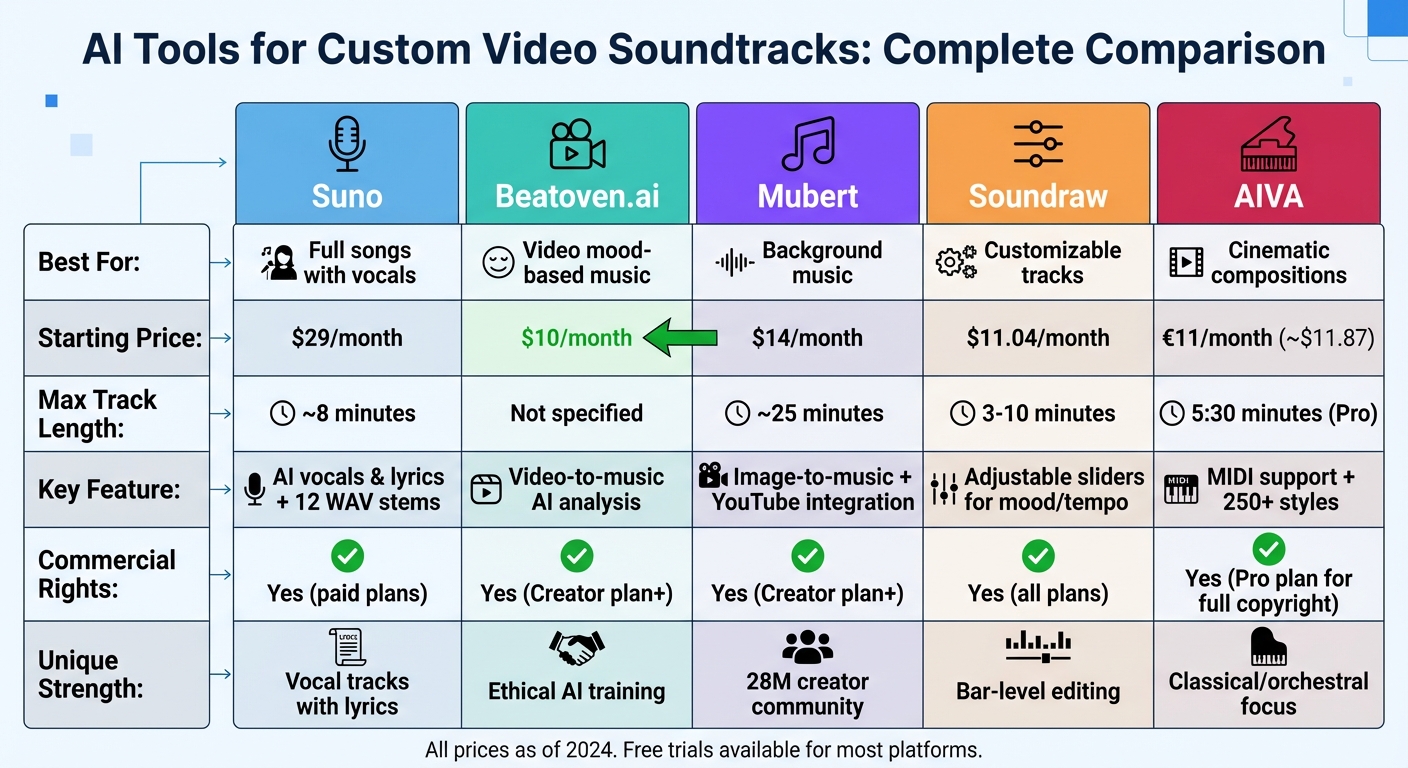
AI Soundtrack Tools Comparison: Features, Pricing, and Best Use Cases
7 Best AI Music Production Tools You NEED to Try!
sbb-itb-94859ad
1. Suno
Suno is a web-based generative audio workstation that combines digital audio workstation (DAW) functionality with AI-driven tools to produce music at a professional level. Its V5 engine can create fully mastered tracks up to 8 minutes long, making it a great option for longer video projects.
Features
Suno stands out with features like "Personas", "Inspo" prompts, and style sliders, which give users control over the mood and genre of their tracks. You can customize vocal gender, rewrite lyrics, rearrange song sections, or even upload your own audio for the AI to follow. For those working on video production, the stem extraction feature is a game-changer. It exports up to 12 time-aligned WAV stems (vocals, instruments, etc.), making it easy to sync audio with video editing tools like Premiere Pro or DAWs such as Ableton and Logic. This feature simplifies tasks like audio ducking and syncing music with dialogue.
To help creators move beyond generic AI-generated sounds, Suno offers "Weirdness" and "Style" sliders, which allow for unique and personalized audio creations. Additionally, the "Exclusions" feature lets you block specific instruments or moods that don’t fit your project.
Pricing
Suno provides three subscription options tailored to different needs. The free Starter plan lets users generate up to 10 professional-quality songs daily, though only for non-commercial purposes. The Professional plan, priced at $29/month, includes up to 500 songs per month, priority generation, and commercial licensing. For those requiring unlimited access and team collaboration, the Studio plan costs $99/month and offers full commercial rights along with dedicated support.
Video Sync Capabilities
While Suno doesn’t include built-in video-to-audio sync, its time-aligned WAV stems integrate effortlessly with external video editing software. The "Extend" feature is particularly useful for syncing music to video segments, as it allows users to upload audio clips and have the AI continue the composition seamlessly. By early 2024, Suno had already attracted 12 million users and achieved an ELO benchmark score of 1,293, cementing its reputation as a top-tier tool for AI music generation.
Customization Options
Content creator Jake remarked: "The quality of sound and lyrics generated by Suno is astonishing. It feels like having a professional producer at my fingertips".
For paid users, Suno offers full commercial rights to their tracks, making them suitable for use in videos, advertisements, and even commercial albums. With its extensive customization options and professional-grade tools, Suno sets the bar high as a leader in AI music production.
2. Beatoven.ai
Beatoven.ai stands out as a "Fairly Trained" certified AI music generator, committed to ethical AI practices. Its Maestro AI model has been trained on a library of over 3 million tracks, all ethically sourced to ensure fair compensation for contributing musicians. With over 2 million users creating more than 15 million tracks, it's become a go-to tool for video producers seeking custom soundtracks.
Features
Beatoven.ai offers a multimodal input system that supports text-to-music, audio-to-music, and video-to-music workflows. The video-to-music feature is especially helpful for filmmakers - you can upload a video file, and the AI will analyze the visuals to create a soundtrack that matches the mood and pacing of your scenes. Another standout tool is "Maestro SFX," a text-to-sound-effect generator that functions like an AI foley artist, producing sound effects based on your text prompts.
The platform also includes a text-based editor for detailed adjustments post-generation. You can tweak the tempo, switch genres, modify moods, or add and remove instruments to better fit your project. For professionals, the ability to download individual stems allows for greater precision when working in video editing software.
Pricing
Beatoven.ai offers flexible pricing options:
- Free Trial plan: 10 Maestro music and sound effect generations per month.
- Creator plan: $10/month (or $100/year), which includes 30 minutes of downloads monthly, unlimited generations, and advanced editing tools.
- Visionary plan: $20/month (or $200/year), doubling the download time to 60 minutes.
- Pay-as-you-go: Purchase additional download minutes for $3 each.
These options make it accessible for both casual users and professionals, offering great value alongside its creative tools.
Video Sync Capabilities
Beatoven.ai integrates seamlessly with video production workflows, making it a favorite among creators.
"As a creator, I often know exactly what I need the music to be like before generating it. Beatoven.ai allowed me to generate music that perfectly aligned with my creative vision", shared Semir Poturak, Architect & Game Designer.
Each download comes with a non-exclusive, perpetual license, allowing monetization on platforms like YouTube, social media, and podcasts. If you face a copyright claim on YouTube, you can easily resolve it by reporting the track ID from your license and submitting Beatoven.ai's dispute form. However, tracks cannot be directly distributed on streaming platforms like Spotify or Apple Music. That said, stems can be repurposed for sampling in remixes. These features make Beatoven.ai an efficient tool for video creators looking to streamline their soundtrack production process.
3. Mubert
Mubert takes a unique approach to AI music generation, focusing on creating background soundtracks tailored for video creators. With an impressive track record of over 200 million tracks generated and a community of around 28 million creators, Mubert has become a go-to solution for YouTubers, podcasters, and video editors. Its AI builds music using a fully licensed library of 2.5 million sound samples, and contributing artists receive an 80% revenue share - an appealing arrangement for creators and musicians alike.
Features
Mubert's standout feature, Mubert Render, creates soundtracks specifically matched to a video's mood, style, and duration. You can generate music using text prompts or the innovative Image-to-Music tool, which pairs soundtracks with the mood of an image. The platform supports over 150 genres and more than 50 moods, offering flexibility for projects ranging from short 15-second jingles to extended 25-minute mixes.
To streamline workflows, Mubert offers an Adobe extension for Premiere Pro and After Effects, allowing music creation and synchronization directly within these tools - no need to switch between tabs. Users can tweak parameters like intensity and BPM, ensuring the audio perfectly complements their visuals. A like/dislike feedback system further refines the AI's ability to match your brand's musical preferences over time.
These features cater to a wide range of creative needs, backed by flexible pricing options.
Pricing
Mubert's pricing structure is designed to meet the needs of different creators:
- Ambassador Plan: Free, includes 25 tracks per month but requires attribution.
- Creator Plan: $14/month, offering 500 tracks in lossless quality with no attribution required - ideal for social media creators.
- Pro Plan: $39/month, suitable for commercial use, YouTube monetization, and client projects.
- Business Plan: $199/month, designed for agencies and apps, featuring 1,000 tracks and dedicated account manager support.
These straightforward tiers make it easy for creators to choose a plan that fits their needs, while Mubert's video sync tools simplify production.
Video Sync Capabilities
Mubert stands out for its ability to generate tracks that match exact video lengths, eliminating the hassle of manual looping. Its real-time generation, with just a 3-second buffer, is ideal for live streams and interactive content. The platform's technology is already integrated with major tools like Picsart, which generates 3 million unique tunes monthly for its 150 million users, and Canva, which offers a Mubert plugin for seamless design and music pairing.
"Mubert Render is built for creators who need music in service of something else - a video, a podcast, a stream, a game, an ad", says the Mubert team.
All tracks come with straightforward royalty-free licenses. However, it's crucial to ensure your subscription tier aligns with your intended use. Free-tier tracks, for example, aren't suitable for commercial purposes, so upgrading to a paid plan is necessary for monetized content. Unlike some competitors facing legal challenges over training data, Mubert's fully licensed library offers greater legal security for commercial projects.
4. Soundraw
Soundraw creates copyright-safe, customizable tracks through its in-house productions, removing the risk of copyright claims on platforms like YouTube or TikTok. In a March 2026 review by ProPicked, the platform earned an impressive 8.4/10 rating, with users particularly lauding its ease of use (8.7/10) and robust customization features.
Features
Soundraw takes a unique approach by skipping text-based prompts. Instead, users define parameters like genre, mood, tempo, and energy using intuitive sliders. Based on these inputs, the AI generates 15 original tracks instantly, covering over 30 genres - from Hip-Hop and Trap to Cinematic and Orchestra. With track lengths ranging from 3 to 10 minutes, the platform caters to a variety of video formats.
One standout feature is Soundraw's advanced mixer. This tool allows users to tweak individual audio layers - like melody, drums, and bass - and make precise edits to specific sections, such as intros, choruses, or outros. These bar-level adjustments eliminate the need to restart the track from scratch. For professionals, higher-tier plans include stem downloads in WAV format, enabling further refinement in external digital audio workstations like Ableton or Logic.
"Every beat is legally yours to use, monetize, and share." – Soundraw
The platform also offers a Preview Video feature and Adobe plugins for Premiere Pro and After Effects, allowing direct edits on video timelines for seamless audio-video alignment. Additionally, the "genre-blending" option lets users combine styles - like Hip-Hop and Orchestra - for unexpected, creative mixes.
Pricing
Soundraw's pricing is designed to meet the needs of different creators.
- Creator Plan: $11.04/month (billed annually) includes unlimited MP3 downloads with a perpetual license, so tracks remain licensed even after subscription cancellation.
- Artist Starter: $19.49/month offers 10 downloads per month with full royalty ownership, ideal for artists releasing music on platforms like Spotify or Apple Music.
- Artist Pro: $23.39/month adds WAV and stem downloads, advanced mixing tools, and 20 downloads per month.
- Artist Unlimited: $32.49/month provides unlimited downloads in all formats.
A 7-day trial is available, allowing users to explore the mixer and video sync features before committing.
Video Sync Capabilities
Soundraw's Preview Video feature simplifies synchronization by letting you upload your video directly into the editor. The platform ensures that the track's energy shifts and timing align perfectly with your video's cuts and transitions. You can fine-tune beats to match specific visual moments, eliminating the hassle of manual adjustments during post-production.
Customization Options
Soundraw offers extensive customization tools. The bar-level editor lets you refine individual segments, while the advanced mixer gives control over each instrumental layer. Users can save incomplete tracks in the "Keep" section to revisit and polish later.
This flexibility has drawn praise from creators. For example, Artist IQ the Prodigy used Soundraw to craft foundational beats for an entire album in just two weeks - a process that would typically take six months. Reviewer Solesky shared their experience:
"I found the app to be very intuitive and easy to use. I had a very specific sound in mind and the AI-generated music really delivered".
5. AIVA
AIVA takes a composer's perspective when it comes to AI-generated music, offering a selection of over 250 musical styles. These range from classical orchestral arrangements to modern cinematic scores. It shines particularly in crafting soundtracks for long-form content, making it a favorite among documentary makers, game developers, and YouTube creators working on explainer videos. In July, the platform saw a steady increase in usage as creators began to explore its versatility and depth.
Features
AIVA can create original compositions in just seconds. One standout feature is its ability to let users upload MIDI or audio files to guide the output. For example, you could upload a 30-second snippet to ensure the generated music perfectly matches the emotional tone of a product launch or a poignant moment in a story.
The platform also allows users to design custom style models, which is especially useful for maintaining consistency across a series of videos or branded content. AIVA supports downloads in MP3, MIDI, and high-quality WAV formats, making it easy to refine tracks further in professional tools like Logic or Ableton. These features are complemented by straightforward pricing plans that cater to different creative needs.
Pricing
AIVA's pricing is simple and transparent, with all annual plans billed in euros (€).
- The Free Plan: Offers 3 downloads per month, with tracks capped at 3 minutes. It requires crediting AIVA and is limited to non-commercial use.
- The Standard Plan: Costs €11/month (around $11.87 USD) and includes 15 downloads per month with tracks up to 5 minutes. This plan removes the need for crediting in social media projects.
- The Pro Plan: At €33/month (about $35.61 USD), this plan provides full copyright ownership, 300 downloads per month, and tracks up to 5 minutes and 30 seconds.
"Subscribe to our Pro Plan to own the full copyright of your compositions, forever." – AIVA
Video Sync Capabilities
Although AIVA doesn't have an automatic "sync to video" feature like some other tools, it supports a professional workflow for video creators. Users can map out their video's emotional flow - such as Intro, Problem, Solution, and Call-to-Action - and generate multiple variations to fit these sections. These can then be stitched together and fine-tuned in software like DaVinci Resolve or Premiere Pro. For precise timing, AIVA's MIDI export feature allows editors to align musical events with specific video frames.
Customization Options
AIVA goes beyond offering a wide range of 250+ styles by providing powerful editing tools. Its "Compose from Reference" feature lets users upload a clip that conveys the desired mood, enabling the AI to better interpret creative intent. Additionally, creators can tweak the structure and instrumentation of generated tracks. On average, AIVA takes about 2 minutes to produce music - much faster than scouring traditional music libraries for the perfect track.
"AIVA excels at producing functional background music - the kind you need for a YouTube explainer, a corporate training video, or mobile app sounds." – Cracked.AI
Comparison: Strengths and Weaknesses
Suno and Mubert each bring their own style to soundtrack creation, so the better choice depends on what you're looking for.
Suno focuses on creating full songs, complete with AI-generated vocals and lyrics. This makes it a great pick for theme songs or emotionally engaging tracks that take center stage. On its paid plans, Suno can generate tracks up to about 8 minutes long, with pricing starting at $29/month for commercial licensing.
Mubert, on the other hand, excels at producing instrumental background music that blends seamlessly into tutorials, podcasts, or explainer videos. With a community of 28 million creators, Mubert offers tracks up to 25 minutes long. Its Creator plan, priced at roughly $14/month, provides royalty-free music for monetized social media projects.
"Suno is the tool you open when you're starting an idea. Mubert is the tool you open when you're finishing a project." – Mubert Team
The main difference lies in creative control versus speed. Suno allows for detailed customization using text prompts like key and tempo to craft vocal tracks quickly. Meanwhile, Mubert offers innovative inputs, such as turning images into music or using YouTube links to inspire instrumental scores. For developers, Mubert's API is a standout feature, making it easy to integrate generative music into apps, games, or other digital platforms. These unique strengths highlight how each tool serves different needs.
| Tool | Best For | Max Track Length | Pricing (USD) | Commercial Rights | Unique Feature |
|---|---|---|---|---|---|
| Suno | Full songs with vocals | ~8 minutes | $29/month | Yes (on paid plans) | AI-generated vocals and lyrics |
| Mubert | Instrumental background music | ~25 minutes | $14/month | Yes (Creator plan) | Image-to-music conversion, YouTube integration |
Conclusion
In the competitive world of AI-generated soundtracks, finding the right balance between creative control and efficiency is essential. The best tool for you will depend on your specific needs and workflow. For lyrical content or theme songs, Suno's full-track vocals and Beatoven.ai's mood editing offer tailored creative options. On the other hand, Mubert's background tracks are ideal for tutorials and podcasts.
Before committing to a paid plan, take advantage of free trials. Use them to create test cases - like a 30-second product ad or a podcast intro - to see how well the tool aligns with your pacing and brand identity.
"The main trade-off is between speed and control. One-click tools are faster, but harder to refine. Workflow-based tools take more steps, but produce more reliable results." – Runbo Li, CEO of Magic Hour
Be mindful of licensing when it comes to commercial use. For instance, Suno's free plan only supports personal projects, while Mubert requires you to select the right business tier for your needs. If your goal is to monetize your content, investing in Pro or Creator plans can help you avoid legal headaches and secure the rights you need.
Once licensing is sorted, focus on streamlining your production process. These platforms can save time, but they shine brightest when used as part of a larger workflow. Plan for additional post-production adjustments in your video editor to refine timing and layering. While AI tools simplify the creative process, they work best as partners in production - not as fully automated solutions.
FAQs
Which tool is best for YouTube videos vs. ads?
For YouTube videos, tools like LongStories.ai and LTX Studio are perfect for creating long-form content. These platforms are designed to handle extended videos (over 10 minutes) and offer features like narrative consistency, character development, and high-quality production at scale. They're particularly suited for storytelling and maintaining audience engagement.
On the other hand, for ads, short-form AI tools such as Runway Gen-3 and OpenAI Sora are more effective. These tools excel at generating short, visually captivating clips (under 20 seconds) that are tailored for social media platforms and have the potential to go viral.
Can I monetize AI-made music without copyright claims?
Yes, you can usually monetize AI-generated music without worrying about copyright claims, but it all comes down to the tool you’re using and its licensing terms. Many AI music generators create royalty-free tracks that are ready for commercial use. That said, licensing rules can differ - some platforms might ask for attribution or impose specific restrictions. Make sure to carefully check the terms of use for each tool to stay compliant and steer clear of any copyright complications.
How do I sync AI music to my video edits?
To align AI-generated music with your video edits, try platforms with advanced audio control features. Tools like LTX Studio let you import both video and music, position audio tracks on a timeline, and tweak the timing to match lip movements or key sound cues. These precise adjustments help ensure your audio syncs perfectly with your visuals, boosting the overall quality of your video content.
Related posts
LongStories is constantly evolving as it finds its product-market fit. Features, pricing, and offerings are continuously being refined and updated. The information in this blog post reflects our understanding at the time of writing. Please always check LongStories.ai for the latest information about our products, features, and pricing, or contact us directly for the most current details.