
AI Frame Interpolation for YouTube Creators

AI frame interpolation uses deep learning to create new frames between existing ones, making videos smoother and increasing frame rates. This technology is a game-changer for YouTube creators, allowing them to transform standard 24-30 FPS footage into 60 FPS or even 120 FPS, enhancing motion clarity and overall viewing experience. It also enables professional-quality slow-motion effects without the need for expensive high-speed cameras.
Key Points:
- What It Does: Generates intermediate frames for smoother motion.
- Benefits: Higher frame rates reduce motion blur, improve slow motion, and boost audience engagement.
- Tools: Options range from free tools like RIFE and DAIN to premium software like Topaz Video AI ($299).
- Hardware: Requires a modern GPU for local processing or cloud-based solutions for those without high-end equipment.
This technology is ideal for creators in gaming, action sports, animation, or anyone seeking to improve video quality without investing in costly gear. By adopting AI frame interpolation, creators can produce polished content that stands out on high-frame-rate platforms like YouTube.
How AI Frame Interpolation Works
The Basic Process
For creators looking to improve viewer engagement with smoother, more dynamic visuals, understanding AI frame interpolation is key.
The process starts with analyzing two consecutive frames - let's call them Frame A and Frame B. The AI tracks pixel movement between these frames, generating motion vectors (essentially a "motion map") to figure out where objects are moving on the screen. But it doesn't stop at simple pixel tracking. Advanced AI models go further, identifying foreground and background elements, distinguishing rigid objects from fluid motions like water or hair, and even detecting scene cuts to avoid blending unrelated shots. Robert MacWha, a machine learning developer, highlights the importance of this step:
Reconstructing background information is one of the most important parts of frame interpolation... The AI will naturally learn how to re-construct missing background information in a realistic manner.
After mapping motion, the AI predicts new in-between frames (e.g., Frame A.5) by applying learned patterns. Some advanced models analyze up to ten surrounding frames, which lets them reconstruct hidden parts of the background that might have been obscured by moving objects. To wrap things up, the system performs an artifact correction pass to fix issues like ghosting or warping.
This approach is a big leap from older methods. Traditional techniques like frame duplication simply repeated existing frames, causing choppy playback. Frame blending, another outdated method, combined two frames with transparency, often resulting in blurry ghosting effects. In contrast, AI interpolation generates entirely new visual information, enhancing the original footage.
These advancements have a direct impact on video quality and user experience, especially on platforms like YouTube.
Benefits for YouTube Videos
AI frame interpolation isn't just a technical breakthrough - it offers tangible benefits for YouTube content creators.
One major perk is smoother playback on high-refresh-rate screens. Viewers with 120 Hz monitors or modern smartphones notice reduced motion blur and judder, particularly during fast-moving scenes or panning shots.
It also opens the door for professional-quality slow-motion effects without the need for expensive equipment. Creators have used tools like DAIN and FILM to convert standard 24-30 FPS footage into 2× or 4× slow-motion with impressive smoothness.
Beyond that, interpolation improves the fluidity of animated or educational content. By enhancing 3D CGI renders or AI-generated videos with low native frame rates, it makes high-quality motion accessible to more creators - no need for costly gear or lengthy rendering times. This levels the playing field, allowing creators of all skill levels to produce visually stunning content.
sbb-itb-94859ad
Flowframes Tutorial: Convert 30FPS to 60FPS+ (Best AI Frame Interpolation Method)
Best AI Frame Interpolation Tools for YouTube Creators
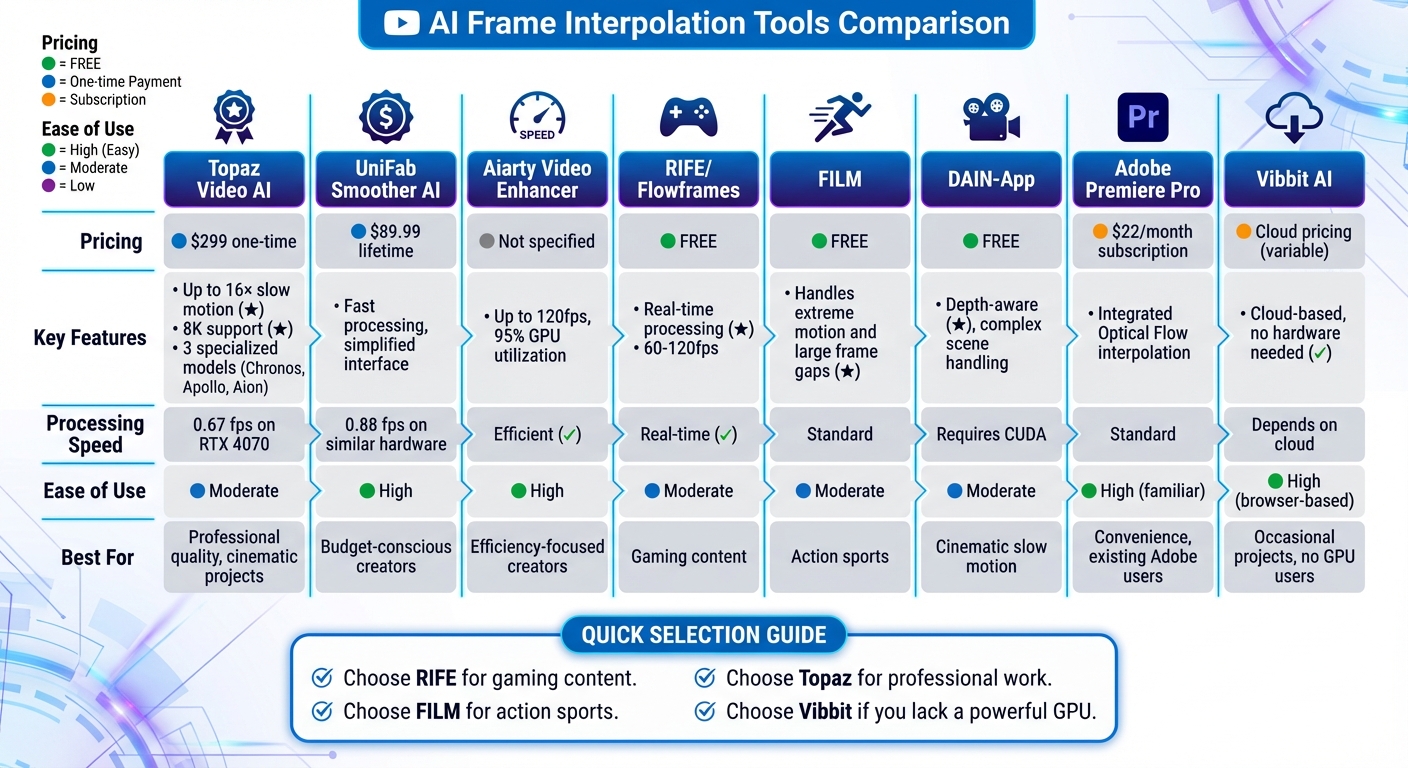
AI Frame Interpolation Tools Comparison for YouTube Creators
Tool Recommendations and Features
If you're looking to level up your YouTube videos with smoother motion and higher frame rates, here are some of the best AI-powered frame interpolation tools to consider.
Topaz Video AI is a standout option for professional creators who prioritize precision and quality. It comes with a one-time price of $299 and offers three specialized models tailored to different needs. The Chronos model is perfect for general-purpose tasks, like converting a 24fps vlog into a buttery-smooth 60fps video. If you're into action-packed content such as sports or dance, the Apollo model handles chaotic motion exceptionally well, even enabling up to 8× slow motion. For cinematic projects, the Aion model supports up to 16× slow motion and 8K resolution, making it ideal for high-end 4K+ productions. On an RTX 4070 GPU, Topaz Video AI processes at a rate of about 0.67 frames per second.
For creators on a budget, UniFab Smoother AI and Aiarty Video Enhancer are excellent choices. UniFab, priced at $89.99 for a lifetime license, offers a user-friendly interface and processes videos at around 0.88 frames per second on similar hardware. Meanwhile, Aiarty focuses on efficiency, boosting frame rates up to 120fps while utilizing 95% of GPU resources.
If you lack high-end hardware, Vibbit AI is a cloud-based solution that eliminates the need for a powerful local GPU. Gamers often turn to RIFE, accessible for free via Flowframes, for its real-time processing and ability to double frame rates from 60fps to 120fps. For action sports creators, FILM excels at handling extreme motion and bridging large frame gaps. Meanwhile, DAIN is particularly effective for cinematic slow motion, especially in scenes with complex depth and occlusion.
For those already using professional editing software, Adobe Premiere Pro ($22/month) offers Optical Flow interpolation, though dedicated AI tools often deliver better results. Similarly, DaVinci Resolve includes interpolation features in both its free and paid versions, providing a well-rounded option for creators who prefer an integrated editing workflow.
Comparison Table
Here's a quick breakdown of the key features and pricing for each tool to help you decide which one fits your needs best:
| Tool Name | Key Features | Ease of Use | Pricing | YouTube Suitability |
|---|---|---|---|---|
| Topaz Video AI | Up to 16× slow motion; 8K support; multiple models | Moderate (requires model selection) | $299 one-time | High (Professional quality) |
| UniFab Smoother AI | Fast processing; simplified interface | High (easy to use) | $89.99 lifetime | High (Budget-conscious) |
| Aiarty Video Enhancer | Up to 120fps; efficient GPU usage | High (automated) | Not specified | High (Efficiency-focused) |
| RIFE / Flowframes | Real-time processing; 60–120fps | Moderate | Free | High (Gaming content) |
| FILM | Handles extreme motion and frame gaps | Moderate | Free | High (Action sports) |
| DAIN-App | Depth-aware; great for complex scenes | Moderate (requires CUDA) | Free | High (Cinematic slow motion) |
| Adobe Premiere Pro | Integrated Optical Flow interpolation | High (familiar interface) | $22/month | Medium (Convenience) |
| Vibbit AI | Cloud-based; no hardware needed | High (browser-based) | Cloud pricing | Medium (Occasional projects) |
These tools cater to a wide range of creators, from casual YouTubers to professionals working on cinematic projects. Whether you're looking for high-end features or budget-friendly solutions, there's an option here to suit your workflow.
How to Use AI Frame Interpolation: Step-by-Step Guide
Frame Interpolation Workflow
To get started with AI frame interpolation, follow these steps to refine and enhance your video footage effectively.
First, choose the video segment you want to work on and export it as a high-bitrate file. This ensures you're working with clean, high-quality source material. Then, pick the AI model that best suits your content type. For instance, RIFE is ideal for gaming or videos with rapid motion, FILM works well for action sports or scenes with extreme movement, and DAIN is better for cinematic footage with complex depth.
Next, determine your target frame rate. For smoother playback, you can convert 30fps footage to 60fps, or go for a dramatic slow-motion effect by increasing to 120fps. If you're making a large jump, such as from 30fps to 120fps, use a multi-pass process (e.g., 30→60fps, then 60→120fps) to maintain quality and minimize artifacts.
For best results, follow this sequence: upscale the footage, reduce noise, interpolate frames, stabilize the video, and then apply color grading. If you're aiming for cinematic slow motion, interpolate from 30fps to 120fps and set playback speed to 25%, creating a 4× slow-motion effect. Finally, export your video in high-bitrate 1080p or 4K resolution — make sure you're using the right YouTube upload formats to avoid quality loss when publishing.
Requirements and Best Practices
To achieve top-tier results, it's essential to meet certain technical requirements and follow recommended practices.
If you're processing videos locally, tools like Topaz Video AI or Flowframes will require a powerful GPU, such as an NVIDIA RTX 30-series card, along with sufficient VRAM. Don't have a high-end GPU? No problem - cloud-based platforms like TensorPix, Vibbit, or Runway allow you to process videos without local hardware. Keep in mind, though, that these services require a stable internet connection for uploading your source files and downloading the final renders. On a modern GPU, processing one minute of 1080p footage to 60fps usually takes between 2 and 10 minutes.
Before committing to full-length processing, test the workflow on a short 5–10-second clip to ensure everything looks right. Pre-process your footage by reducing noise and stabilizing it - this will help avoid amplifying any issues like shake or grain. Always use lossless formats to preserve quality. If you notice ghosting or other artifacts, tweak the settings by lowering the interpolation factor (e.g., use 2× instead of 4×) or switch to a more advanced AI model, such as FILM.
Advanced Uses of AI Frame Interpolation
Using Frame Interpolation with Animated Content
Smoother frame rates aren't just for live-action videos - they can also enhance the visual flow of animated content. AI frame interpolation takes animations to the next level by creating intermediate frames, eliminating the choppiness often seen with standard frame rates. Unlike older techniques like frame blending, which can cause ghosting or blur, advanced AI models such as DAIN (Depth-Aware Video Frame Interpolation) use motion vectors and depth analysis to generate entirely new frames. This allows creators to transform animations from 24 FPS or 30 FPS into seamless 60 FPS or even 120 FPS outputs.
One standout feature of these models is their ability to handle complex motion and overlapping objects. For example, DAIN excels in interpreting depth relationships in cinematic animations, while FILM (Frame Interpolation for Large Motion) is specifically designed for extreme movements, making it perfect for fast-paced action scenes. These tools ensure that animations stay true to their original artistic style while delivering smooth, detailed motion that keeps audiences captivated.
For the best results with animated content, it's recommended to upscale resolution and reduce noise before applying frame interpolation. Additionally, using a multi-step approach - like converting 30 FPS to 60 FPS first, then 60 FPS to 120 FPS - can help achieve ultra-high frame rates with minimal artifacts.
Scaling Production with LongStories.ai

Platforms like LongStories.ai make it easier than ever to produce long-form video animated content while incorporating advanced interpolation techniques. Designed for creators, LongStories.ai streamlines the animation process by integrating reusable "Universes" that maintain consistent characters, styles, and voices across projects. This eliminates the need for repetitive prompts, a common bottleneck in many AI animation workflows. Once your base video is created in LongStories.ai, you can apply AI frame interpolation to deliver professional 60 FPS or 120 FPS outputs, meeting the high-quality expectations of platforms like YouTube.
LongStories.ai offers three animation quality levels - No Animation, Fast Animation, and Pro Animation - giving creators control over the initial rendering quality before interpolation. For longer videos, such as 10-minute animations, it's a good idea to process content in smaller segments to avoid hardware overload or processing errors. By combining LongStories.ai's ability to ensure narrative and character consistency with the smooth motion delivered by AI frame interpolation, creators can focus on telling engaging stories while maintaining the frequent posting schedule needed to grow their audience and income streams.
Conclusion
AI frame interpolation is reshaping the way content creators produce videos on YouTube, making it possible to achieve smooth, professional-quality motion without the need for high-end gear. By leveraging deep learning, this technology generates new intermediate frames during post-production, eliminating the reliance on costly high-speed cameras.
This means smoother camera movements and cinematic slow-motion effects that can captivate audiences, whether you're creating gaming content, live-action footage, or animation. The right tool for the job depends on your specific needs - free tools can provide a quick and accessible starting point, while more advanced software offers comprehensive options for professional-grade results.
"AI frame interpolation changes everything. Using deep learning, AI can generate entirely new frames between existing ones, creating smooth motion that never existed in your original footage." – Vibbit
These tools not only elevate video quality but also simplify production workflows. For example, in animation, platforms like LongStories.ai help maintain consistent character designs and styles, while frame interpolation ensures a polished 60 FPS output that enhances the final product.
The key to success is starting with high-quality source footage, experimenting with free tools to get a feel for the process, and gradually incorporating frame interpolation into your regular production routine. With YouTube supporting playback up to 240 FPS on compatible devices, audiences are ready for this next level of viewing. Creators who embrace AI-driven video workflows now can position themselves ahead of the curve, delivering polished and engaging content at scale.
FAQs
Will interpolating to 60 or 120 FPS hurt my video quality on YouTube?
Interpolating video to 60 or 120 FPS generally doesn't degrade quality on YouTube. In fact, using AI-driven frame interpolation can make motion appear smoother by creating additional frames. This technique is particularly useful for creators who want to provide a more fluid and polished viewing experience.
How do I avoid artifacts like ghosting and warping with AI interpolation?
To reduce issues like ghosting and warping when using AI interpolation, start with high-resolution, well-lit footage. Consistent lighting across the scene is equally important to maintain clarity. Be cautious with high-speed transitions - pushing the AI too far can lead to smearing or flickering effects. For smoother results, choose interpolation tools specifically designed for seamless motion and ensure the input frames are of consistent quality.
What GPU specs do I need to interpolate 1080p or 4K footage quickly?
For 1080p video editing, a GPU with at least 8GB of VRAM (like the RTX 3060) will handle the job. However, opting for 12GB of VRAM (such as the RTX 4070) ensures smoother performance, especially when working with more complex projects.
When it comes to 4K video editing, you'll want a GPU with 16GB or more of VRAM (e.g., RTX 4090). This allows for faster processing and delivers better results, especially when dealing with high-resolution footage.
- 1080p: 8GB–12GB VRAM recommended
- 4K: 16GB+ VRAM for optimal performance
Related posts
LongStories is constantly evolving as it finds its product-market fit. Features, pricing, and offerings are continuously being refined and updated. The information in this blog post reflects our understanding at the time of writing. Please always check LongStories.ai for the latest information about our products, features, and pricing, or contact us directly for the most current details.